
Close Menu
    Latest Post

    Verifying 5G Standalone Activation on Your iPhone

    March 1, 2026

    Hands on: the Galaxy S26 and S26 Plus are more of the same for more money

    March 1, 2026

    IronCurtain: A Secure AI Agent Designed to Prevent Rogue Actions

    March 1, 2026
    Facebook X (Twitter) Instagram
    Trending
    • Verifying 5G Standalone Activation on Your iPhone
    • Hands on: the Galaxy S26 and S26 Plus are more of the same for more money
    • IronCurtain: A Secure AI Agent Designed to Prevent Rogue Actions
    • Kwasi Asare’s Entrepreneurial Journey: Risk, Reputation, and Resilience
    • The Rubin Observatory’s alert system sent 800,000 pings on its first night
    • GitHub Actions Now Supports Unzipped Artifact Uploads and Downloads
    • Project Genie: Experimenting with Infinite, Interactive Worlds
    • Text Generation Using Diffusion Models and ROI with LLMs
    Facebook X (Twitter) Instagram Pinterest Vimeo
    NodeTodayNodeToday
    • Home
    • AI
    • Dev
    • Guides
    • Products
    • Security
    • Startups
    • Tech
    • Tools
    NodeTodayNodeToday
    Home»Guides»Verifying 5G Standalone Activation on Your iPhone
    Guides

    Verifying 5G Standalone Activation on Your iPhone

    Samuel AlejandroBy Samuel AlejandroMarch 1, 2026No Comments2 Mins Read
    Share Facebook Twitter Pinterest LinkedIn Tumblr Reddit Telegram Email
    src 1qz1wp8 featured
    Share
    Facebook Twitter LinkedIn Pinterest Email

    5G Standalone (SA) represents a significant advancement in cellular technology, offering substantial improvements over the earlier 5G Non-Standalone (NSA) deployments. While 5G NSA relies on existing 4G LTE infrastructure for its core network, 5G SA operates on a dedicated 5G core, leading to benefits such as lower latency, faster speeds, and more efficient network slicing capabilities.

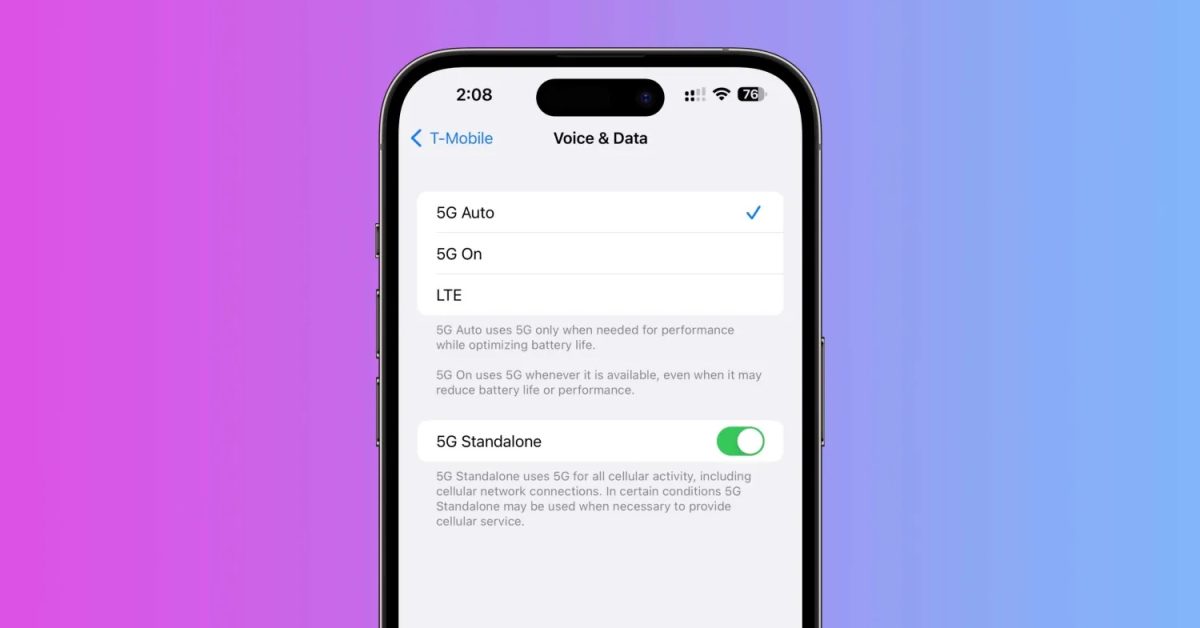
    For iPhone users, particularly those on carriers like T-Mobile that have heavily invested in 5G SA, understanding whether their device is connected to this advanced network can be insightful. Apple introduced 5G SA support for iPhones with iOS 17.4 and later versions.

    Image 1

    How to Check if 5G Standalone is Working on Your iPhone

    To determine if your iPhone is actively connected to a 5G Standalone network, you can access the hidden Field Test Mode. This mode provides detailed information about your device’s cellular connection.

    1. Open the Phone app on your iPhone.
    2. Dial *3001#12345#* and press the call button. This will launch Field Test Mode.
    3. Navigate to the NR Connection Stats section.
    4. Look for NR SA Status.

    Within the NR SA Status section, you will find several indicators:

    • SA or NSA: This indicates whether the current connection is Standalone or Non-Standalone. For 5G SA, it should display “SA”.
    • sa-enabled: This field will show “true” if 5G SA is enabled on your device.
    • sa-connected: A “true” value here confirms that your iPhone is currently connected to a 5G Standalone network.
    • sa-restricted: Indicates if SA is restricted.
    • sa-fallback-nsa: Shows if the device falls back to NSA.
    • sa-fallback-lte: Shows if the device falls back to LTE.
    • sa-fallback-unknown: Indicates an unknown fallback state.

    If your iPhone is successfully connected to 5G SA, you should observe “nr-sa” in the connection type and “sa-connected: true” within the NR SA Status. Some carriers, such as T-Mobile, may also display a “5G SA” icon in the status bar when connected to the standalone network.

    This method provides a direct way to verify your iPhone’s 5G SA connectivity, ensuring you are leveraging the full capabilities of the latest 5G technology available in your area.

    Share. Facebook Twitter Pinterest LinkedIn Tumblr Email
    Previous ArticleHands on: the Galaxy S26 and S26 Plus are more of the same for more money
    Samuel Alejandro

    Related Posts

    Guides

    Modern PC hardware failure rates aren’t increasing, the expectations are just higher

    March 1, 2026
    Guides

    Android 17 Beta 2 Introduces Apple-Like Handoff and “Bubbles” Multitasking

    February 28, 2026
    Guides

    How to Add or Remove a Yelp Review

    February 27, 2026
    Add A Comment
    Leave A Reply Cancel Reply

    Latest Post

    ChatGPT Mobile App Surpasses $3 Billion in Consumer Spending

    December 21, 202517 Views

    Automate Your iPhone’s Always-On Display for Better Battery Life and Privacy

    December 21, 202515 Views

    Creator Tayla Cannon Lands $1.1M Investment for Rebuildr PT Software

    December 21, 202514 Views
    Stay In Touch
    • Facebook
    • YouTube
    • TikTok
    • WhatsApp
    • Twitter
    • Instagram
    About

    Welcome to NodeToday, your trusted source for the latest updates in Technology, Artificial Intelligence, and Innovation. We are dedicated to delivering accurate, timely, and insightful content that helps readers stay ahead in a fast-evolving digital world.

    At NodeToday, we cover everything from AI breakthroughs and emerging technologies to product launches, software tools, developer news, and practical guides. Our goal is to simplify complex topics and present them in a clear, engaging, and easy-to-understand way for tech enthusiasts, professionals, and beginners alike.

    Latest Post

    Verifying 5G Standalone Activation on Your iPhone

    March 1, 20264 Views

    Hands on: the Galaxy S26 and S26 Plus are more of the same for more money

    March 1, 20265 Views

    IronCurtain: A Secure AI Agent Designed to Prevent Rogue Actions

    March 1, 20264 Views
    Recent Posts
    • Verifying 5G Standalone Activation on Your iPhone
    • Hands on: the Galaxy S26 and S26 Plus are more of the same for more money
    • IronCurtain: A Secure AI Agent Designed to Prevent Rogue Actions
    • Kwasi Asare’s Entrepreneurial Journey: Risk, Reputation, and Resilience
    • The Rubin Observatory’s alert system sent 800,000 pings on its first night
    Facebook X (Twitter) Instagram Pinterest
    • About Us
    • Contact Us
    • Privacy Policy
    • Terms & Conditions
    • Disclaimer
    • Cookie Policy
    © 2026 NodeToday.

    Type above and press Enter to search. Press Esc to cancel.