


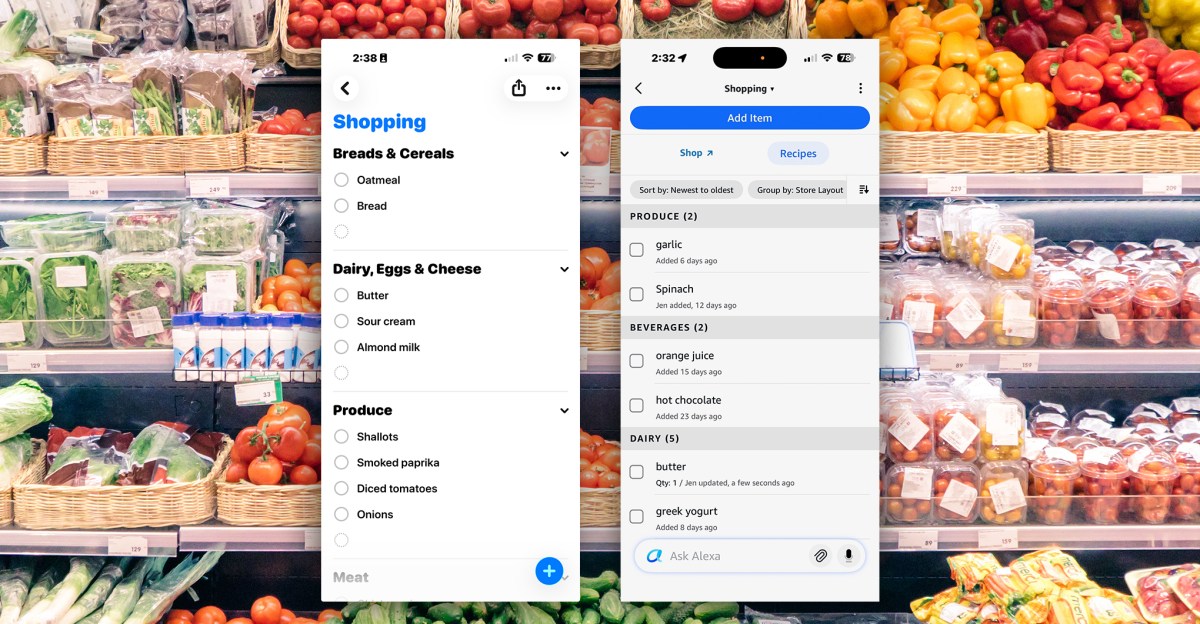
 Shopping list comparison: Apple’s Reminders app (left) and Amazon’s Alexa app (right). The recent UI overhaul of the Alexa app has made the list significantly harder to use.
For years, Alexa served as a convenient tool for managing shopping lists. While numerous list applications exist, the ability to add items by voice from anywhere in a home, view the list on an Echo Show, and access it via the Alexa app on a phone proved highly effective. This convenience, however, has recently diminished.
The introduction of Alexa Plus, coupled with an app redesign that prioritizes the generative AI assistant, has made the shopping list process frustrating. This has led some users to reluctantly switch to Apple’s Reminders app and Siri.
This change is not ideal for users with multiple Echo devices and fewer HomePods. Siri, for instance, often includes the user’s name when confirming an item added to a list, which can be a minor annoyance.
However, when accessing the list on an iPhone, Apple’s Reminders app presents a straightforward list, free from unsolicited advertisements for Whole Foods products or prompts to interact with Alexa Plus. While Siri may have its quirks, it maintains a focused functionality.
 The Alexa app’s shopping list interface has grown increasingly cluttered.
 In contrast, the Apple Reminders shopping list offers a clean and simple layout.
The Alexa app’s list experience has undergone gradual changes. Initially, users observed advertisements for Whole Foods products. Subsequently, adding items required navigating through two screens. Currently, a new Alexa chatbot text box is prominently displayed at the bottom of the list, inviting users to “Ask Alexa.”
This placement is counterintuitive, as users naturally expect to type new list items into such a field. In contrast, the Reminders app features a clear plus sign for adding items. When attempting to add “butter” by typing it into Alexa Plus, the system provided a guide to butter instead of adding it to the list.
To successfully add an item, users must navigate to the top of the screen, tap “add item,” which leads to a second screen filled with Whole Foods advertisements, and then locate a small text box at the top to input the desired item.
This entire process now requires five taps, even when the shopping list is designated as a Favorite and theoretically accessible from the app’s front page. However, a new Alexa Plus chatbot card now precedes the Favorites section, increasing the total to six taps.
 The “Add Item” screen, as observed recently, featuring large product images.
 A newer version of this screen.
While using the Alexa app’s iPhone widget offers a slight speed improvement, it still presents Whole Foods images and Alexa Plus prompts when the user’s sole intention is to add an item. In contrast, Apple’s Reminders allows for adding an item with a single tap after opening the app.
When questioned about the Whole Foods images, Amazon stated that they were part of a short-term test for new shopping list experiences and have since been removed, according to Trang Nguyen of Amazon.
More recently, accessing the list still required navigating to a second screen, but instead of large Whole Foods product images, it displayed a more extensive and varied list of suggested products with smaller thumbnails.
Nguyen also mentioned that the app should default to the last-used card, such as Favorites, as it previously did. However, these adjustments do not alleviate the overly complicated user experience, particularly when compared to the simplicity of adding items to Reminders.
 Alexa Plus provided a guide to butter when the user attempted to add butter to the list via the app.
 A transcript of a conversation with Alexa when sour cream was added using a voice command to an Echo Show.
Adding items by voice remains the simplest method, free from advertisements, but Alexa Plus still complicates the process. Requesting the new, “smarter” assistant to add an item often results in an unnecessarily verbose response, as if demonstrating its enhanced intelligence:
User: “Alexa, add sour cream to my shopping list.”
Alexa Plus: “Looks like you’re already stocked up on that creamy goodness! Sour cream is already chilling in your cart.”
Such verbose responses are often unwelcome.
The additional commentary can be particularly bothersome for users accustomed to more concise interactions.
Despite repeated attempts to reduce Alexa’s verbosity, the assistant has not complied, leading to frustration. While Siri may also have its own annoyances, such as prompting for web results, its shopping list feature remains clean, uncluttered, and free of advertisements.
The App’s New Look Prioritizes Alexa Plus


 The Alexa app’s redesigned front page now positions Favorites and Devices cards behind a new Alexa Plus card.
The app’s redesign aligns with Amazon’s strategy to evolve its generative AI-powered assistant into a more versatile tool, akin to ChatGPT and Gemini, moving beyond its traditional role as a home assistant.
Upon the launch of Alexa Plus last February, Amazon also announced plans for a new Alexa app. While the current redesign may not be the comprehensive rebuild many users desire, it undeniably elevates Alexa Plus to a central position within the application.
Recently, the company confirmed that Alexa Plus has exited its Early Access phase and is now freely accessible to all US users through the app and the updated Alexa.com website, which also provides shopping list access. Prime subscribers and those paying $20 monthly can utilize it on their Echo devices.
The redesign is part of Amazon’s push to make Alexa Plus a more generalist AI assistant
Amazon aims to facilitate seamless interaction with Alexa across various locations, a goal reflected in the app’s new design. The chatbot is prominently featured upon app launch, with the homepage presenting an Alexa Plus card pre-populated with suggested prompts. A smaller chatbot interface then persists across all app pages.
Regarding the app changes, Daniel Rausch, vice president of Alexa and Echo, stated that the intention is to “bring Alexa to the front, have direct access to Alexa more simply in voice and in typed chat,” asserting its capability to perform most in-app functions.
Rausch explained, “You can just directly tell Alexa what you want to accomplish, say changing a Setting, and she’ll either change it herself or tell you exactly where to find it.” However, this capability seemingly does not extend to simply adding “butter” to a shopping list when typed into the chatbot on the relevant page.
The viability of Alexa Plus as a competitor in the AI assistant market remains uncertain. As Amazon pushes for its adoption, it appears that some of Alexa’s core useful functionalities are being compromised. If the system struggles with a basic task like adding an item to a list without excessive commentary or advertisements, it suggests a fundamental issue.
Update, Feb 6th: Amazon has stated that the Whole Foods product page in the shopping list was a test and has since been removed.
Screenshots by Jennifer Pattison Tuohy / The Verge
