
Close Menu
    Latest Post

    Verifying 5G Standalone Activation on Your iPhone

    March 1, 2026

    Hands on: the Galaxy S26 and S26 Plus are more of the same for more money

    March 1, 2026

    IronCurtain: A Secure AI Agent Designed to Prevent Rogue Actions

    March 1, 2026
    Facebook X (Twitter) Instagram
    Trending
    • Verifying 5G Standalone Activation on Your iPhone
    • Hands on: the Galaxy S26 and S26 Plus are more of the same for more money
    • IronCurtain: A Secure AI Agent Designed to Prevent Rogue Actions
    • Kwasi Asare’s Entrepreneurial Journey: Risk, Reputation, and Resilience
    • The Rubin Observatory’s alert system sent 800,000 pings on its first night
    • GitHub Actions Now Supports Unzipped Artifact Uploads and Downloads
    • Project Genie: Experimenting with Infinite, Interactive Worlds
    • Text Generation Using Diffusion Models and ROI with LLMs
    Facebook X (Twitter) Instagram Pinterest Vimeo
    NodeTodayNodeToday
    • Home
    • AI
    • Dev
    • Guides
    • Products
    • Security
    • Startups
    • Tech
    • Tools
    NodeTodayNodeToday
    Home»Security»Microsoft Expands Windows Restore Capabilities for Enterprise Devices
    Security

    Microsoft Expands Windows Restore Capabilities for Enterprise Devices

    Samuel AlejandroBy Samuel AlejandroFebruary 26, 2026No Comments3 Mins Read
    Share Facebook Twitter Pinterest LinkedIn Tumblr Reddit Telegram Email
    src 40iyks featured
    Share
    Facebook Twitter LinkedIn Pinterest Email

    Microsoft has extended the functionality for enterprise users to restore personal settings and Microsoft Store applications from a previous Windows 11 device. This enhancement aims to streamline the setup process for new or reimaged machines.

    Known as the first sign-in restore experience, this feature is integrated into Windows Backup for Organizations, an enterprise-grade solution designed to simplify data backups and facilitate migrations to Windows 11.

    Upon logging into a new or reimaged Windows 11 device with a Microsoft Entra ID account, users can now restore their previously saved settings and Microsoft Store app list during their initial login. This is possible even if they initially bypassed the restore option during the device’s setup.

    Previously, this restore capability was exclusive to devices joined directly to Microsoft Entra, Microsoft’s cloud-based identity platform. With the latest update, support has been expanded to include hybrid-managed environments, multi-user device configurations, and Windows 365 Cloud PCs. This significantly increases the feature’s applicability across various enterprise deployment scenarios.

    “This allows users to restore Windows settings, restore their Microsoft Store app list, or choose to configure the device as new,” Microsoft stated recently. The company further explained, “This feature extends restore capabilities beyond Microsoft Entra-joined devices to support hybrid-managed environments, improving readiness for new or reimaged Windows 11 devices.”
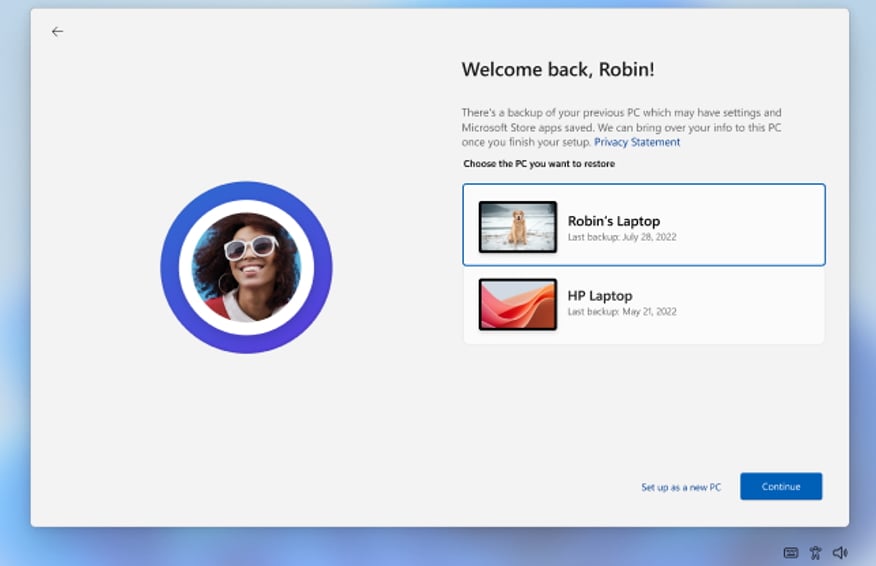
    First sign-in restore experienceFirst sign-in restore experience (Microsoft)

    When an eligible user logs into a device for the first time, a prompt appears, presenting the choice to restore from a prior device’s backup or to set up the device as new. Users who intentionally skip the restore process during the initial setup will not encounter the prompt again.

    The Windows first sign-in restore feature is managed through existing Windows Backup for Organizations policies. IT administrators can configure and deploy it using Microsoft Intune or Group Policy, eliminating the need to learn new management tools.

    Microsoft highlighted the feature’s particular utility for organizations transitioning to Windows 11 or those that frequently update hardware. The company also confirmed that administrators maintain complete control over which devices and users are offered the restore experience.

    General availability for this feature commenced with devices that installed Windows updates released on February 24, 2026, or later. Its functionality is controlled by administrators and adheres to existing Windows Backup for Organizations policies.

    Windows Backup for Organizations was initially unveiled at the Microsoft Ignite conference in November 2024 as an opt-in feature, disabled by default. It entered public preview in May 2025 and achieved general availability in August of the same year.

    Share. Facebook Twitter Pinterest LinkedIn Tumblr Email
    Previous ArticleWeekly Insights: JoulesLabs, Waffle Up, PRAN-RFL’s Retail Growth, Air Fryer Demand, and Founder Wisdom
    Next Article Lenovo ThinkPad P16 Gen 3 Review: A Powerful Mobile Workstation for Professionals
    Samuel Alejandro

    Related Posts

    Security

    IronCurtain: A Secure AI Agent Designed to Prevent Rogue Actions

    March 1, 2026
    Security

    Enterprise Spotlight: Data Center Modernization

    February 28, 2026
    Security

    US Justice Department Seizes $61 Million in Tether from Pig Butchering Crypto Scams

    February 28, 2026
    Add A Comment
    Leave A Reply Cancel Reply

    Latest Post

    ChatGPT Mobile App Surpasses $3 Billion in Consumer Spending

    December 21, 202517 Views

    Automate Your iPhone’s Always-On Display for Better Battery Life and Privacy

    December 21, 202515 Views

    Creator Tayla Cannon Lands $1.1M Investment for Rebuildr PT Software

    December 21, 202514 Views
    Stay In Touch
    • Facebook
    • YouTube
    • TikTok
    • WhatsApp
    • Twitter
    • Instagram
    About

    Welcome to NodeToday, your trusted source for the latest updates in Technology, Artificial Intelligence, and Innovation. We are dedicated to delivering accurate, timely, and insightful content that helps readers stay ahead in a fast-evolving digital world.

    At NodeToday, we cover everything from AI breakthroughs and emerging technologies to product launches, software tools, developer news, and practical guides. Our goal is to simplify complex topics and present them in a clear, engaging, and easy-to-understand way for tech enthusiasts, professionals, and beginners alike.

    Latest Post

    Verifying 5G Standalone Activation on Your iPhone

    March 1, 20264 Views

    Hands on: the Galaxy S26 and S26 Plus are more of the same for more money

    March 1, 20265 Views

    IronCurtain: A Secure AI Agent Designed to Prevent Rogue Actions

    March 1, 20264 Views
    Recent Posts
    • Verifying 5G Standalone Activation on Your iPhone
    • Hands on: the Galaxy S26 and S26 Plus are more of the same for more money
    • IronCurtain: A Secure AI Agent Designed to Prevent Rogue Actions
    • Kwasi Asare’s Entrepreneurial Journey: Risk, Reputation, and Resilience
    • The Rubin Observatory’s alert system sent 800,000 pings on its first night
    Facebook X (Twitter) Instagram Pinterest
    • About Us
    • Contact Us
    • Privacy Policy
    • Terms & Conditions
    • Disclaimer
    • Cookie Policy
    © 2026 NodeToday.

    Type above and press Enter to search. Press Esc to cancel.