


Ready to move beyond static mockups? This is a practical, step-by-step guide to Intent Prototyping — a disciplined method that uses AI to turn design intent (UI sketches, conceptual models, and user flows) directly into a live prototype, making it the primary canvas for ideation.
In Part 1 of this series, the “lopsided horse” problem, stemming from mockup-centric design, was explored, demonstrating how the appeal of vibe coding often leads to structural flaws. A key question remains:
How can the gap between design intent and a live prototype be closed, allowing for iteration on real functionality from day one, without falling into ambiguity?
In essence, a method is needed to build prototypes that are both quick to create and based on a clear, unambiguous blueprint.
The solution is a more disciplined process called Intent Prototyping (a concept inspired by Marco Kotrotsos’s Intent-Oriented Programming). This method utilizes AI-assisted coding but avoids ambiguity, placing the designer’s explicit intent at the core of the process. It takes a comprehensive expression of intent (sketches for screen layouts, conceptual model descriptions, and user flows) and uses it to generate a live, testable prototype.
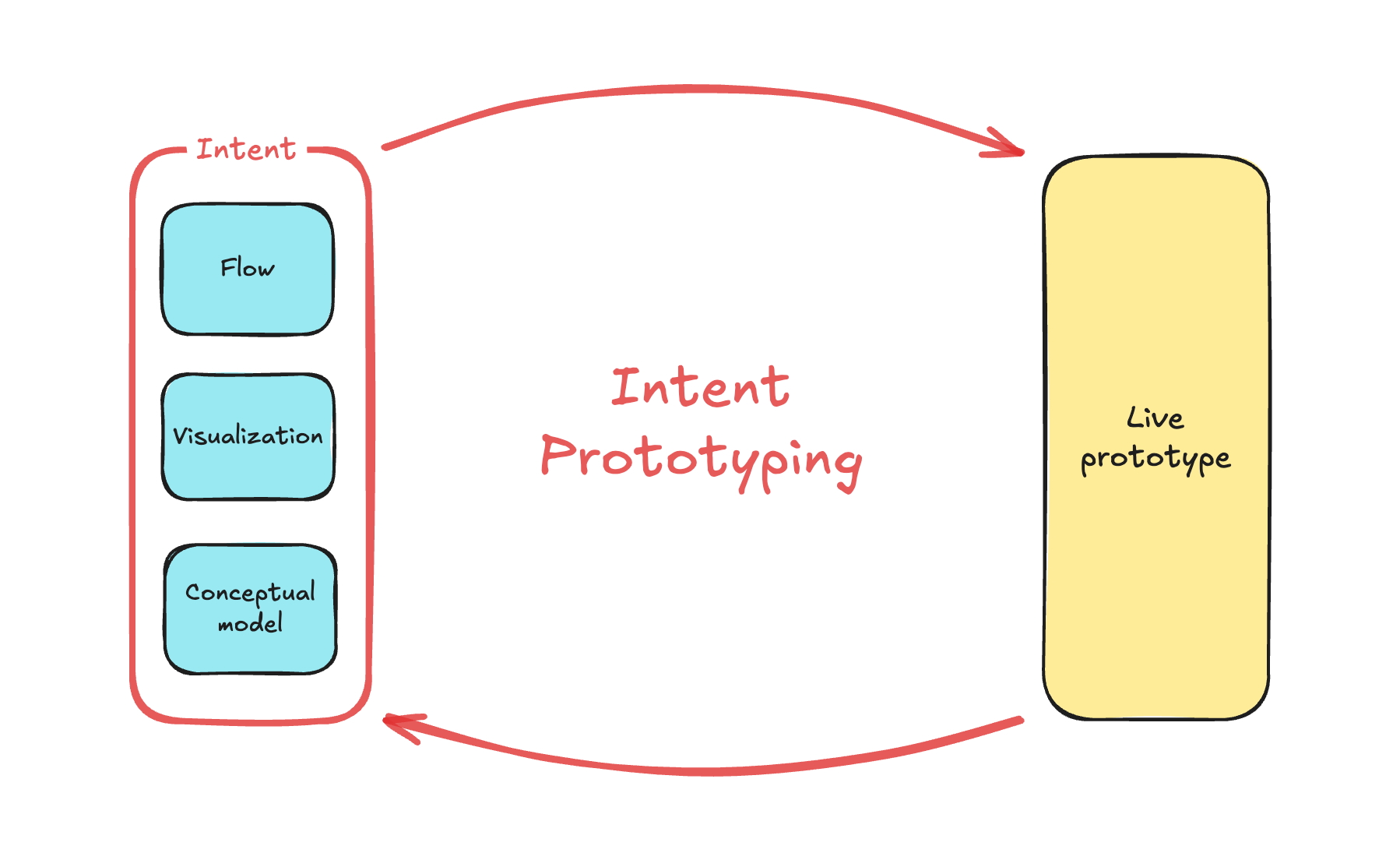
The Intent Prototyping workflow.
This method effectively addresses the concerns discussed in Part 1:
- Unlike static mockups, the prototype is fully interactive and can be easily populated with extensive realistic data. This enables testing of both the system’s underlying logic and its surface.
- Unlike a vibe-coded prototype, it is built from a stable, unambiguous specification. This prevents conceptual model failures and design debt that arise from unclear specifications. The engineering team receives not only a live prototype but also a clearly documented design intent, eliminating the need to reverse-engineer a black box or guess at the designer’s vision.
This combination makes the method particularly suitable for designing complex enterprise applications. It allows for testing the system’s most critical point of failure, its underlying structure, with unprecedented speed and flexibility. Furthermore, the process is designed for iteration. Multiple directions can be explored simply by modifying the intent and evolving the design based on user testing feedback.
Workflow Overview
To illustrate this process in action, a case study is presented. It uses the same example previously used to demonstrate the vibe coding trap: a simple tool for tracking tests to validate product ideas. The complete project, including all source code and documentation files, is available in this GitHub repository.
Step 1: Expressing Intent
After conducting research and contemplating a defined problem, an initial, vague idea for a solution begins to form. To capture this idea immediately, a quick sketch is created:
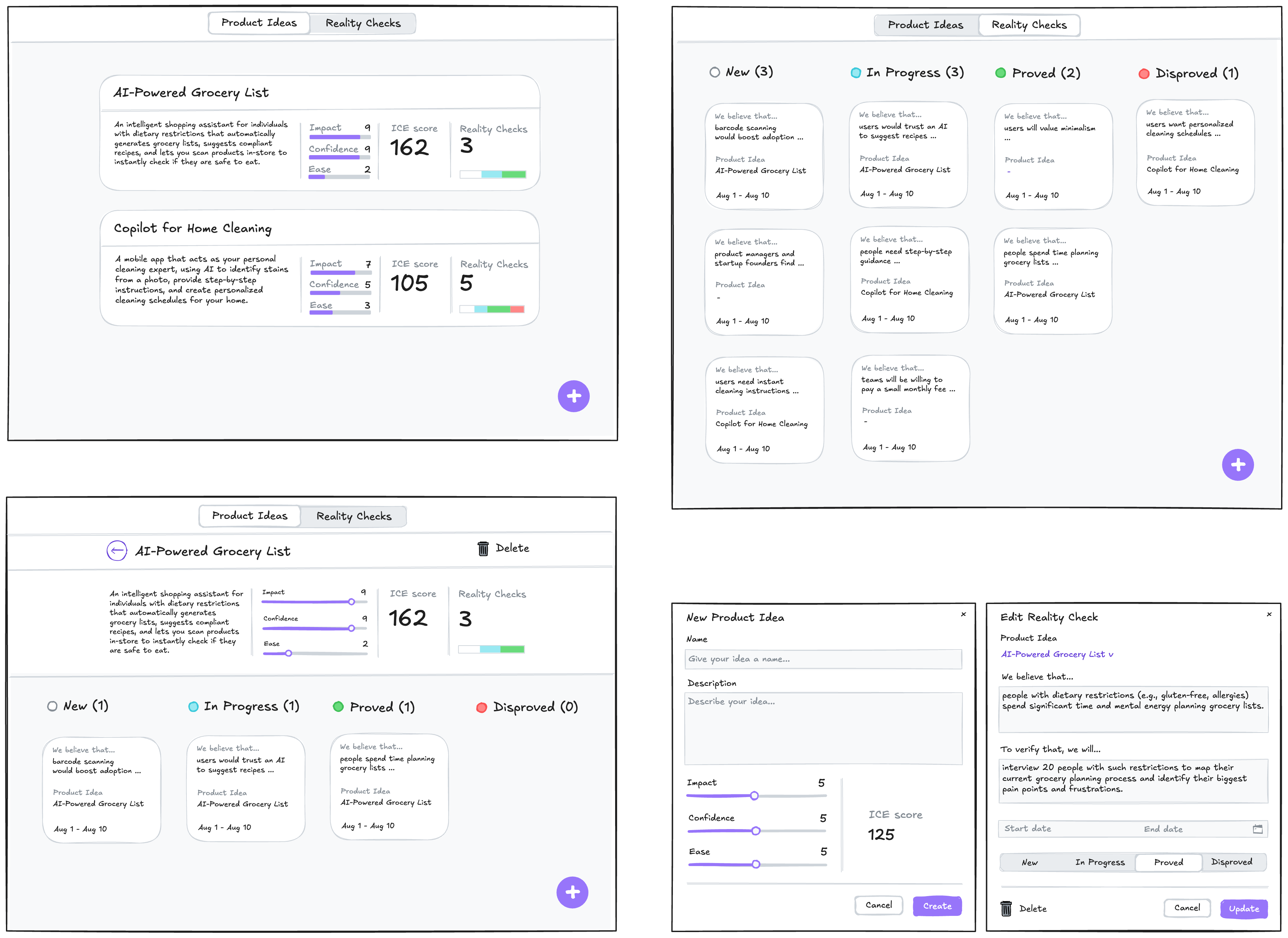
A low-fidelity sketch of the initial idea.
In this example, Excalidraw was used, though the specific tool is not critical. The sketch is intentionally kept rough, as visual details are not the focus at this stage. The goal is to move directly from this initial sketch to a live prototype for user testing, so polishing these sketches would not advance that objective.
To progress, just enough detail needs to be added to these sketches to serve as sufficient input for a junior frontend developer or an AI assistant. This involves explaining:
- Navigational paths (e.g., clicking here leads to).
- Interaction details not visible in a static picture (e.g., non-scrollable areas, adaptive layout, drag-and-drop behavior).
- Parts that could be built as reusable components.
- Which components from the design system (Ant Design Library is used) should be incorporated.
- Any other comments that clarify how the system should function (while sketches illustrate its appearance).
With these details added, the result is an annotated sketch:
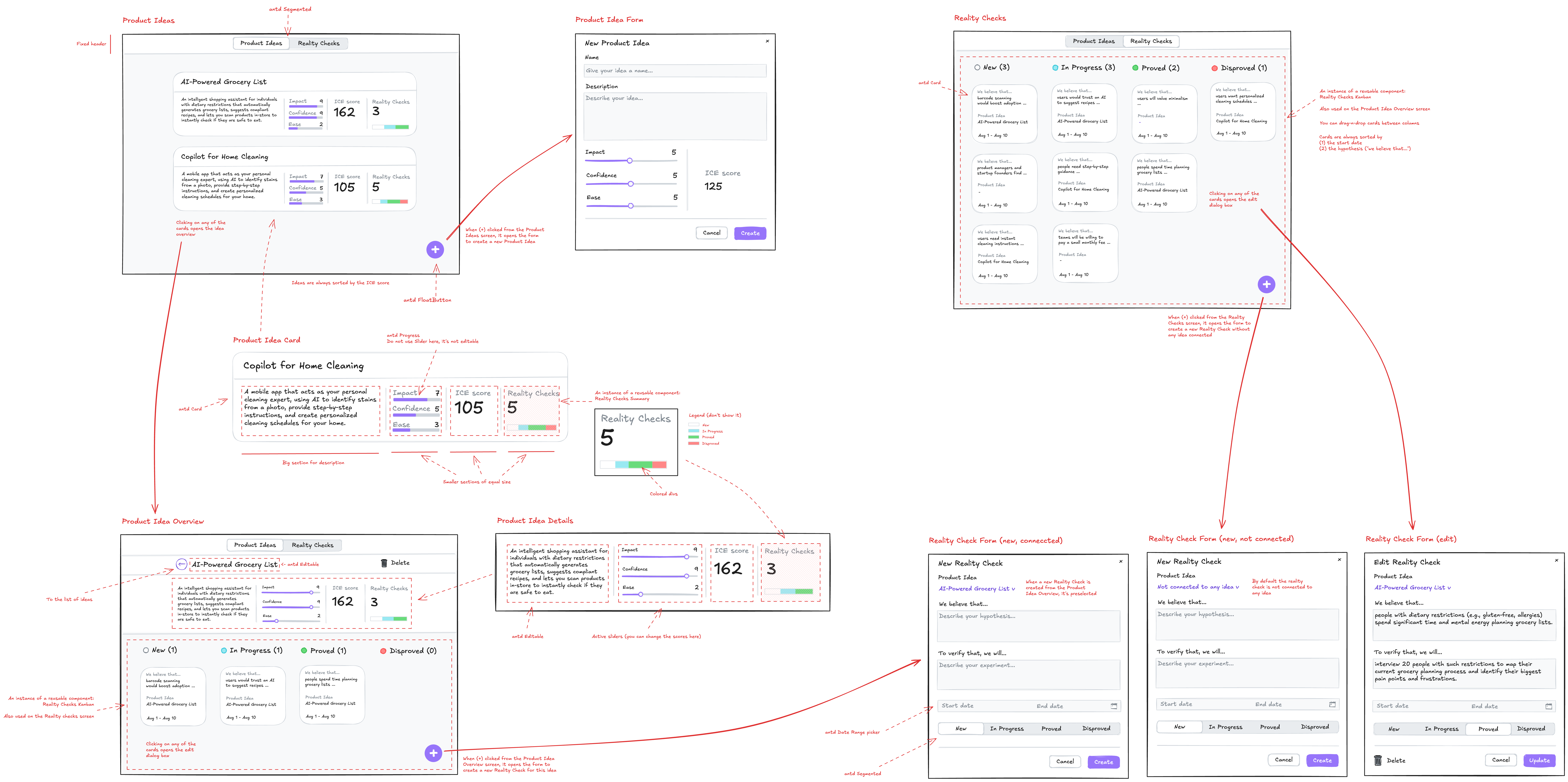
The sketch annotated with details.
This sketch addresses both Visualization and Flow aspects. Regarding the Conceptual Model, its absence would leave the expression of intent incomplete. While it could be added to the sketch margins (e.g., as a UML Class Diagram) for more complex applications where the model isn’t easily derived from the UI, in this case, an LLM can generate a comprehensive description of the conceptual model based on the sketch, saving effort.
For such tasks, Gemini 2.5 Pro is a suitable LLM, being a multimodal model that accepts both text and image inputs (GPT-5 and Claude-4 also meet this criterion). Google AI Studio offers sufficient control and visibility into the process:
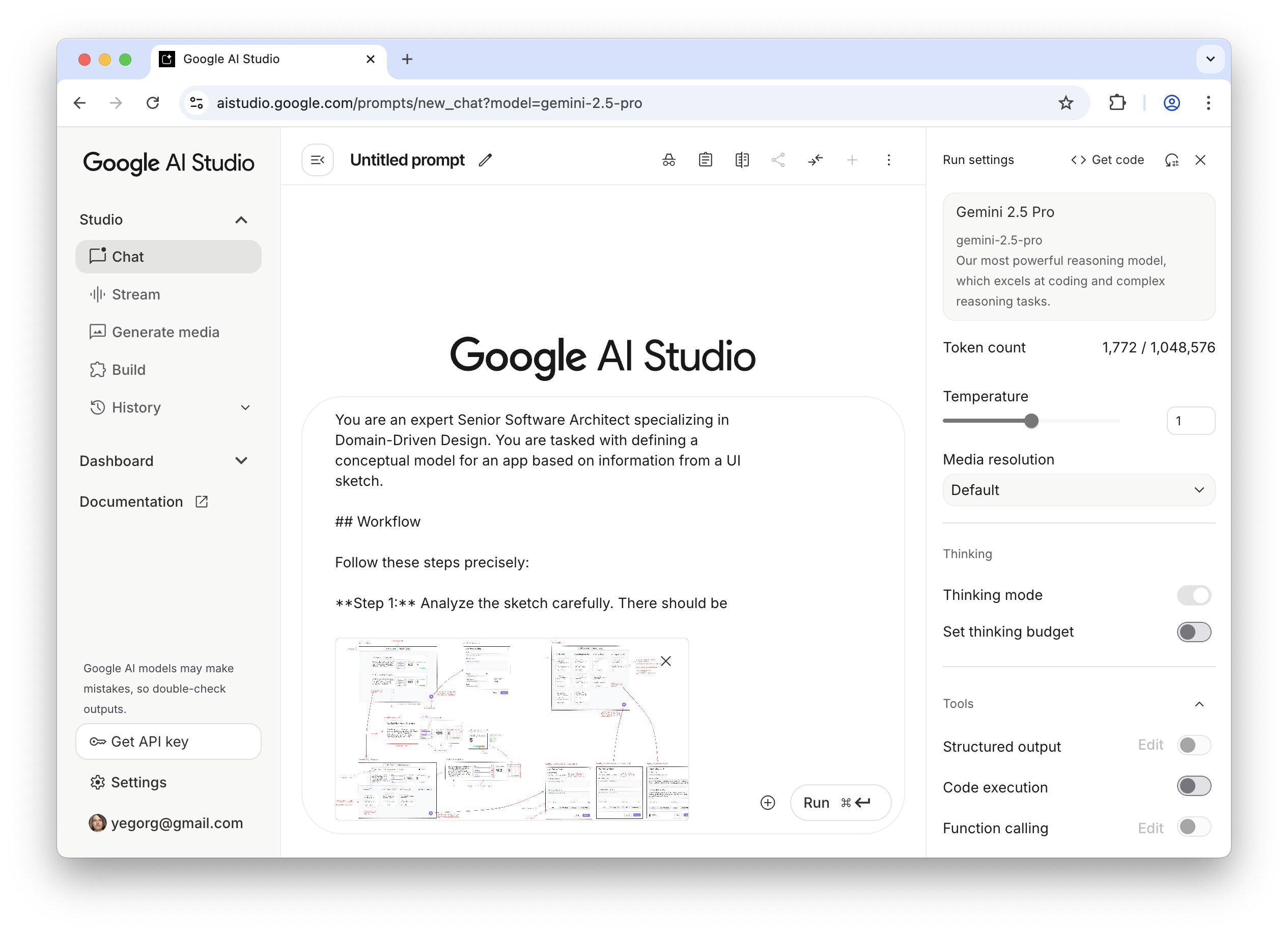
Generating a conceptual model from the sketch using Google AI Studio.
Note: All prompts used here can be found in the Appendices. These prompts are designed for reuse and are not project-specific.
Gemini then provides a description and the following diagram:
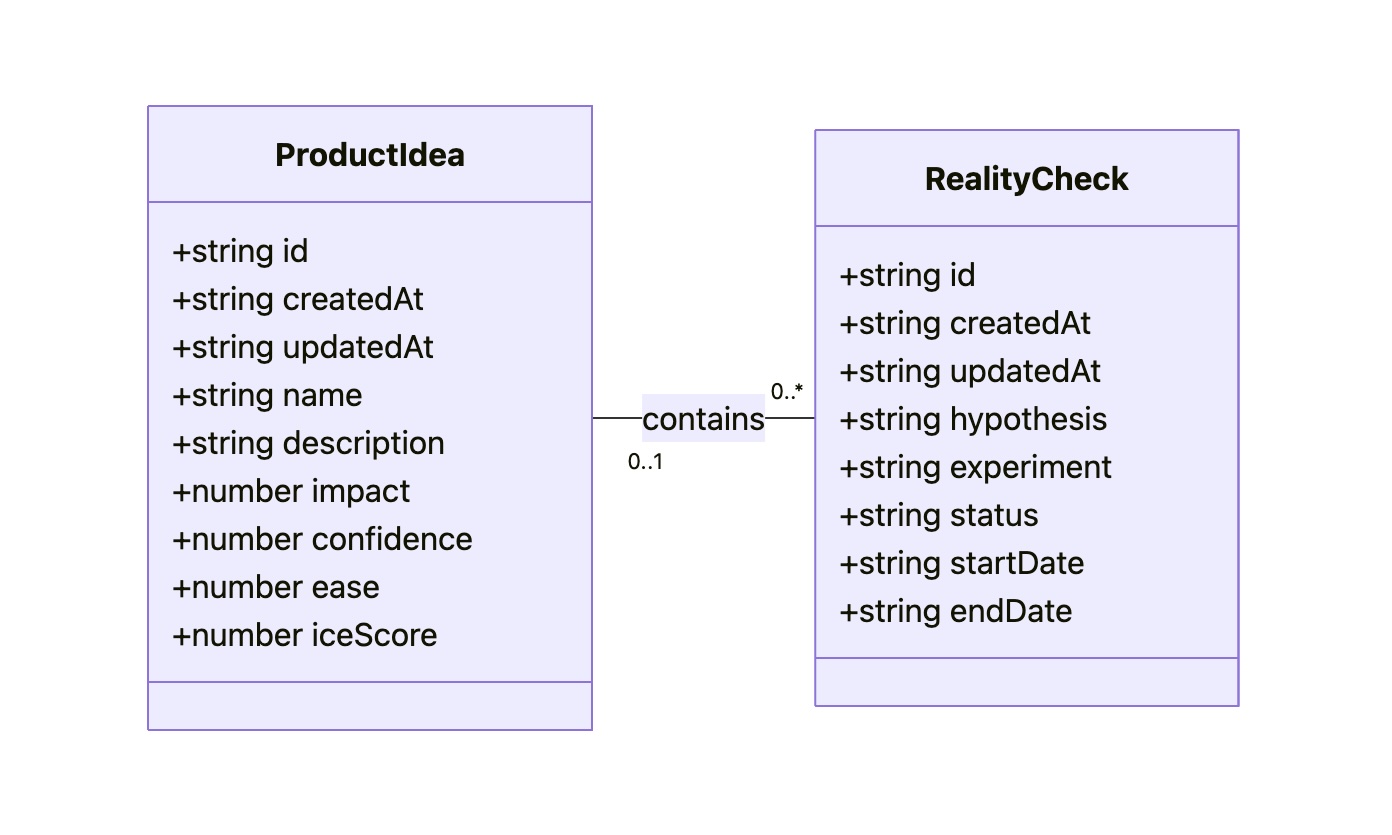
UML class diagram.
While the diagram may appear technical, a clear understanding of all objects, their attributes, and relationships is crucial for effective design. Therefore, the Conceptual Model is considered an essential part of expressing intent, alongside Flow and Visualization.
As a result of this step, the intent is fully expressed in two files: Sketch.png and Model.md. These serve as a durable source of truth.
Step 2: Preparing a Specification and a Plan
This step focuses on creating a comprehensive technical specification and a step-by-step plan. AI performs most of this work, requiring only oversight.
The Data Access Layer and the UI layer are separated, and specifications for each are created using two distinct prompts (see Appendices 2 and 3). The output of the first prompt (the Data Access Layer specification) serves as input for the second. Additionally, guidelines tailored for prototyping needs are provided as input (see Appendices 8, 9, and 10). These guidelines are not project-specific, and the technical approach they encode is beyond the scope of this article.
Gemini then provides content for DAL.md and UI.md. While the output is generally reliable, it is advisable to scrutinize it. Some level of programming literacy is helpful for understanding, but even without it, questions can be posed to Gemini in Google AI Studio before refreshing the context window. If a problem is identified, informing Gemini will prompt it to either fix it or explain its approach.
It is important to remember that LLMs are not deterministic and can sometimes overlook small details, particularly in sketches. For instance, the “Delete” button in the upper right corner of a sketch might not be mentioned in the specification.
Despite occasional oversights, Gemini typically performs exceptionally well. Notifying it of any identified issues usually leads to corrections.
Once Sketch.png, Model.md, DAL.md, and UI.md are complete and reviewed, the technical design documentation is finalized. This documentation provides a stable foundation for building the actual product, ensuring adherence to the original intent and proper integration of all components and layers.
Before proceeding, a step-by-step plan is prepared, divided into two parts: one for the Data Access Layer and another for the UI. Prompts for creating such a plan can be found in Appendices 4 and 5.
Step 3: Executing The Plan
To begin building the prototype, a different category of AI tools is required. Up to this point, Generative AI has been used, which excels at creating new content (specifications and plans) based on a single prompt. Google Gemini 2.5 Pro in Google AI Studio is used, but other similar tools like ChatGPT, Claude, Grok, and DeepSeek could also handle these one-off tasks.
However, for this step, a simple generative AI is insufficient. Building a prototype from specifications and a plan requires an AI that can read context from multiple files, execute a sequence of tasks, and maintain coherence. This is akin to asking a person to build a house by only showing them one brick at a time. An agentic AI is needed, capable of receiving a complete blueprint and project plan, then proceeding to build the foundation, frame walls, and add the roof in the correct sequence.
Google Gemini CLI is chosen as the coding agent, as Gemini 2.5 Pro performs well, and intermediate tools like Cursor or Windsurf (which would use Claude, Gemini, or GPT) are not deemed necessary. If Claude were preferred, Claude Code would be the choice, but with Gemini, Gemini CLI is used. However, the same process can be applied with other preferred tools like Cursor or Windsurf.
Before engaging the agent, a basic template for the React application needs to be created. Tutorials on scaffolding an empty React project using Vite are readily available.
All generated files are then placed into that project:
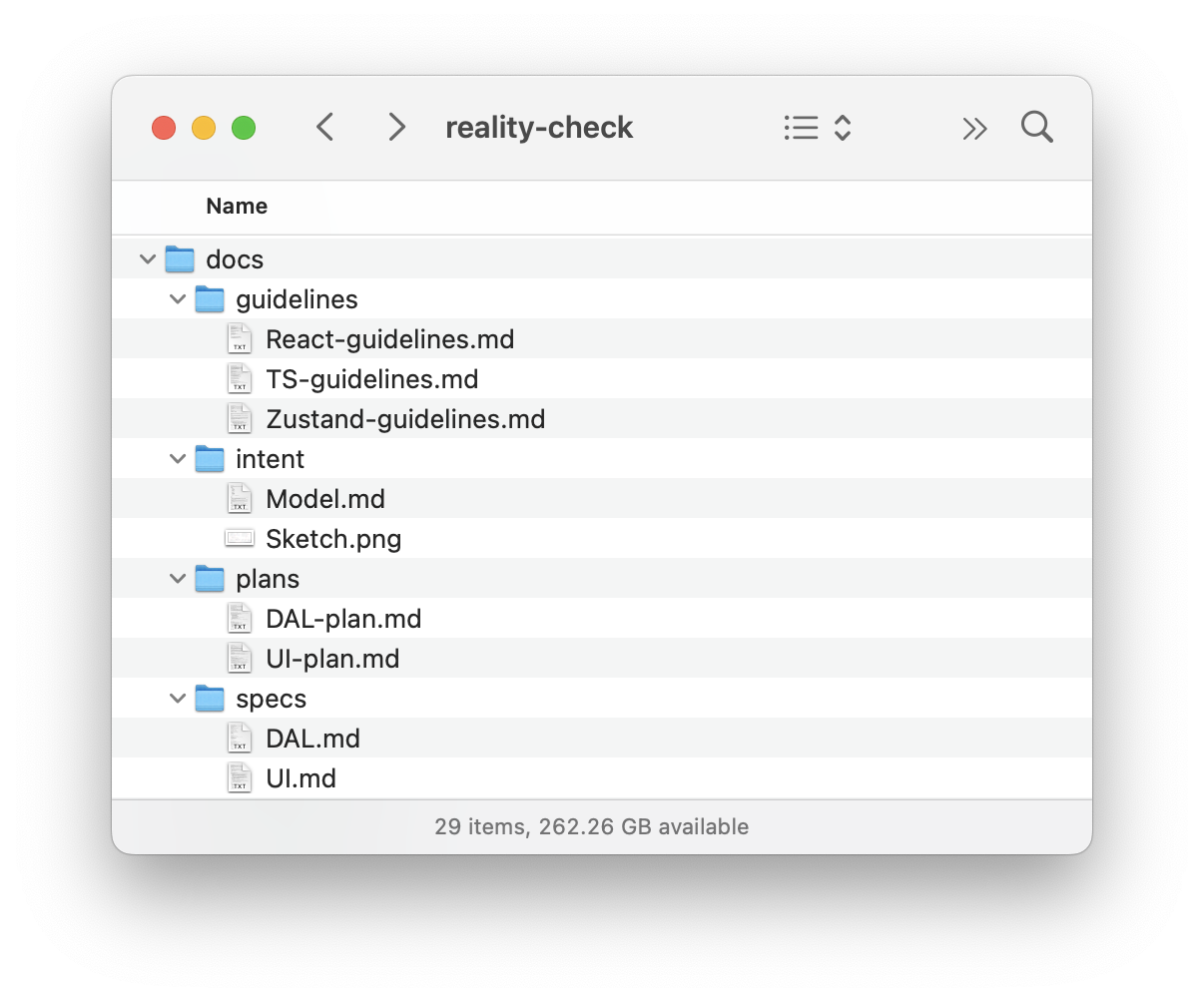
Project structure with design intent and spec files.
Once the basic template with all files is ready, the Terminal is opened, navigated to the project folder, and “gemini” is typed:
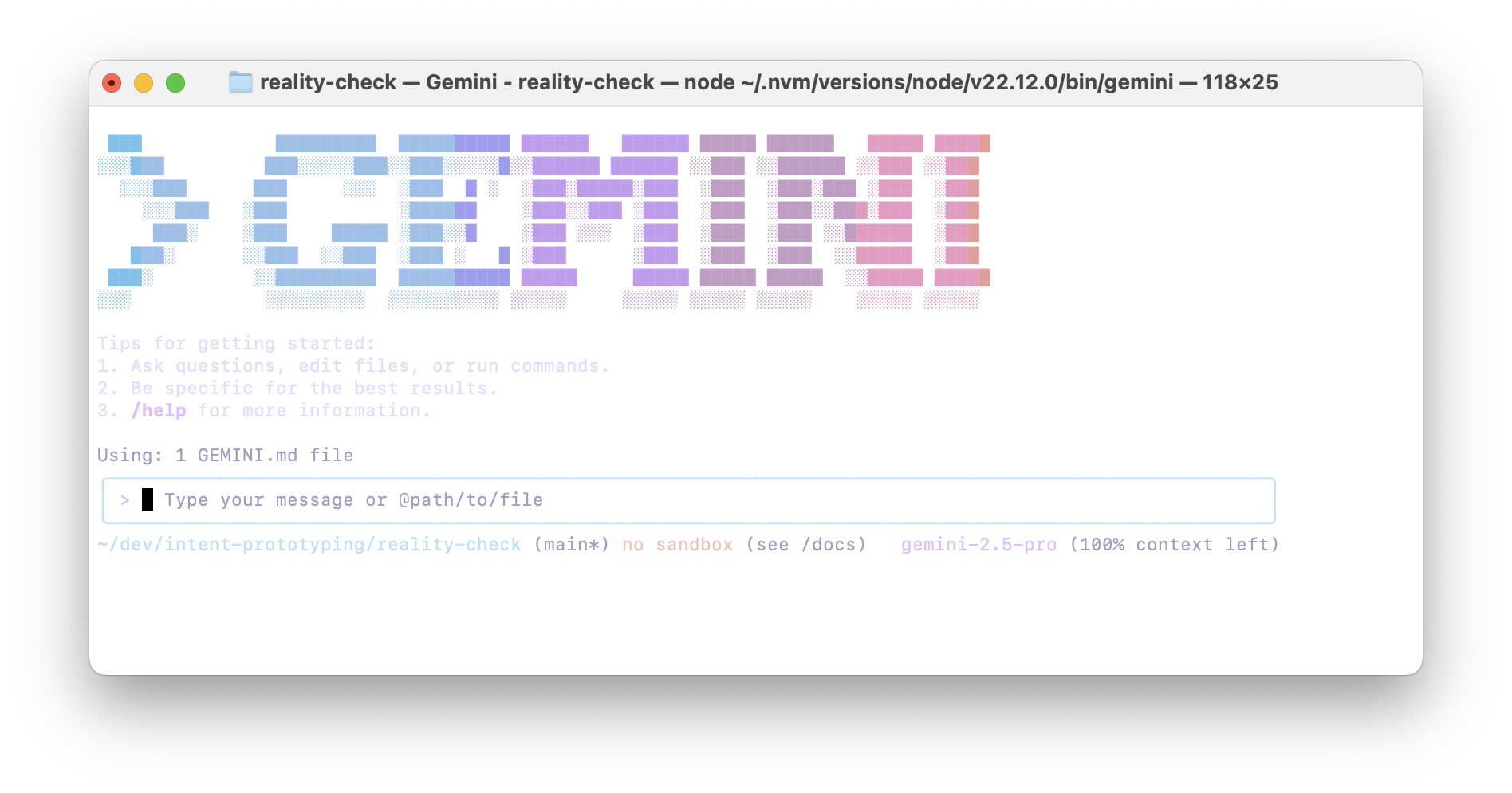
Gemini CLI.
The prompt to build the Data Access Layer is then sent (see Appendix 6). This prompt implies step-by-step execution, so upon completion of each step, the following is sent:
Thank you! Now, please move to the next task.
Remember that you must not make assumptions based on common patterns; always verify them with the actual data from the spec.
After each task, stop so that I can test it. Don’t move to the next task before I tell you to do so.
As the final task in the plan, the agent builds a special page to test all capabilities of the Data Access Layer, allowing for manual testing. It might appear as follows:
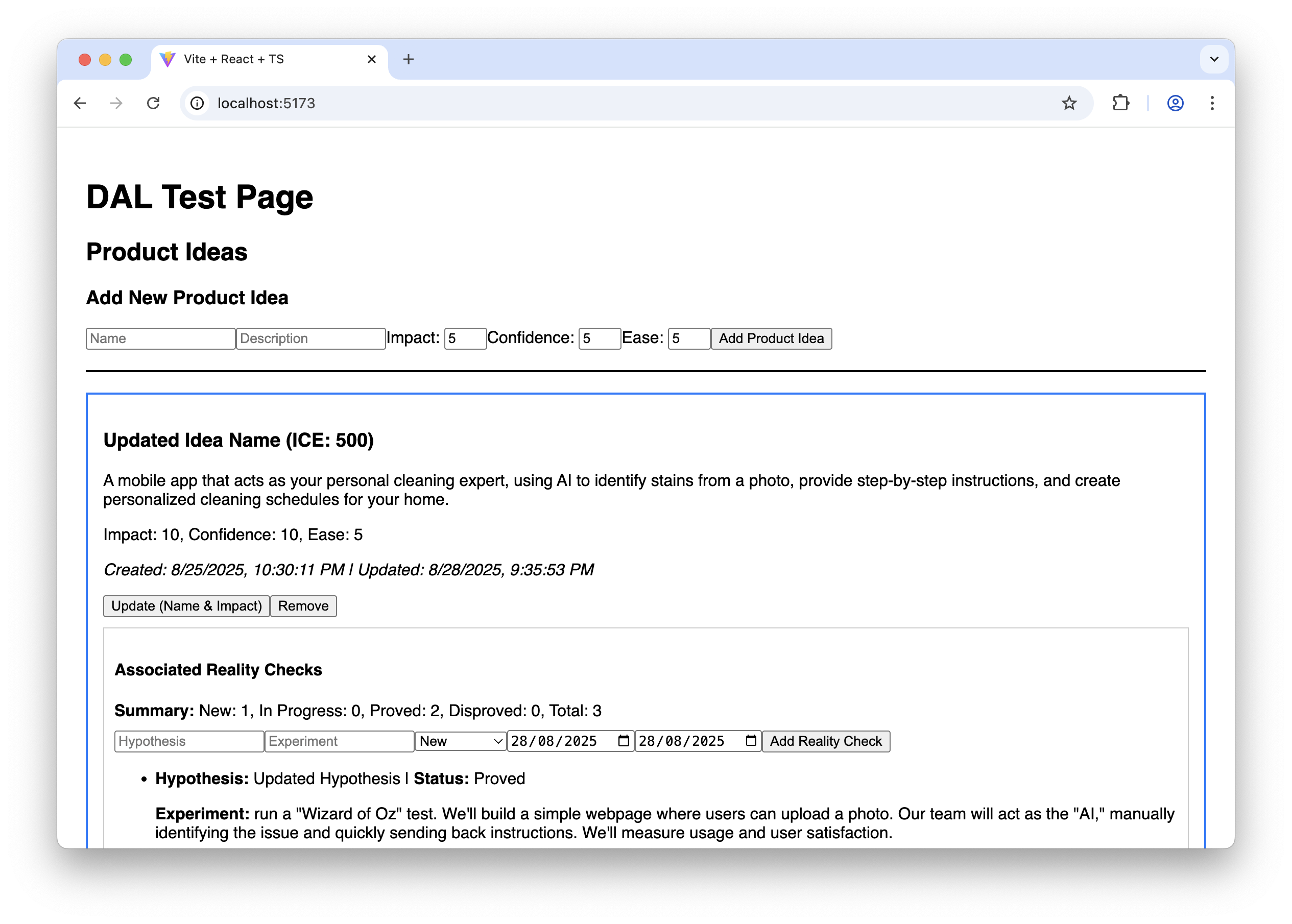
The AI-generated test page for the Data Access Layer.
While not visually elaborate, this page ensures the Data Access Layer functions correctly before proceeding with building the final UI.
Finally, the Gemini CLI context window is cleared to provide more processing capacity, and the prompt to build the UI is sent (see Appendix 7). This prompt also involves step-by-step execution. After each step, its functionality and appearance are tested, following the “Manual Testing Plan” from UI-plan.md. Despite the sketch being uploaded to the model context and Gemini generally attempting to follow it, attention to visual detail is not yet its strongest suit. Typically, a few additional adjustments are needed at each step to refine the look and feel:
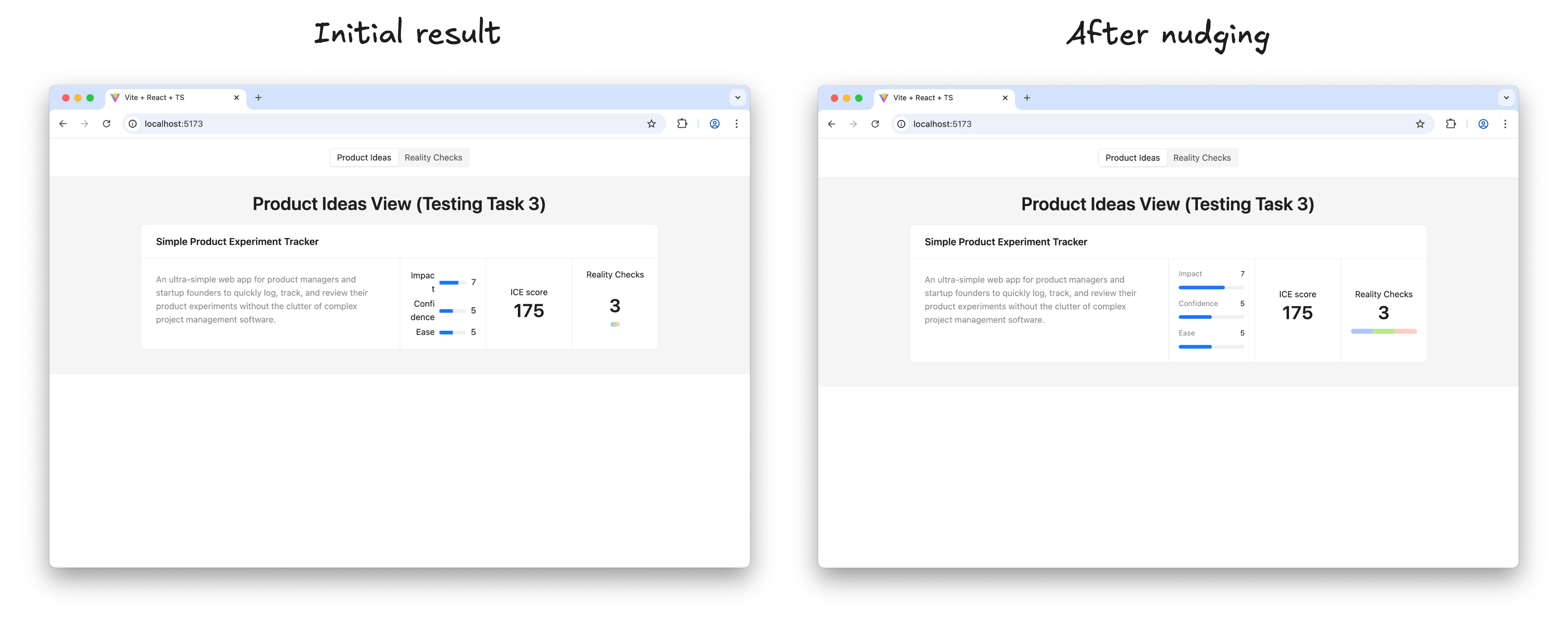
Refining the AI-generated UI to match the sketch.
Once satisfied with the result of a step, Gemini is instructed to proceed:
Thank you! Now, please move to the next task.
Make sure you build the UI according to the sketch; this is very important. Remember that you must not make assumptions based on common patterns; always verify them with the actual data from the spec and the sketch.
After each task, stop so that I can test it. Don’t move to the next task before I tell you to do so.
Soon, the result appears, and it functions exactly as intended in every detail:
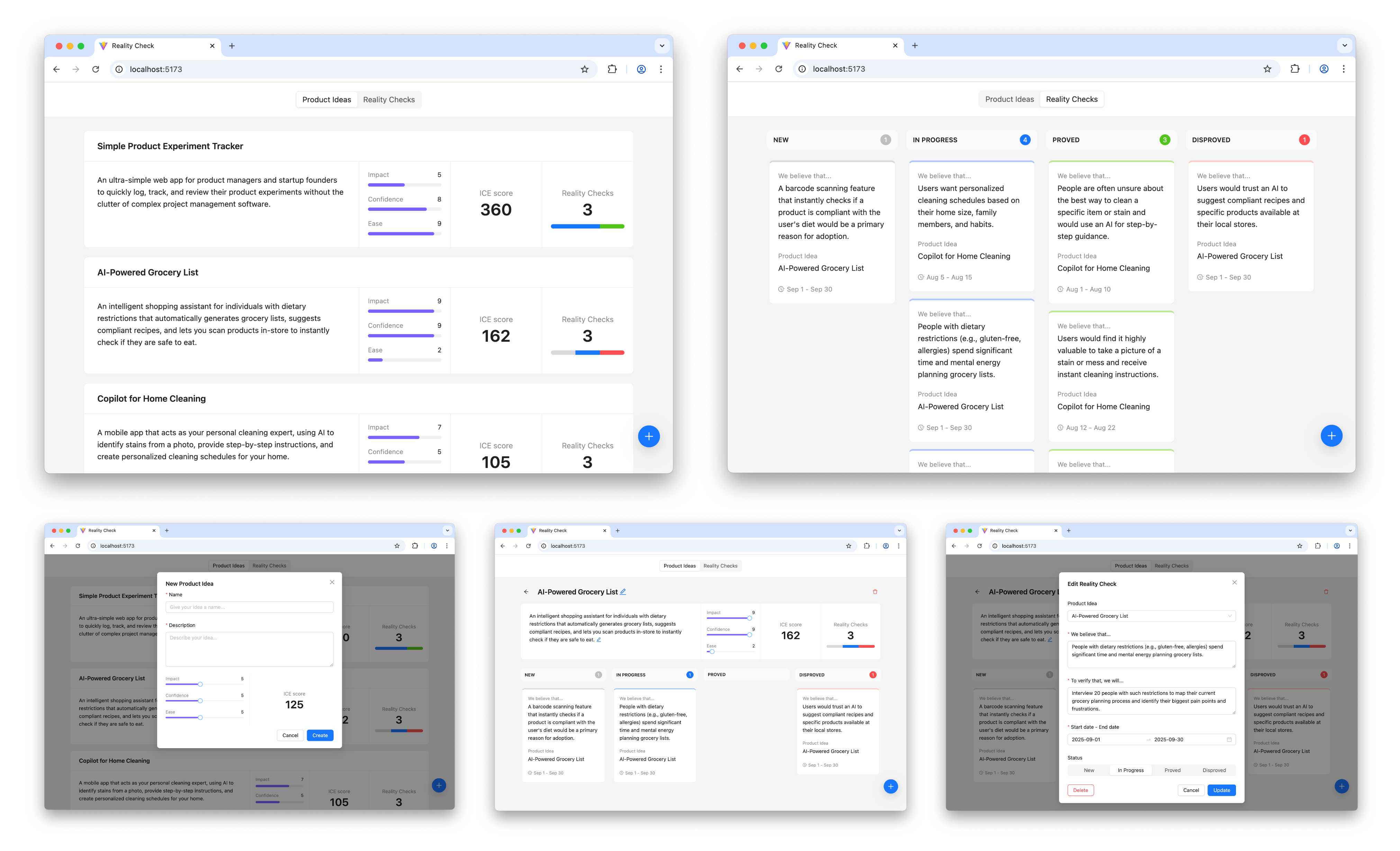
The final interactive prototype.
The prototype is operational and visually appealing. This marks the beginning of the most engaging phase.
Step 4: Learning And Iterating
It is now time to present the prototype to potential users to gather insights on whether the solution effectively addresses their needs.
Upon learning new information, iteration begins. Sketches and the conceptual model are adjusted or expanded based on this new input, specifications are updated, plans are created to implement changes according to the new specifications, and those plans are executed. In essence, each iteration involves repeating the steps outlined above.
Is This Workflow Too Heavy?
This four-step workflow might seem like a somewhat cumbersome process that demands excessive upfront thinking and does not genuinely foster creativity. However, before reaching that conclusion, consider the following:
- In practice, only the first step and the learning phase in the last step require significant effort. AI handles most of the intermediate work, requiring only supervision.
- Individual iterations do not need to be extensive. One can begin with a Walking Skeleton—the absolute minimum implementation of the concept—and add more substance in subsequent iterations. Changes to the overall direction between iterations are welcome.
- Finally, the principle of “think before you do” can be highly beneficial. A clear and unambiguous statement of intent can prevent numerous unnecessary mistakes and save considerable effort in the long run.
Intent Prototyping Vs. Other Methods
No single method suits all situations, and Intent Prototyping is no exception. Like any specialized tool, it serves a specific purpose. The most effective teams are those that understand which approach to employ to mitigate the most significant risk at each stage. The table below clarifies this choice, comparing Intent Prototyping with other common methods and tools, explaining each in terms of its primary goal and the specific risks it is best suited to mitigate.
| Method/Tool | Goal | Risks it is best suited to mitigate | Examples | Why |
|---|---|---|---|---|
| Intent Prototyping | To rapidly iterate on the fundamental architecture of a data-heavy application with a complex conceptual model, sophisticated business logic, and non-linear user flows. | Building a system with a flawed or incoherent conceptual model, leading to critical bugs and costly refactoring. |
|
It enforces conceptual clarity. This not only de-risks the core structure but also produces a clear, documented blueprint that serves as a superior specification for the engineering handoff. |
| Vibe Coding (Conversational) | To rapidly explore interactive ideas through improvisation. | Losing momentum because of analysis paralysis. |
|
It has the smallest loop between an idea conveyed in natural language and an interactive outcome. |
| Axure | To test complicated conditional logic within a specific user journey, without having to worry about how the whole system works. | Designing flows that break when users don’t follow the “happy path.” |
|
It’s made to create complex if-then logic and manage variables visually. This lets one test complicated paths and edge cases in a user journey without writing any code. |
| Figma | To make sure that the user interface looks good, aligns with the brand, and has a clear information architecture. | Making a product that looks bad, doesn’t fit with the brand, or has a layout that is hard to understand. |
|
It excels at high-fidelity visual design and provides simple, fast tools for linking static screens. |
| ProtoPie, Framer | To make high-fidelity micro-interactions feel just right. | Shipping an application that feels cumbersome and unpleasant to use because of poorly executed interactions. |
|
These tools let one manipulate animation timelines, physics, and device sensor inputs in great detail. Designers can carefully work on and test the small things that make an interface feel really polished and fun to use. |
| Low-code / No-code Tools (e.g., Bubble, Retool) | To create a working, data-driven app as quickly as possible. | The application will never be built because traditional development is too expensive. |
|
They put a UI builder, a database, and hosting all in one place. The goal is not merely to make a prototype of an idea, but to make and release an actual, working product. This is the last step for many internal tools or MVPs. |
The key takeaway is that each method serves as a specialized tool for mitigating a specific type of risk. For example, Figma de-risks the visual presentation, and ProtoPie de-risks the feel of an interaction. Intent Prototyping is uniquely positioned to address the most fundamental risk in complex applications: building on a flawed or incoherent conceptual model.
Bringing It All Together
The era of “lopsided horse” design, where products appear sleek but are structurally unsound, results directly from the trade-off between fidelity and flexibility. This trade-off has led to processes filled with redundant effort and misdirected focus. Intent Prototyping, powered by modern AI, resolves this conflict. It is not merely a shortcut to faster building — it represents a fundamental shift in design methodology. By placing clear, unambiguous intent at the core of the process, it eliminates redundant work and allows for a focus on architecting a sound and robust system.
This renewed focus offers three major benefits. First, by moving directly to live, interactive prototypes, validation efforts shift from surface-level aesthetics to deep system logic, testing actual functionality with users from day one. Second, the very act of documenting design intent clarifies ideas, ensuring a full understanding of the system’s underlying logic. Finally, this documented intent becomes a durable source of truth, eliminating ambiguous handoffs and the redundant, error-prone task of engineers reverse-engineering a designer’s vision from a black box.
Ultimately, Intent Prototyping transforms the nature of design work. It enables a move beyond creating pictures of a product, empowering designers to become architects of blueprints for a system. With AI assistance, the live prototype can finally become the primary canvas for ideation, rather than a high-effort afterthought.
Appendices
The complete Intent Prototyping Starter Kit, which includes all prompts and guidelines, as well as the example from this article and a minimal boilerplate project, is available in this GitHub repository.
Appendix 1: Sketch to UML Class Diagram
You are an expert Senior Software Architect specializing in Domain-Driven Design. You are tasked with defining a conceptual model for an app based on information from a UI sketch.

## Workflow

Follow these steps precisely:

**Step 1:** Analyze the sketch carefully. There should be no ambiguity about what we are building.

**Step 2:** Generate the conceptual model description in the Mermaid format using a UML class diagram.

## Ground Rules

- Every entity must have the following attributes:
    - `id` (string)
    - `createdAt` (string, ISO 8601 format)
    - `updatedAt` (string, ISO 8601 format)
- Include all attributes shown in the UI: If a piece of data is visually represented as a field for an entity, include it in the model, even if it's calculated from other attributes.
- Do not add any speculative entities, attributes, or relationships ("just in case"). The model should serve the current sketch's requirements only.
- Pay special attention to cardinality definitions (e.g., if a relationship is optional on both sides, it cannot be `"1" -- "0..*"`, it must be `"0..1" -- "0..*"`).
- Use only valid syntax in the Mermaid diagram.
- Do not include enumerations in the Mermaid diagram.
- Add comments explaining the purpose of every entity, attribute, and relationship, and their expected behavior (not as a part of the diagram, in the Markdown file).

## Naming Conventions

- Names should reveal intent and purpose.
- Use PascalCase for entity names.
- Use camelCase for attributes and relationships.
- Use descriptive variable names with auxiliary verbs (e.g., isLoading, hasError).

## Final Instructions

- **No Assumptions:** Base every detail on visual evidence in the sketch, not on common design patterns.
- **Double-Check:** After composing the entire document, read through it to ensure the hierarchy is logical, the descriptions are unambiguous, and the formatting is consistent. The final document should be a self-contained, comprehensive specification.
- **Do not add redundant empty lines between items.**

Your final output should be the complete, raw markdown content for `Model.md`.
Appendix 2: Sketch to DAL Spec
You are an expert Senior Frontend Developer specializing in React, TypeScript, and Zustand. You are tasked with creating a comprehensive technical specification for the development team in a structured markdown document, based on a UI sketch and a conceptual model description.

## Workflow

Follow these steps precisely:

**Step 1:** Analyze the documentation carefully:

- `Model.md`: the conceptual model
- `Sketch.png`: the UI sketch

There should be no ambiguity about what we are building.

**Step 2:** Check out the guidelines:

- `TS-guidelines.md`: TypeScript Best Practices
- `React-guidelines.md`: React Best Practices
- `Zustand-guidelines.md`: Zustand Best Practices

**Step 3:** Create a Markdown specification for the stores and entity-specific hook that implements all the logic and provides all required operations.

---

## Markdown Output Structure

Use this template for the entire document.

```markdown

# Data Access Layer Specification

This document outlines the specification for the data access layer of the application, following the principles defined in `docs/guidelines/Zustand-guidelines.md`.

## 1. Type Definitions

Location: `src/types/entities.ts`

### 1.1. `BaseEntity`

A shared interface that all entities should extend.

[TypeScript interface definition]

### 1.2. `[Entity Name]`

The interface for the [Entity Name] entity.

[TypeScript interface definition]

## 2. Zustand Stores

### 2.1. Store for `[Entity Name]`

**Location:** `src/stores/[Entity Name (plural)].ts`

The Zustand store will manage the state of all [Entity Name] items.

**Store State (`[Entity Name]State`):**

[TypeScript interface definition]

**Store Implementation (`use[Entity Name]Store`):**

- The store will be created using `create<[Entity Name]State>()(...)`.
- It will use the `persist` middleware from `zustand/middleware` to save state to `localStorage`. The persistence key will be `[entity-storage-key]`.
- `[Entity Name (plural, camelCase)]` will be a dictionary (`Record<string, [Entity]>`) for O(1) access.

**Actions:**

- **`add[Entity Name]`**:
    [Define the operation behavior based on entity requirements]
- **`update[Entity Name]`**:
    [Define the operation behavior based on entity requirements]
- **`remove[Entity Name]`**:
    [Define the operation behavior based on entity requirements]
- **`doSomethingElseWith[Entity Name]`**:
    [Define the operation behavior based on entity requirements]

## 3. Custom Hooks

### 3.1. `use[Entity Name (plural)]`

**Location:** `src/hooks/use[Entity Name (plural)].ts`

The hook will be the primary interface for UI components to interact with [Entity Name] data.

**Hook Return Value:**

[TypeScript interface definition]

**Hook Implementation:**

[List all properties and methods returned by this hook, and briefly explain the logic behind them, including data transformations, memoization. Do not write the actual code here.]

```

---

## Final Instructions

- **No Assumptions:** Base every detail in the specification on the conceptual model or visual evidence in the sketch, not on common design patterns.
- **Double-Check:** After composing the entire document, read through it to ensure the hierarchy is logical, the descriptions are unambiguous, and the formatting is consistent. The final document should be a self-contained, comprehensive specification.
- **Do not add redundant empty lines between items.**

Your final output should be the complete, raw markdown content for `DAL.md`.
Appendix 3: Sketch to UI Spec
You are an expert Senior Frontend Developer specializing in React, TypeScript, and the Ant Design library. You are tasked with creating a comprehensive technical specification by translating a UI sketch into a structured markdown document for the development team.

## Workflow

Follow these steps precisely:

**Step 1:** Analyze the documentation carefully:

- `Sketch.png`: the UI sketch
  - Note that red lines, red arrows, and red text within the sketch are annotations for you and should not be part of the final UI design. They provide hints and clarification. Never translate them to UI elements directly.
- `Model.md`: the conceptual model
- `DAL.md`: the Data Access Layer spec

There should be no ambiguity about what we are building.

**Step 2:** Check out the guidelines:

- `TS-guidelines.md`: TypeScript Best Practices
- `React-guidelines.md`: React Best Practices

**Step 3:** Generate the complete markdown content for a new file, `UI.md`.

---

## Markdown Output Structure

Use this template for the entire document.

```markdown

# UI Layer Specification

This document specifies the UI layer of the application, breaking it down into pages and reusable components based on the provided sketches. All components will adhere to Ant Design's principles and utilize the data access patterns defined in `docs/guidelines/Zustand-guidelines.md`.

## 1. High-Level Structure

The application is a single-page application (SPA). It will be composed of a main layout, one primary page, and several reusable components.

### 1.1. `App` Component

The root component that sets up routing and global providers.

-   **Location**: `src/App.tsx`
-   **Purpose**: To provide global context, including Ant Design's `ConfigProvider` and `App` contexts for message notifications, and to render the main page.
-   **Composition**:
  -   Wraps the application with `ConfigProvider` and `App as AntApp` from 'antd' to enable global message notifications as per `simple-ice/antd-messages.mdc`.
  -   Renders `[Page Name]`.

## 2. Pages

### 2.1. `[Page Name]`

-   **Location:** `src/pages/PageName.tsx`
-   **Purpose:** [Briefly describe the main goal and function of this page]
-   **Data Access:**
  [List the specific hooks and functions this component uses to fetch or manage its data]
-   **Internal State:**
    [Describe any state managed internally by this page using `useState`]
-   **Composition:**
    [Briefly describe the content of this page]
-   **User Interactions:**
    [Describe how the user interacts with this page]
-   **Logic:**
  [If applicable, provide additional comments on how this page should work]

## 3. Components

### 3.1. `[Component Name]`

-   **Location:** `src/components/ComponentName.tsx`
-   **Purpose:** [Explain what this component does and where it's used]
-   **Props:**
  [TypeScript interface definition for the component's props. Props should be minimal. Avoid prop drilling by using hooks for data access.]
-   **Data Access:**
    [List the specific hooks and functions this component uses to fetch or manage its data]
-   **Internal State:**
    [Describe any state managed internally by this component using `useState`]
-   **Composition:**
    [Briefly describe the content of this component]
-   **User Interactions:**
    [Describe how the user interacts with the component]
-   **Logic:**
  [If applicable, provide additional comments on how this component should work]

```

---

## Final Instructions

- **No Assumptions:** Base every detail on the visual evidence in the sketch, not on common design patterns.
- **Double-Check:** After composing the entire document, read through it to ensure the hierarchy is logical, the descriptions are unambiguous, and the formatting is consistent. The final document should be a self-contained, comprehensive specification.
- **Do not add redundant empty lines between items.**

Your final output should be the complete, raw markdown content for `UI.md`.
Appendix 4: DAL Spec to Plan
You are an expert Senior Frontend Developer specializing in React, TypeScript, and Zustand. You are tasked with creating a plan to build a Data Access Layer for an application based on a spec.

## Workflow

Follow these steps precisely:

**Step 1:** Analyze the documentation carefully:

- `DAL.md`: The full technical specification for the Data Access Layer of the application. Follow it carefully and to the letter.

There should be no ambiguity about what we are building.

**Step 2:** Check out the guidelines:

- `TS-guidelines.md`: TypeScript Best Practices
- `React-guidelines.md`: React Best Practices
- `Zustand-guidelines.md`: Zustand Best Practices

**Step 3:** Create a step-by-step plan to build a Data Access Layer according to the spec.

Each task should:

- Focus on one concern
- Be reasonably small
- Have a clear start + end
- Contain clearly defined Objectives and Acceptance Criteria

The last step of the plan should include creating a page to test all the capabilities of our Data Access Layer, and making it the start page of this application, so that I can manually check if it works properly.

I will hand this plan over to an engineering LLM that will be told to complete one task at a time, allowing me to review results in between.

## Final Instructions

- Note that we are not starting from scratch; the basic template has already been created using Vite.
- Do not add redundant empty lines between items.

Your final output should be the complete, raw markdown content for `DAL-plan.md`.
Appendix 5: UI Spec to Plan
You are an expert Senior Frontend Developer specializing in React, TypeScript, and the Ant Design library. You are tasked with creating a plan to build a UI layer for an application based on a spec and a sketch.

## Workflow

Follow these steps precisely:

**Step 1:** Analyze the documentation carefully:

- `UI.md`: The full technical specification for the UI layer of the application. Follow it carefully and to the letter.
- `Sketch.png`: Contains important information about the layout and style, complements the UI Layer Specification. The final UI must be as close to this sketch as possible.

There should be no ambiguity about what we are building.

**Step 2:** Check out the guidelines:

- `TS-guidelines.md`: TypeScript Best Practices
- `React-guidelines.md`: React Best Practices

**Step 3:** Create a step-by-step plan to build a UI layer according to the spec and the sketch.

Each task must:

- Focus on one concern.
- Be reasonably small.
- Have a clear start + end.
- Result in a verifiable increment of the application. Each increment should be manually testable to allow for functional review and approval before proceeding.
- Contain clearly defined Objectives, Acceptance Criteria, and Manual Testing Plan.

I will hand this plan over to an engineering LLM that will be told to complete one task at a time, allowing me to test in between.

## Final Instructions

- Note that we are not starting from scratch, the basic template has already been created using Vite, and the Data Access Layer has been built successfully.
- For every task, describe how components should be integrated for verification. You must use the provided hooks to connect to the live Zustand store data—do not use mock data (note that the Data Access Layer has been already built successfully).
- The Manual Testing Plan should read like a user guide. It must only contain actions a user can perform in the browser and must never reference any code files or programming tasks.
- Do not add redundant empty lines between items.

Your final output should be the complete, raw markdown content for `UI-plan.md`.
Appendix 6: DAL Plan to Code
You are an expert Senior Frontend Developer specializing in React, TypeScript, and Zustand. You are tasked with building a Data Access Layer for an application based on a spec.

## Workflow

Follow these steps precisely:

**Step 1:** Analyze the documentation carefully:

- @docs/specs/DAL.md: The full technical specification for the Data Access Layer of the application. Follow it carefully and to the letter.

There should be no ambiguity about what we are building.

**Step 2:** Check out the guidelines:

- @docs/guidelines/TS-guidelines.md: TypeScript Best Practices
- @docs/guidelines/React-guidelines.md: React Best Practices
- @docs/guidelines/Zustand-guidelines.md: Zustand Best Practices

**Step 3:** Read the plan:

- @docs/plans/DAL-plan.md: The step-by-step plan to build the Data Access Layer of the application.

**Step 4:** Build a Data Access Layer for this application according to the spec and following the plan.

- Complete one task from the plan at a time.
- After each task, stop, so that I can test it. Don’t move to the next task before I tell you to do so.
- Do not do anything else. At this point, we are focused on building the Data Access Layer.

## Final Instructions

- Do not make assumptions based on common patterns; always verify them with the actual data from the spec and the sketch.
- Do not start the development server, I'll do it by myself.
Appendix 7: UI Plan to Code
You are an expert Senior Frontend Developer specializing in React, TypeScript, and the Ant Design library. You are tasked with building a UI layer for an application based on a spec and a sketch.

## Workflow

Follow these steps precisely:

**Step 1:** Analyze the documentation carefully:

- @docs/specs/UI.md: The full technical specification for the UI layer of the application. Follow it carefully and to the letter.
- @docs/intent/Sketch.png: Contains important information about the layout and style, complements the UI Layer Specification. The final UI must be as close to this sketch as possible.
- @docs/specs/DAL.md: The full technical specification for the Data Access Layer of the application. That layer is already ready. Use this spec to understand how to work with it.

There should be no ambiguity about what we are building.

**Step 2:** Check out the guidelines:

- @docs/guidelines/TS-guidelines.md: TypeScript Best Practices
- @docs/guidelines/React-guidelines.md: React Best Practices

**Step 3:** Read the plan:

- @docs/plans/UI-plan.md: The step-by-step plan to build the UI layer of the application.

**Step 4:** Build a UI layer for this application according to the spec and the sketch, following the step-by-step plan:

- Complete one task from the plan at a time.
- Make sure you build the UI according to the sketch; this is very important.
- After each task, stop, so that I can test it. Don’t move to the next task before I tell you to do so.

## Final Instructions

- Do not make assumptions based on common patterns; always verify them with the actual data from the spec and the sketch.
- Follow Ant Design's default styles and components.
- Do not touch the data access layer: it's ready and it's perfect.
- Do not start the development server, I'll do it by myself.
Appendix 8: TS-guidelines.md
# Guidelines: TypeScript Best Practices

## Type System & Type Safety

- Use TypeScript for all code and enable strict mode.
- Ensure complete type safety throughout stores, hooks, and component interfaces.
- Prefer interfaces over types for object definitions; use types for unions, intersections, and mapped types.
- Entity interfaces should extend common patterns while maintaining their specific properties.
- Use TypeScript type guards in filtering operations for relationship safety.
- Avoid the 'any' type; prefer 'unknown' when necessary.
- Use generics to create reusable components and functions.
- Utilize TypeScript's features to enforce type safety.
- Use type-only imports (import type { MyType } from './types') when importing types, because verbatimModuleSyntax is enabled.
- Avoid enums; use maps instead.

## Naming Conventions

- Names should reveal intent and purpose.
- Use PascalCase for component names and types/interfaces.
- Prefix interfaces for React props with 'Props' (e.g., ButtonProps).
- Use camelCase for variables and functions.
- Use UPPER_CASE for constants.
- Use lowercase with dashes for directories, and PascalCase for files with components (e.g., components/auth-wizard/AuthForm.tsx).
- Use descriptive variable names with auxiliary verbs (e.g., isLoading, hasError).
- Favor named exports for components.

## Code Structure & Patterns

- Write concise, technical TypeScript code with accurate examples.
- Use functional and declarative programming patterns; avoid classes.
- Prefer iteration and modularization over code duplication.
- Use the "function" keyword for pure functions.
- Use curly braces for all conditionals for consistency and clarity.
- Structure files appropriately based on their purpose.
- Keep related code together and encapsulate implementation details.

## Performance & Error Handling

- Use immutable and efficient data structures and algorithms.
- Create custom error types for domain-specific errors.
- Use try-catch blocks with typed catch clauses.
- Handle Promise rejections and async errors properly.
- Log errors appropriately and handle edge cases gracefully.

## Project Organization

- Place shared types in a types directory.
- Use barrel exports (index.ts) for organizing exports.
- Structure files and directories based on their purpose.

## Other Rules

- Use comments to explain complex logic or non-obvious decisions.
- Follow the single responsibility principle: each function should do exactly one thing.
- Follow the DRY (Don't Repeat Yourself) principle.
- Do not implement placeholder functions, empty methods, or "just in case" logic. Code should serve the current specification's requirements only.
- Use 2 spaces for indentation (no tabs).
Appendix 9: React-guidelines.md
# Guidelines: React Best Practices

## Component Structure

- Use functional components over class components
- Keep components small and focused
- Extract reusable logic into custom hooks
- Use composition over inheritance
- Implement proper prop types with TypeScript
- Structure React files: exported component, subcomponents, helpers, static content, types
- Use declarative TSX for React components
- Ensure that UI components use custom hooks for data fetching and operations rather than receive data via props, except for simplest components

## React Patterns

- Utilize useState and useEffect hooks for state and side effects
- Use React.memo for performance optimization when needed
- Utilize React.lazy and Suspense for code-splitting
- Implement error boundaries for robust error handling
- Keep styles close to components

## React Performance

- Avoid unnecessary re-renders
- Lazy load components and images when possible
- Implement efficient state management
- Optimize rendering strategies
- Optimize network requests
- Employ memoization techniques (e.g., React.memo, useMemo, useCallback)

## React Project Structure

```
/src
- /components - UI components (every component in a separate file)
- /hooks - public-facing custom hooks (every hook in a separate file)
- /providers - React context providers (every provider in a separate file)
- /pages - page components (every page in a separate file)
- /stores - entity-specific Zustand stores (every store in a separate file)
- /styles - global styles (if needed)
- /types - shared TypeScript types and interfaces
```
Appendix 10: Zustand-guidelines.md
# Guidelines: Zustand Best Practices

## Core Principles

- **Implement a data layer** for this React application following this specification carefully and to the letter.
- **Complete separation of concerns**: All data operations should be accessible in UI components through simple and clean entity-specific hooks, ensuring state management logic is fully separated from UI logic.
- **Shared state architecture**: Different UI components should work with the same shared state, despite using entity-specific hooks separately.

## Technology Stack

- **State management**: Use Zustand for state management with automatic localStorage persistence via the `persist` middleware.

## Store Architecture

- **Base entity:** Implement a BaseEntity interface with common properties that all entities extend:
```typescript
export interface BaseEntity {
  id: string;
  createdAt: string; // ISO 8601 format
  updatedAt: string; // ISO 8601 format
}
```
- **Entity-specific stores**: Create separate Zustand stores for each entity type.
- **Dictionary-based storage**: Use dictionary/map structures (`Record`) rather than arrays for O(1) access by ID.
- **Handle relationships**: Implement cross-entity relationships (like cascade deletes) within the stores where appropriate.

## Hook Layer

The hook layer is the exclusive interface between UI components and the Zustand stores. It is designed to be simple, predictable, and follow a consistent pattern across all entities.

### Core Principles

1.  **One Hook Per Entity**: There will be a single, comprehensive custom hook for each entity (e.g., `useBlogPosts`, `useCategories`). This hook is the sole entry point for all data and operations related to that entity. Separate hooks for single-item access will not be created.
2.  **Return reactive data, not getter functions**: To prevent stale data, hooks must return the state itself, not a function that retrieves state. Parameterize hooks to accept filters and return the derived data directly. A component calling a getter function will not update when the underlying data changes.
3.  **Expose Dictionaries for O(1) Access**: To provide simple and direct access to data, every hook will return a dictionary (`Record`) of the relevant items.

### The Standard Hook Pattern

Every entity hook will follow this implementation pattern:

1.  **Subscribe** to the entire dictionary of entities from the corresponding Zustand store. This ensures the hook is reactive to any change in the data.
2.  **Filter** the data based on the parameters passed into the hook. This logic will be memoized with `useMemo` for efficiency. If no parameters are provided, the hook will operate on the entire dataset.
3.  **Return a Consistent Shape**: The hook will always return an object containing:
    *   A **filtered and sorted array** (e.g., `blogPosts`) for rendering lists.
    *   A **filtered dictionary** (e.g., `blogPostsDict`) for convenient `O(1)` lookup within the component.
    *   All necessary **action functions** (`add`, `update`, `remove`) and **relationship operations**.
    *   All necessary **helper functions** and **derived data objects**. Helper functions are suitable for pure, stateless logic (e.g., calculators). Derived data objects are memoized values that provide aggregated or summarized information from the state (e.g., an object containing status counts). They must be derived directly from the reactive state to ensure they update automatically when the underlying data changes.

## API Design Standards

- **Object Parameters**: Use object parameters instead of multiple direct parameters for better extensibility:
```typescript

// ✅ Preferred

add({ title, categoryIds })

// ❌ Avoid

add(title, categoryIds)

```
- **Internal Methods**: Use underscore-prefixed methods for cross-store operations to maintain clean separation.

## State Validation Standards

- **Existence checks**: All `update` and `remove` operations should validate entity existence before proceeding.
- **Relationship validation**: Verify both entities exist before establishing relationships between them.

## Error Handling Patterns

- **Operation failures**: Define behavior when operations fail (e.g., updating non-existent entities).
- **Graceful degradation**: How to handle missing related entities in helper functions.

## Other Standards

- **Secure ID generation**: Use `crypto.randomUUID()` for entity ID generation instead of custom implementations for better uniqueness guarantees and security.
- **Return type consistency**: `add` operations return generated IDs for component workflows requiring immediate entity access, while `update` and `remove` operations return `void` to maintain clean modification APIs.
