


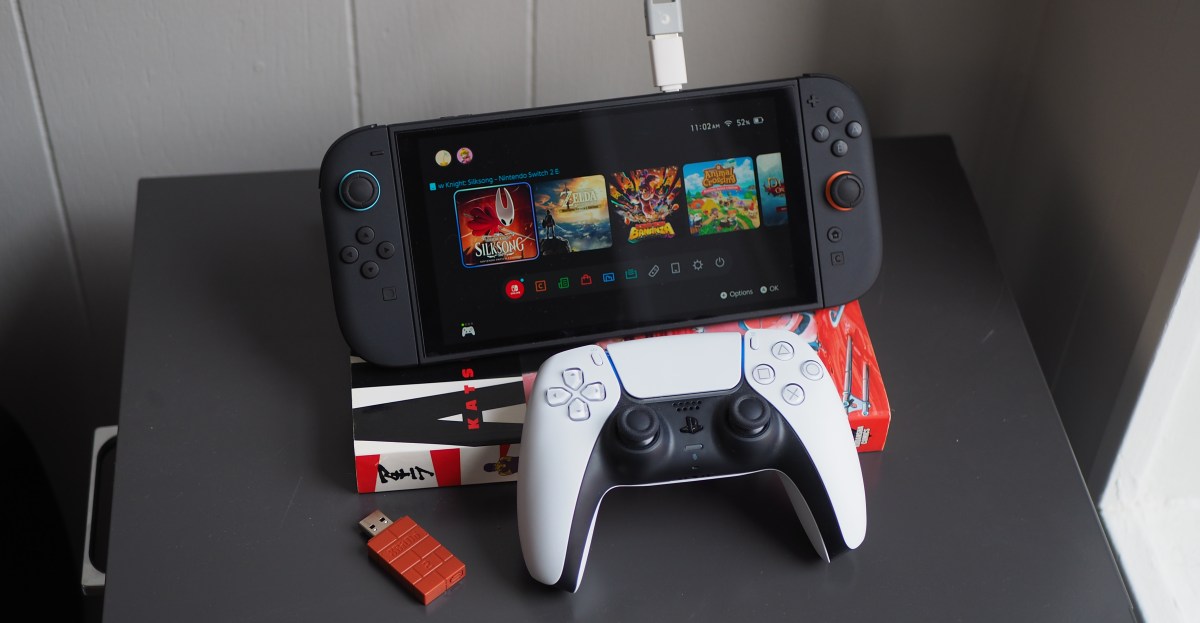
Dongles often carry a reputation for being inconvenient and expensive. However, for gamers, certain adapters defy this stereotype by offering practical and affordable solutions. One such device is 8BitDo’s $20 USB Adapter 2, which enables wireless connectivity for otherwise unsupported controllers on the Nintendo Switch 2. This includes popular options like the Sony DualSense, complete with rumble and motion controls, as well as recent Microsoft Xbox gamepads. The adapter can be plugged into the Switch 2’s dock or connected directly to the console using a USB-A-to-USB-C adapter.
Utilizing an existing controller instead of purchasing a new one can result in significant savings. The performance is often comparable, with motion controls feeling as precise as those from a native Switch controller, even when using a PS5 controller in games like Splatoon 3.
A similar, even more compact, and slightly cheaper alternative is the GuliKit Hyperlink Gen 2 USB-A adapter. Available for $16.99 on Amazon, this adapter is also included with GuliKit’s TT Pro and TT Max controllers. It supports Xbox, PlayStation 4, and PlayStation 5 controllers. Compatibility extends to the Nintendo Switch 2, PCs, Steam Deck, other handheld PCs, and Android devices. However, GuliKit’s list of supported controllers is not as extensive as 8BitDo’s, which includes older models from the PS3 and Wii eras, alongside its own range of wireless controllers.


GuliKit Hyperlink Gen 2 USB adapter
$17 at Amazon
It is important to note some limitations shared by both dongles. Neither adapter supports remote console wake-up, meaning the console must be manually turned on before pairing a controller. Wireless audio is also not supported, rendering the 3.5mm headphone jacks on DualSense and Xbox controllers unusable when connected via these dongles. Additionally, only one controller can be connected per dongle, requiring multiple adapters for multiplayer setups. While these are not necessarily deal-breakers, they are worth considering prior to purchase.
The 8BitDo dongle offers distinct advantages, primarily through its free Ultimate Software. This software allows extensive customization for various non-8BitDo controllers, including button remapping, macros, vibration intensity adjustments, trigger range settings, and stick sensitivity calibration. GuliKit currently lacks such software, though its PR manager indicated plans for Android and iOS apps with similar features in Q2 2026. Furthermore, the 8BitDo model supports button combinations to activate different connection modes, such as Xinput, Dinput, Mac mode, and Switch mode.
Conversely, the GuliKit adapter has its own strengths. In some games, such as Hollow Knight: Silksong, the rumble feedback provided by the GuliKit dongle feels more akin to the HD rumble found in high-quality Switch controllers. The 8BitDo adapter, in comparison, can make the rumble in this particular game feel less impactful. However, the quality of rumble effects can vary across different games and dongles. For instance, the intense rumble in Donkey Kong Bananza, even for minor movements, is reported to be poor on the DualSense regardless of the connected dongle.

These adapters are primarily designed for PCs or the Switch’s dock, rather than being USB-C by default.
GuliKit highlights the Hyperlink Gen 2’s PC-exclusive low-latency wireless connection as a key feature. This mode aims to increase the controller polling rate beyond console capabilities and reduce input latency. While the improved latency did not have a dramatically noticeable impact, the overall easy setup and enhanced connection were appreciated, a benefit shared by both dongles and many PC Bluetooth adapters.
For individuals who prefer to purchase new controllers guaranteed to perform optimally with their Switch 2, various options exist. However, for those looking to utilize existing hardware, these affordable dongles present a sensible solution.
