
Close Menu
    Latest Post

    Verifying 5G Standalone Activation on Your iPhone

    March 1, 2026

    Hands on: the Galaxy S26 and S26 Plus are more of the same for more money

    March 1, 2026

    IronCurtain: A Secure AI Agent Designed to Prevent Rogue Actions

    March 1, 2026
    Facebook X (Twitter) Instagram
    Trending
    • Verifying 5G Standalone Activation on Your iPhone
    • Hands on: the Galaxy S26 and S26 Plus are more of the same for more money
    • IronCurtain: A Secure AI Agent Designed to Prevent Rogue Actions
    • Kwasi Asare’s Entrepreneurial Journey: Risk, Reputation, and Resilience
    • The Rubin Observatory’s alert system sent 800,000 pings on its first night
    • GitHub Actions Now Supports Unzipped Artifact Uploads and Downloads
    • Project Genie: Experimenting with Infinite, Interactive Worlds
    • Text Generation Using Diffusion Models and ROI with LLMs
    Facebook X (Twitter) Instagram Pinterest Vimeo
    NodeTodayNodeToday
    • Home
    • AI
    • Dev
    • Guides
    • Products
    • Security
    • Startups
    • Tech
    • Tools
    NodeTodayNodeToday
    Home»Guides»Google Wallet Redesign: Navigating and Customizing Your Digital Cards
    Guides

    Google Wallet Redesign: Navigating and Customizing Your Digital Cards

    Samuel AlejandroBy Samuel AlejandroFebruary 1, 2026No Comments2 Mins Read
    Share Facebook Twitter Pinterest LinkedIn Tumblr Reddit Telegram Email
    src 1c83r0u featured
    Share
    Facebook Twitter LinkedIn Pinterest Email

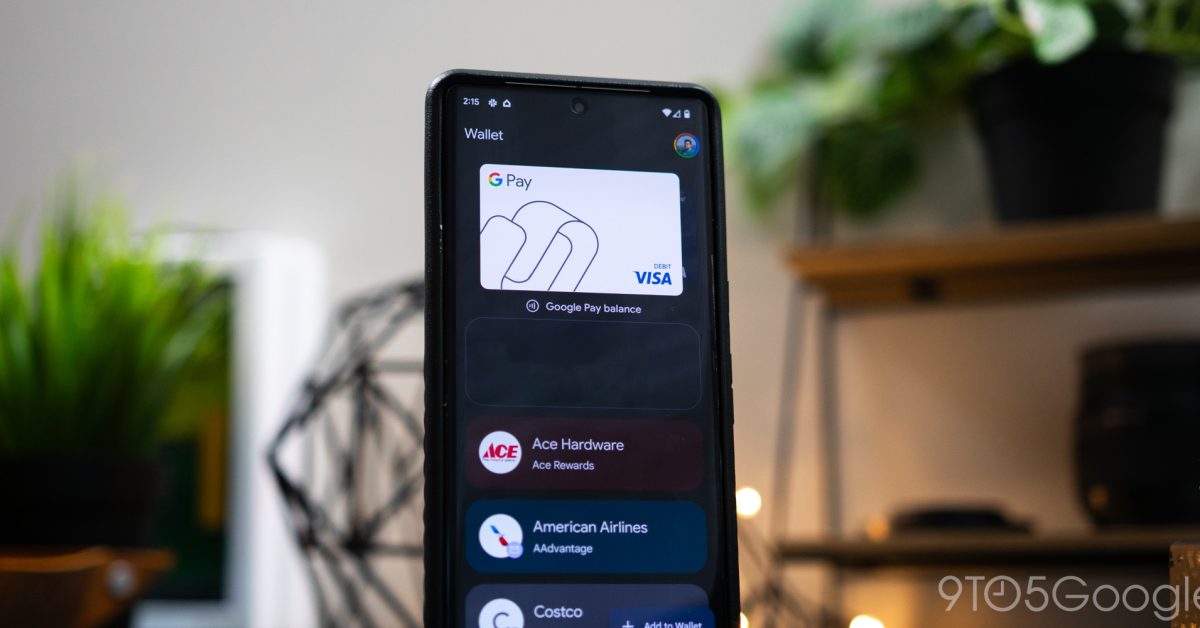
    Google Wallet recently rolled out a new design, bringing a fresh look and feel to how users interact with their payment cards, loyalty programs, and other digital passes. This update aims to streamline the user experience, making it easier to access and manage your essential items.

    Understanding the New Interface

    The updated Google Wallet features a cleaner, more intuitive layout. Upon opening the app, users will notice changes to how cards and passes are displayed. The primary focus is on quick access to your most frequently used items, with a clear visual hierarchy.

    Navigating through your various cards and passes is straightforward. The design emphasizes swiping between different items, allowing for quick transitions. Users can typically find their default payment method prominently displayed, with other cards and passes accessible through simple gestures.

    Image 1

    Customizing Your Cards and Passes

    One of the key aspects of the new Google Wallet design is the enhanced ability to customize your digital items. This includes reordering cards, setting a default payment method, and managing the visibility of certain passes.

    • Reordering Cards: To change the order of your cards, users can usually press and hold on a card and then drag it to the desired position. This allows for personalization, ensuring your most used cards are always within easy reach.
    • Setting a Default Payment: Designating a default payment card is crucial for quick transactions. Within the settings or card management section, there is typically an option to select which card should be used by default for tap-to-pay transactions.
    • Managing Passes: For loyalty cards, tickets, and other passes, the new design often provides clearer options for viewing details, archiving old passes, or removing them from your wallet. This helps keep your digital wallet clutter-free.

    Exploring the settings menu within the Google Wallet app is recommended to discover all available customization options. The goal of the redesign is to offer a more personalized and efficient experience for managing your digital essentials.

    Share. Facebook Twitter Pinterest LinkedIn Tumblr Email
    Previous ArticleThe latest Instax printer is a pricey but worthy upgrade
    Next Article DrP: Meta’s Root Cause Analysis Platform at Scale
    Samuel Alejandro

    Related Posts

    Guides

    Verifying 5G Standalone Activation on Your iPhone

    March 1, 2026
    Guides

    Modern PC hardware failure rates aren’t increasing, the expectations are just higher

    March 1, 2026
    Guides

    Android 17 Beta 2 Introduces Apple-Like Handoff and “Bubbles” Multitasking

    February 28, 2026
    Add A Comment
    Leave A Reply Cancel Reply

    Latest Post

    ChatGPT Mobile App Surpasses $3 Billion in Consumer Spending

    December 21, 202517 Views

    Automate Your iPhone’s Always-On Display for Better Battery Life and Privacy

    December 21, 202515 Views

    Creator Tayla Cannon Lands $1.1M Investment for Rebuildr PT Software

    December 21, 202514 Views
    Stay In Touch
    • Facebook
    • YouTube
    • TikTok
    • WhatsApp
    • Twitter
    • Instagram
    About

    Welcome to NodeToday, your trusted source for the latest updates in Technology, Artificial Intelligence, and Innovation. We are dedicated to delivering accurate, timely, and insightful content that helps readers stay ahead in a fast-evolving digital world.

    At NodeToday, we cover everything from AI breakthroughs and emerging technologies to product launches, software tools, developer news, and practical guides. Our goal is to simplify complex topics and present them in a clear, engaging, and easy-to-understand way for tech enthusiasts, professionals, and beginners alike.

    Latest Post

    Verifying 5G Standalone Activation on Your iPhone

    March 1, 20264 Views

    Hands on: the Galaxy S26 and S26 Plus are more of the same for more money

    March 1, 20265 Views

    IronCurtain: A Secure AI Agent Designed to Prevent Rogue Actions

    March 1, 20264 Views
    Recent Posts
    • Verifying 5G Standalone Activation on Your iPhone
    • Hands on: the Galaxy S26 and S26 Plus are more of the same for more money
    • IronCurtain: A Secure AI Agent Designed to Prevent Rogue Actions
    • Kwasi Asare’s Entrepreneurial Journey: Risk, Reputation, and Resilience
    • The Rubin Observatory’s alert system sent 800,000 pings on its first night
    Facebook X (Twitter) Instagram Pinterest
    • About Us
    • Contact Us
    • Privacy Policy
    • Terms & Conditions
    • Disclaimer
    • Cookie Policy
    © 2026 NodeToday.

    Type above and press Enter to search. Press Esc to cancel.