
Close Menu
    Latest Post

    Verifying 5G Standalone Activation on Your iPhone

    March 1, 2026

    Hands on: the Galaxy S26 and S26 Plus are more of the same for more money

    March 1, 2026

    IronCurtain: A Secure AI Agent Designed to Prevent Rogue Actions

    March 1, 2026
    Facebook X (Twitter) Instagram
    Trending
    • Verifying 5G Standalone Activation on Your iPhone
    • Hands on: the Galaxy S26 and S26 Plus are more of the same for more money
    • IronCurtain: A Secure AI Agent Designed to Prevent Rogue Actions
    • Kwasi Asare’s Entrepreneurial Journey: Risk, Reputation, and Resilience
    • The Rubin Observatory’s alert system sent 800,000 pings on its first night
    • GitHub Actions Now Supports Unzipped Artifact Uploads and Downloads
    • Project Genie: Experimenting with Infinite, Interactive Worlds
    • Text Generation Using Diffusion Models and ROI with LLMs
    Facebook X (Twitter) Instagram Pinterest Vimeo
    NodeTodayNodeToday
    • Home
    • AI
    • Dev
    • Guides
    • Products
    • Security
    • Startups
    • Tech
    • Tools
    NodeTodayNodeToday
    Home»Tools»Firefox Enhancements: Private Web Translations and Customizable App Icons
    Tools

    Firefox Enhancements: Private Web Translations and Customizable App Icons

    Samuel AlejandroBy Samuel AlejandroDecember 21, 2025Updated:December 22, 2025No Comments3 Mins Read
    Share Facebook Twitter Pinterest LinkedIn Tumblr Reddit Telegram Email
    src 1hvck2u featured
    Share
    Facebook Twitter LinkedIn Pinterest Email

    A stylized graphic showing a smartphone screen in the background with three square icons in front of it. The left icon is purple with a translation symbol, the middle icon is orange with the Firefox logo, and the right icon is teal with a geometric snowflake-like symbol. The background features a dark grid pattern with soft gradients and small star-like sparkles.Firefoxcalendar

    Firefox aims to provide a browsing experience that aligns with individual preferences and language needs. Recent updates introduce features developed from community suggestions and user feedback, designed to make everyday browsing more enjoyable.

    These new additions include on-device translations for iOS, customizable app icons for Android, and an optional search feature powered by Perplexity.

    On-Device Web Translation for iOS

    Encountering a webpage in an unfamiliar language can be frustrating. Previously, iOS users lacked a private, integrated translation option within Firefox. This capability is now available.

    Translations began rolling out in German, French, and Japanese, with Spanish and Portuguese added recently, and more languages planned for future release.

    This translation feature stands out because it leverages extensive research and operates entirely on the user’s device.

    Unlike many browsers that send page content to external servers for translation, Firefox performs all translation processes locally on the smartphone.

    This approach ensures:

    • Content remains on the device.
    • No data is logged or stored.
    • Offline translation is possible once the language model is downloaded.

    Developing on-device translation presents challenges due to mobile device memory and battery constraints. Engineers developed efficient algorithms to translate only the necessary content, rather than an entire page simultaneously.

    This initiative highlights a broader commitment to integrating privacy by default into features, rather than as an afterthought.

    How it works

    When Firefox identifies a webpage in a language different from the device’s settings, a translation icon appears in the toolbar. The page will then be translated into the language configured on the device.
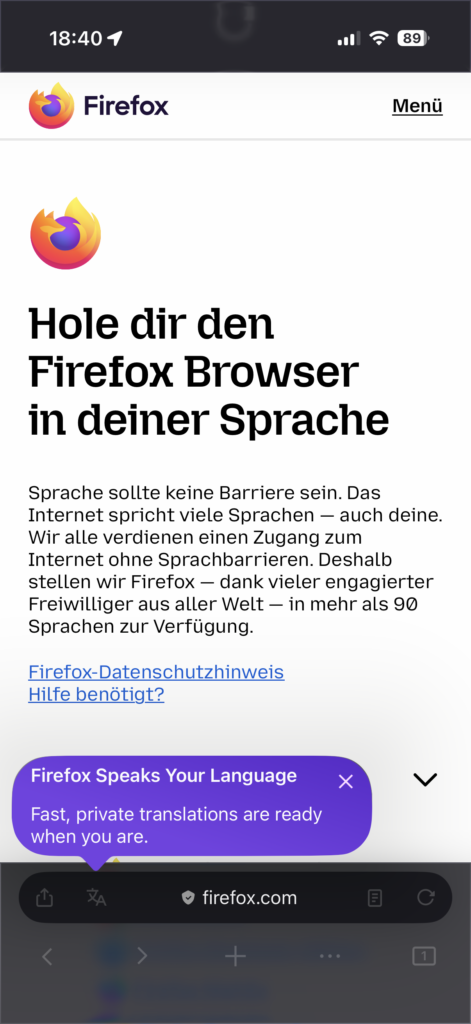
    Image 3Translation icon appears in the toolbar

    Customize Your Firefox Icon – Now on Android

    The ability to choose a custom icon on iOS, released earlier this year, proved to be a popular way for users to personalize Firefox. Users appreciated selecting an icon that reflected their personal style, whether bold, classic, or whimsical.

    This customization option is now available for Android users.

    Personalize Your Home Screen

    Android users can access this feature by navigating to: Settings → Customize → App Icon. A selection of Firefox styles is available, including Momo, a cheerful fox embracing the Earth. Momo’s significance extends beyond its visual appeal to its unique origin story.
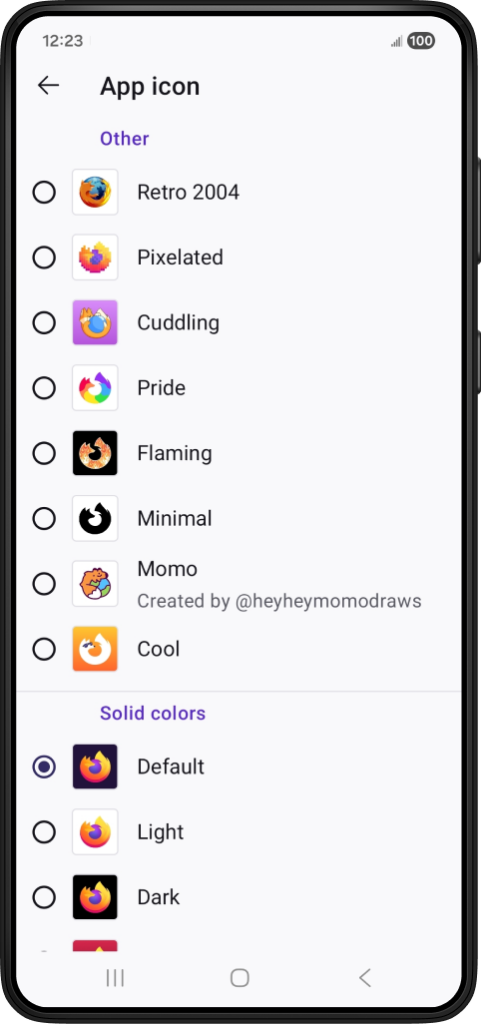
    Image 4Momo is just one of the many icons to choose from in Firefox mobile

    Momo began as a quick sketch by Dutch illustrator Ruud Hendriks (@heyheymomodraws). Its lively character resonated with the Firefox team, evoking a sense of nostalgia reminiscent of Firefox’s original logo. This doodle has since become the first community-created Firefox app icon.

    Ruud’s creation illustrates how some of the most engaging product features can originate from simple, authentic ideas shared by the community.

    An interview with Ruud details how his sketch transformed into an icon embraced by Firefox users globally.

    A New Search Option: Perplexity

    Search functionality should offer flexibility, adapting to individual user needs. In a previous release, Perplexity, an AI-powered answer engine, was introduced as an optional search tool for mobile users.

    Perplexity delivers conversational answers with accompanying citations, streamlining the process of obtaining quick summaries without needing to browse numerous pages. Users retain control over when and if they choose to utilize this feature.

    Perplexity is integrated into the search bar and is available worldwide. Perplexity adheres to strict policies prohibiting the sale or sharing of personal data.

    This addition provides another choice for Firefox users, aligning with a commitment to user values.

    Designed for Daily Browsing

    From translating web content on the go to customizing the home screen or exploring new search methods, these updates aim to make Firefox a more personalized experience for each user.

    Many of these concepts, including the Momo icon, originated from the Firefox community itself, involving artists, contributors, testers, and curious users who collectively envision the browser’s potential.

    Share. Facebook Twitter Pinterest LinkedIn Tumblr Email
    Previous ArticleSeventh-generation server hardware at Dropbox: our most efficient and capable architecture yet
    Next Article Enhancing Firefox Security with Snapshot Fuzzing for IPC
    Samuel Alejandro

    Related Posts

    Guides

    Verifying 5G Standalone Activation on Your iPhone

    March 1, 2026
    Products

    Hands on: the Galaxy S26 and S26 Plus are more of the same for more money

    March 1, 2026
    Tools

    GitHub Actions Now Supports Unzipped Artifact Uploads and Downloads

    March 1, 2026
    Add A Comment
    Leave A Reply Cancel Reply

    Latest Post

    ChatGPT Mobile App Surpasses $3 Billion in Consumer Spending

    December 21, 202517 Views

    Automate Your iPhone’s Always-On Display for Better Battery Life and Privacy

    December 21, 202515 Views

    Creator Tayla Cannon Lands $1.1M Investment for Rebuildr PT Software

    December 21, 202514 Views
    Stay In Touch
    • Facebook
    • YouTube
    • TikTok
    • WhatsApp
    • Twitter
    • Instagram
    About

    Welcome to NodeToday, your trusted source for the latest updates in Technology, Artificial Intelligence, and Innovation. We are dedicated to delivering accurate, timely, and insightful content that helps readers stay ahead in a fast-evolving digital world.

    At NodeToday, we cover everything from AI breakthroughs and emerging technologies to product launches, software tools, developer news, and practical guides. Our goal is to simplify complex topics and present them in a clear, engaging, and easy-to-understand way for tech enthusiasts, professionals, and beginners alike.

    Latest Post

    Verifying 5G Standalone Activation on Your iPhone

    March 1, 20264 Views

    Hands on: the Galaxy S26 and S26 Plus are more of the same for more money

    March 1, 20265 Views

    IronCurtain: A Secure AI Agent Designed to Prevent Rogue Actions

    March 1, 20264 Views
    Recent Posts
    • Verifying 5G Standalone Activation on Your iPhone
    • Hands on: the Galaxy S26 and S26 Plus are more of the same for more money
    • IronCurtain: A Secure AI Agent Designed to Prevent Rogue Actions
    • Kwasi Asare’s Entrepreneurial Journey: Risk, Reputation, and Resilience
    • The Rubin Observatory’s alert system sent 800,000 pings on its first night
    Facebook X (Twitter) Instagram Pinterest
    • About Us
    • Contact Us
    • Privacy Policy
    • Terms & Conditions
    • Disclaimer
    • Cookie Policy
    © 2026 NodeToday.

    Type above and press Enter to search. Press Esc to cancel.