

Close Menu
    Latest Post

    Enhanced Search Suggestions in Firefox

    January 12, 2026

    Biologists Treat LLMs Like Aliens to Uncover Their Secrets

    January 12, 2026

    Behind the Scenes: Developing the Question Assistant

    January 12, 2026
    Facebook X (Twitter) Instagram
    Trending
    • Enhanced Search Suggestions in Firefox
    • Biologists Treat LLMs Like Aliens to Uncover Their Secrets
    • Behind the Scenes: Developing the Question Assistant
    • Was Windows 8 Really That Bad? A Revisit 13 Years Later
    • Lenovo’s New Rollable Concept Could Be the Ideal Gaming Laptop
    • Dems pressure Google, Apple to drop X app as international regulators turn up heat
    • Go Katas: Production-Grade Challenges for Experienced Developers
    • TikTok Removes AI Weight Loss Ads from Fake Boots Account
    Facebook X (Twitter) Instagram Pinterest Vimeo
    NodeTodayNodeToday
    • Home
    • AI
    • Dev
    • Guides
    • Products
    • Security
    • Startups
    • Tech
    • Tools
    NodeTodayNodeToday
    Home»Tools»Enhanced Search Suggestions in Firefox
    Tools

    Enhanced Search Suggestions in Firefox

    Samuel AlejandroBy Samuel AlejandroJanuary 12, 2026No Comments4 Mins Read
    Share Facebook Twitter Pinterest LinkedIn Tumblr Reddit Telegram Email
    src 1bi7e3e featured
    Share
    Facebook Twitter LinkedIn Pinterest Email

    Firefox

    calendar

    A new feature is under development to present direct results within the address bar as a user types. This aims to allow users to bypass traditional search results pages and quickly reach the desired website or information.

    Most major browsers currently offer “search suggestions.” This functionality provides real-time search recommendations from the user’s selected search engine while typing in the address bar.
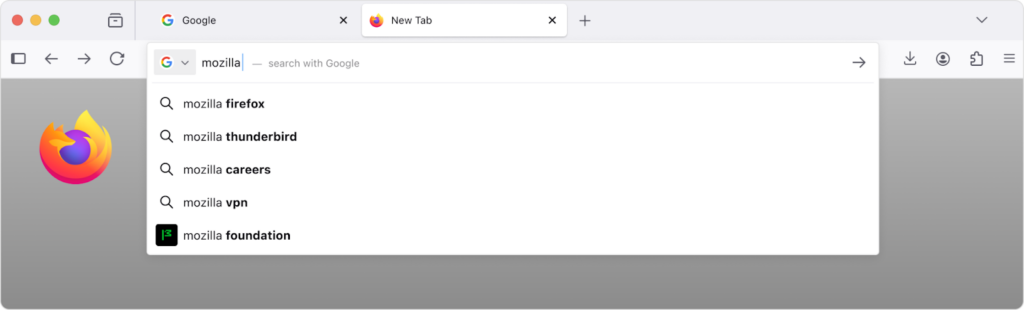
    A Firefox browser window with a gray gradient background. The Google search bar shows “mozilla.” Google suggestions below include “mozilla firefox,” “mozilla thunderbird,” “mozilla careers,” “mozilla vpn,” and “mozilla foundation.”

    While helpful, these suggestions typically direct users to a search engine results page, which may not be the ultimate destination or information sought. This approach benefits the search provider more than the user.

    For instance, although flight status summaries on a search results page are useful, displaying this information directly in the address bar would offer greater convenience:
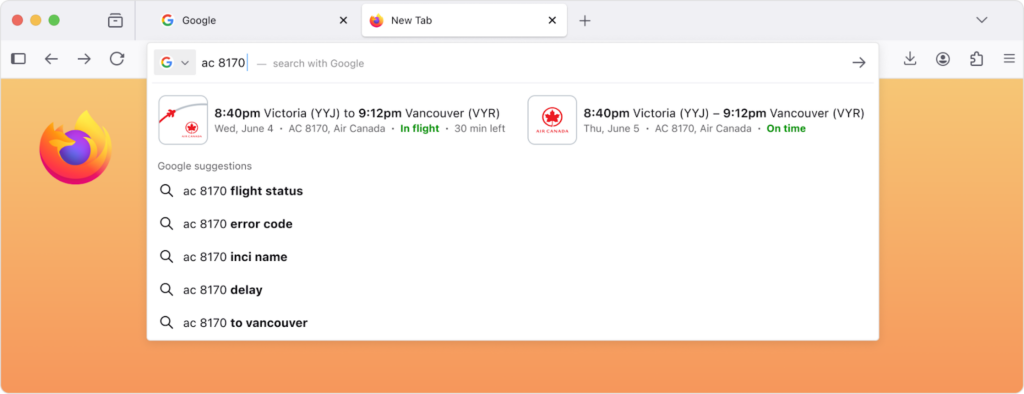
    A Firefox browser window with an orange gradient background. The Google search bar shows “ac 8170.” The result displays an Air Canada flight from Victoria (YYJ) to Vancouver (YVR), showing departure and arrival times and that it’s “In flight” or “On time.”

    Similarly, users often search for websites when the precise URL is unknown or forgotten. The goal is to eliminate the need for an intermediate search.
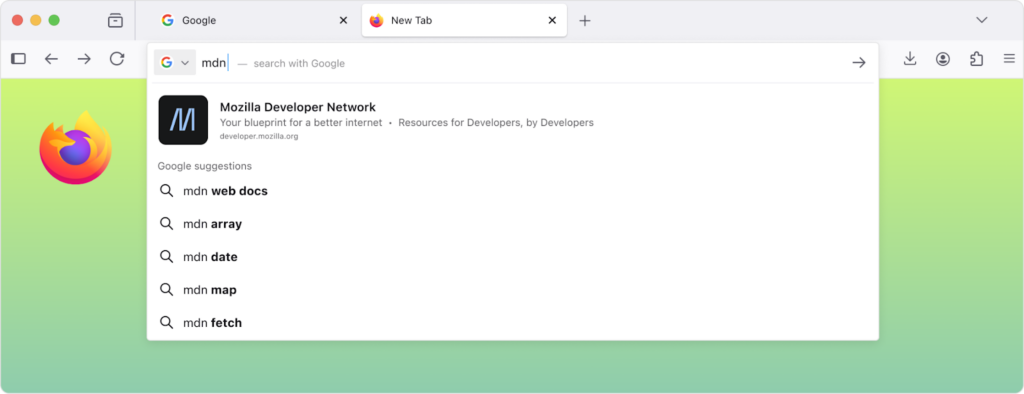
    A Firefox browser window with a green gradient background. The Google search bar shows “mdn.” Below, the top result is “Mozilla Developer Network — Your blueprint for a better internet,” with Google suggestions like “mdn web docs,” “mdn array,” and “mdn fetch.”

    Another frequent scenario involves searching for recommendations, where Firefox can present highly relevant results sourced from various online platforms:
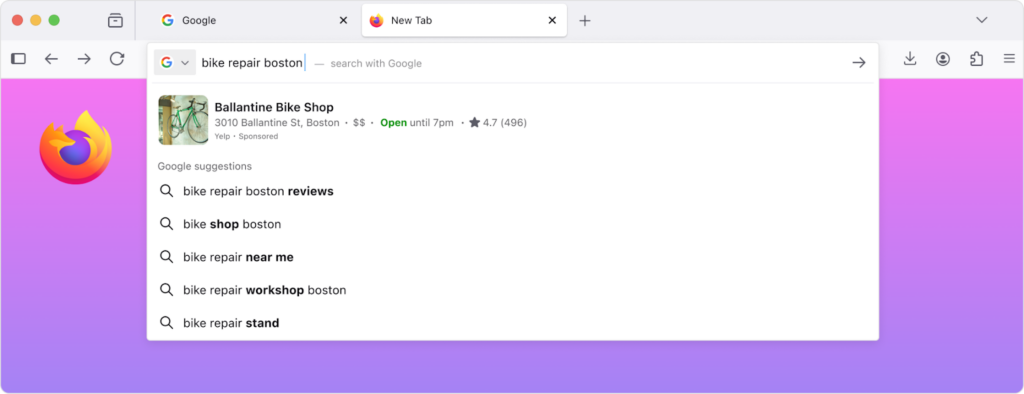
    A Firefox browser window with a gradient pink-to-purple background. The Google search bar shows the query “bike repair boston.” Below it, Google suggestions and a featured result for “Ballantine Bike Shop” appear, showing address, rating, and hours.

    Currently, browser address bars primarily serve as a gateway to search engines. While search engines are valuable, a single, centralized source for all online discovery does not align with the desired functioning of the web. Firefox maintains its independence, and its address bar reflects this principle.

    This concept was explored years ago but not released, due to stringent privacy standards. No design was deemed satisfactory if it involved sending raw queries directly. Although queries are already sent to search engines, Firefox operates on the principle that even its developers should not be able to ascertain user online activity. Unlike many search engines, there is no desire to know individual search patterns, and the aim is to allow global verification that such knowledge is unattainable.

    The necessary technical architecture is now in place to meet these standards. When Firefox requests suggestions, it encrypts the query using Oblivious HTTP, a newly developed protocol. The encrypted request is routed through a relay operated by Fastly, which can identify the IP address but not the query text. The text is visible to Mozilla, but not its origin. This allows for direct result delivery or retrieval from a specialized search service. Consequently, no single entity can link a user’s input to their identity.

    A simple black-and-white diagram with three rounded rectangles labeled “Firefox,” “Relay (Operated by Fastly),” and “Mozilla.” Double arrows connect them, showing a two-way flow between Firefox ↔ Relay ↔ Mozilla.

    Firefox will maintain traditional search suggestions for all queries, introducing direct results only when there is high confidence in their relevance to user intent. Similar to search engines, some results might be sponsored to support Firefox, but only if they are highly pertinent, and neither the browser developer nor the sponsor will know the recipient. This approach is anticipated to benefit users and potentially foster a more balanced web by enabling direct collaboration with independent sites, rather than solely relying on search engines for web discovery.

    Implementing this at scale presents challenges, requiring significant capacity to manage query volume and servers located near users to prevent noticeable latency. To ensure a smooth experience, the rollout will commence in the United States, with expansion to other regions considered after evaluating performance and user feedback. The feature remains under development and testing, with a gradual rollout planned over the next year.

    An experimental version was previously released, which users could activate in settings, alongside a limited set of locally-matched suggestions in certain areas. However, the experimental version lacked sufficient reach to justify further feature development, and the local suggestions suffered from poor relevance and utility due to technical constraints, particularly the size of the local database.

    Where this feature is available, it can be disabled by unchecking “Retrieve suggestions as you type” within the “Search” pane of Firefox settings. If this option is not present in a user’s current Firefox version, it can be preemptively disabled by setting browser.urlbar.quicksuggest.online.enabled to false in about:config.

    Share. Facebook Twitter Pinterest LinkedIn Tumblr Email
    Previous ArticleBiologists Treat LLMs Like Aliens to Uncover Their Secrets
    Samuel Alejandro

    Related Posts

    Tools

    Control who can request apps for your organization now in public preview

    January 12, 2026
    Tools

    Zoomer: Boosting AI Performance at Scale Through Intelligent Debugging and Optimization

    January 11, 2026
    Tools

    Owning AI: Mozilla’s Strategy for an Open-Source Future

    January 10, 2026
    Add A Comment
    Leave A Reply Cancel Reply

    Latest Post

    ChatGPT Mobile App Surpasses $3 Billion in Consumer Spending

    December 21, 202512 Views

    Automate Your iPhone’s Always-On Display for Better Battery Life and Privacy

    December 21, 202510 Views

    Creator Tayla Cannon Lands $1.1M Investment for Rebuildr PT Software

    December 21, 20259 Views
    Stay In Touch
    • Facebook
    • YouTube
    • TikTok
    • WhatsApp
    • Twitter
    • Instagram
    About

    Welcome to NodeToday, your trusted source for the latest updates in Technology, Artificial Intelligence, and Innovation. We are dedicated to delivering accurate, timely, and insightful content that helps readers stay ahead in a fast-evolving digital world.

    At NodeToday, we cover everything from AI breakthroughs and emerging technologies to product launches, software tools, developer news, and practical guides. Our goal is to simplify complex topics and present them in a clear, engaging, and easy-to-understand way for tech enthusiasts, professionals, and beginners alike.

    Latest Post

    Enhanced Search Suggestions in Firefox

    January 12, 20260 Views

    Biologists Treat LLMs Like Aliens to Uncover Their Secrets

    January 12, 20260 Views

    Behind the Scenes: Developing the Question Assistant

    January 12, 20260 Views
    Recent Posts
    • Enhanced Search Suggestions in Firefox
    • Biologists Treat LLMs Like Aliens to Uncover Their Secrets
    • Behind the Scenes: Developing the Question Assistant
    • Was Windows 8 Really That Bad? A Revisit 13 Years Later
    • Lenovo’s New Rollable Concept Could Be the Ideal Gaming Laptop
    Facebook X (Twitter) Instagram Pinterest
    • About Us
    • Contact Us
    • Privacy Policy
    • Terms & Conditions
    • Disclaimer
    • Cookie Policy
    © 2026 NodeToday.

    Type above and press Enter to search. Press Esc to cancel.