



Initially, the idea of creating a VS Code theme seemed like a significant undertaking. However, developing a custom theme proved to be a surprisingly quick process, with the core functionality established in under six hours and final refinements taking just a couple of days.
This article outlines the journey of building such a theme, detailing the steps involved and the progression from initial hesitation to a completed project in a short timeframe. The remaining effort primarily focused on polishing the design.

The Unexpected Path to Theme Creation
The motivation for a custom VS Code theme arose during a website redesign project. The previous design, which had been in place for years, was finally being updated.

For code snippets in the old design, the Dracula Theme was utilized, providing a necessary splash of color against an otherwise minimalist aesthetic.
However, this theme did not integrate effectively with the new site’s design.

The primary goal was to enhance syntax highlighting for code blocks, ensuring better visual alignment with the overall website aesthetic. This specific need ultimately led to the theme development.
Simplifying Theming with Shiki and CSS Variables
The website utilizes Astro, which includes Shiki as its default syntax highlighter. Shiki supports theme creation using CSS variables, requiring the selection of only a few key colors.

This approach seemed straightforward, leading to the use of AI to develop a Shiki theme based on existing CSS variables. The necessary CSS and JavaScript for Astro users are provided below:
:root {
  --shiki-foreground: #eeeeee;
  --shiki-background: #333333;
  --shiki-token-constant: #660000;
  --shiki-token-string: #770000;
  --shiki-token-comment: #880000;
  --shiki-token-keyword: #990000;
  --shiki-token-parameter: #aa0000;
  --shiki-token-function: #bb0000;
  --shiki-token-string-expression: #cc0000;
  --shiki-token-punctuation: #dd0000;
  --shiki-token-link: #ee0000;
}

pre.shiki,
pre.astro-code {
  padding: 1rem;
  border-radius: 0.5rem;
  color: var(--shiki-foreground);
  background-color: var(--shiki-background);
  overflow-x: auto;
}

pre.shiki code,
pre.astro-code code {
  padding: 0;
  font-size: inherit;
  line-height: inherit;
  color: inherit;
  background: none;
}
import { createCssVariablesTheme } from 'shiki/core'
const shikiVariableTheme = createCssVariablesTheme({
name: 'css-variables',
variablePrefix: '--shiki-',
fontStyle: true,
})
export default defineConfig ({
// ...
markdown: {
shikiConfig: {
theme: shikiVariableTheme
}
}
})An initial experiment involved applying colors from the website’s palette and comparing them against popular themes such as Dracula, Sarah Drasner’s Night Owl, and Moonlight 2.
This comparison boosted confidence in the theme’s potential, as the syntax highlighting showed promising results. However, to achieve greater precision, it became necessary to move beyond CSS variable theming and explore TextMate tokens. This transition was crucial for addressing problematic code blocks and gaining finer control over color application, marking the beginning of a more complex phase.
Leveraging AI for TextMate Scopes
AI proved invaluable during this stage, potentially preventing abandonment of the project. The AI was tasked with several key actions:
- Declaring the intent to create a custom theme.
- Requesting the generation of a theme scaffold.
- Instructing it to reference Moonlight 2’s theme files to create TextMate scope tokens.
The AI was also directed to consolidate colors into semantic keywords (e.g., foreground, background, keyword), mirroring the Shiki CSS variable theme structure. Additionally, it was asked to organize all colors into a palette object containing only these semantic names.
An approximation of the AI’s output is shown below:
const colors = {
  purple: '...',
  blue: '...',
  // ...
}

const palette = {
  foreground: '...',
  background: '...',
  // ...
}

export default {
  colors: {
    // Used for theming the text editor
  },
  displayName: 'Display Name of your Theme',
  name: 'your-theme-name',
  tokenColors: [
    {
      name: 'Scope name (optional)',
      scope: [/*scopes used*/],
      settings: {
        foreground: /* change color */,
        background: /* background of the text */,
        fontStyle: /* normal, bold or italic */,
      }
    }
  ]
}
Since VS Code requires JSON for configuration, the AI also generated a build script to convert the described format into a .json file.
The build script and all related resources are available in the GitHub Repo.
Local Debugging Strategies
Debugging syntax highlighting directly on the website proved impractical due to the need for manual server restarts after each variable change. Seeking a more efficient solution, AI was consulted.
The AI suggested utilizing VS Code’s Extension Host for local development and subsequently generated a .vscode/launch.json file with the following configuration:
{
  "version": "0.2.0",
  "configurations": [
    {
      "name": "Extension",
      "type": "extensionHost",
      "request": "launch",
      "args": [
        "--extensionDevelopmentPath=${workspaceFolder}"
      ]
    }
  ]
}
To activate this, pressing F5 (Windows) or Fn + F5 (Mac) will launch a new editor window. Within this window, the custom theme can be selected and applied.
Identifying an Extension Host window is straightforward:
- Its theme will differ from other open text editors if a custom theme is active.
- The phrase “Extension Host” is clearly visible in the window’s title bar.

It is worth noting that the following entry might be required in the package.json file for theme switching to function correctly within the extension host. If needed, include it:
{
  "contributes": {
    "themes": [
      {
        "label": "Your Theme Name",
        "uiTheme": "vs-dark",
        "path": "<path-to-your-theme>.json"
      }
    ]
  }
}
Demystifying TextMate Scopes
Initially, attempts to adjust tokens by providing images to AI proved frustrating. The challenge lay in determining whether the AI incorrectly identified the TextMate scope or if an existing rule overwrote the intended change.
Fortunately, TextMate scopes can be debugged effectively using the “Developer: Inspector Editor Tokens and Scopes” command. Activating this mode allows clicking on any text to reveal a window containing all necessary information for scope adjustments.

Interpreting the displayed information:
- Foreground: Indicates the currently active scope (e.g., “variable”).
- TextMate scopes: Lists all available TextMate scopes applicable to the selected token.
TextMate scopes operate with specific rules, which were deduced through experimentation:
- Partial Scope Usage: Any segment of the available scopes can be used (e.g.,
variable,variable.prop, andvariable.prop.cssare all valid). - Specificity Enhancement: Adding more properties increases specificity (e.g.,
variable.prop.cssis more specific thanvariable.prop, which is more specific thanvariable). - Hierarchical Specificity: A higher scope is generally more specific than a lower one (e.g.,
variableis more specific thanmeta.function.misc.css). - CSS-like Selectors: Other scopes can be combined, similar to CSS selectors, to override higher specificity rules (e.g.,
meta.function variablecan overridevariable).
Strategic Color Selection for Themes
Color choice is paramount in theme design, as effective syntax highlighting directly impacts code readability for developers.
Key insights were drawn from two influential articles:
- “Creating a VS Code Theme” by Sarah Drasner
- “Everyone is getting syntax highlighting wrong” by Tonsky
The core principles derived from these resources include:
- Highlights should be distinct.
- Colors with similar lightness and chroma can be difficult to differentiate.
- Over-highlighting diminishes the impact of all highlights.
- If every element is deemed important, none truly stand out.
These points underscore the importance of the principle of contrast in design. When designing for readability, the following questions guided the color selection process:
- How can visual flow be guided?
- Which elements are crucial for immediate recognition?
- Which elements are of secondary importance?
Based on these considerations, the color scheme was developed:
- Functions and methods were assigned cyan, the strongest color in the palette, due to their significance.
- The
exportkeyword was also highlighted for its importance. - Keywords such as
importandfunctionwere given a more subdued purple. - Strings were colored green, appearing visually pleasing within text lists, particularly in JSON files.
 Without green text, this might be difficult to read.
Further refinement of the color palette led to these decisions:
- Constants were colored orange for easy identification.
- Variables were kept in a white-ish tone, as they constitute the majority of text, and excessive coloring would lead to a cluttered appearance, as described by Tonsky.
- Properties received a blue hue, providing necessary differentiation without drawing excessive attention.

For HTML/Astro/Svelte syntax, the following choices were made:
- Tags were colored red, signifying their importance and offering better readability than cyan in this context.
- Attributes were assigned purple, similar to keywords.
- Components were colored orange to distinguish them from Tags.
- The relationship between Tags and Components made the red and orange combination feel appropriate.

Finally, for CSS syntax highlighting, most elements aligned well, with a few specific adjustments:
- CSS Functions were set to cyan, consistent with JavaScript functions.
- Punctuation was muted to clearly separate elements like
--from surrounding text. - Properties were colored green, as blue appeared too dull, and green provided a pleasant contrast with other powerful colors.
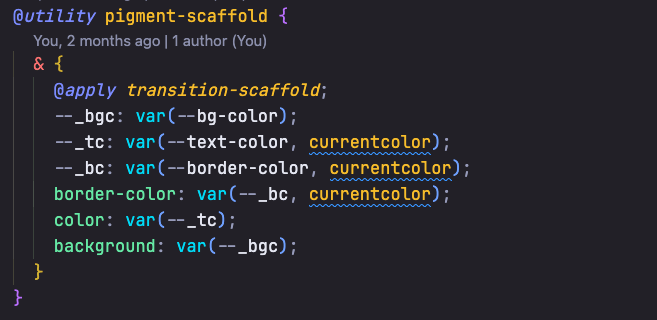
A minor inconsistency was observed where nested classes appeared green instead of orange, but this was an unresolvable limitation.

Debugging Theme Colors
Given that VS Code is built on Electron, debugging and testing colors is straightforward. This involved opening developer tools, inspecting the desired color, and making direct changes for live updates.
Conclusion
A key insight from this process is the value of an iterative approach. What initially appears impossible can quickly become achievable, with one step leading to another, culminating in a completed project within a surprisingly short timeframe.
The resulting theme, named Twilight Cosmos (with AI assistance for naming), is available on multiple platforms:
- Visual Studio Marketplace for VS Code users.
- Open VSX for users of Cursor and other compatible editors.
- npm for those integrating with Shiki.
The GitHub repository is also available for those interested in exploring or building upon the theme’s foundation.
