


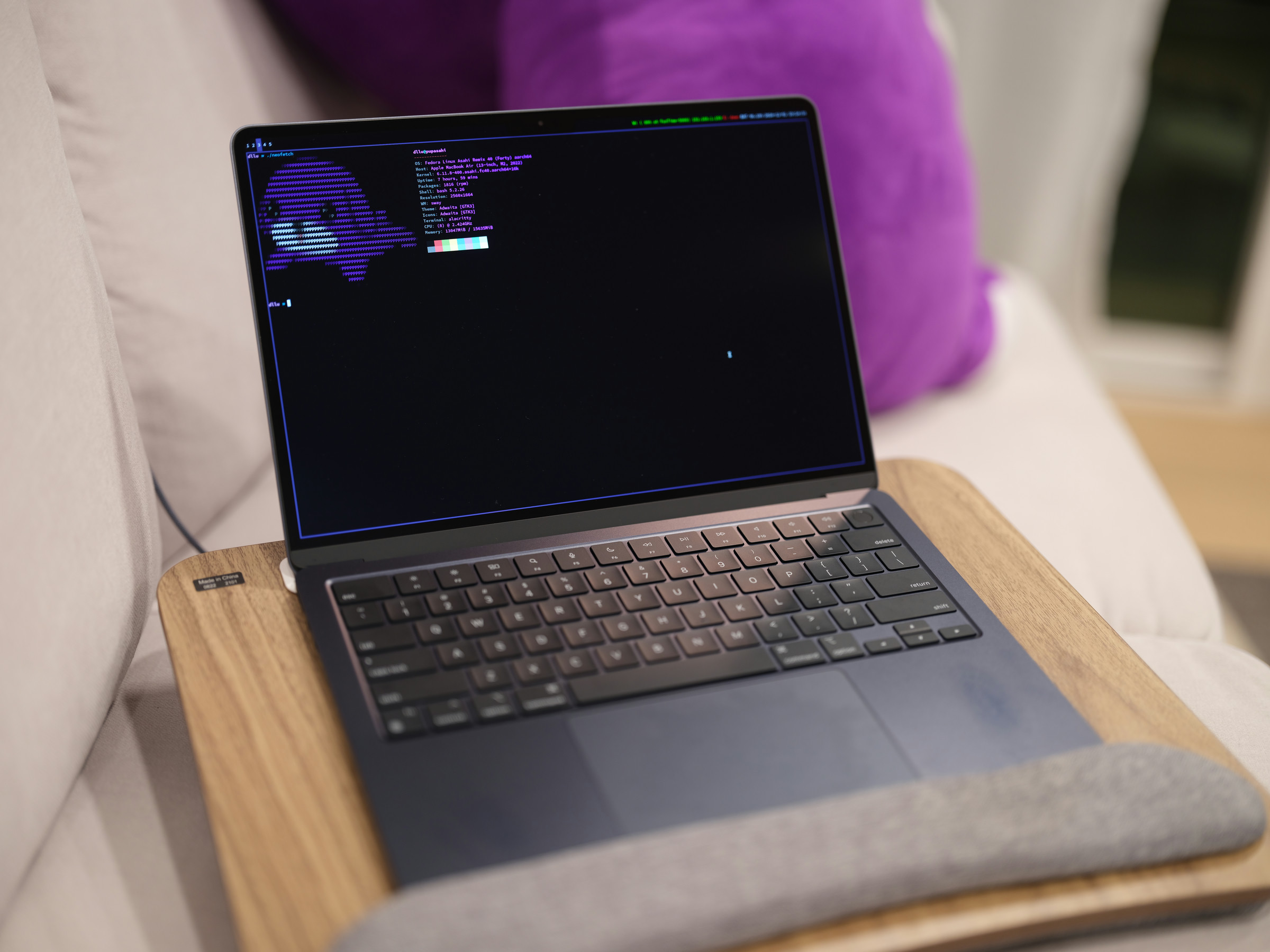
A MacBook Air M2 was acquired. This model, featuring 16 GB RAM, a 256 GB SSD, and a 13.6” display, is currently available at an affordable price of $750. It is important to note that Asahi Linux currently supports up to the M2 chip, with newer models not yet compatible.
 A MacBook Air M2.
Previous computing setups included:
- A 2011 MacBook Air 13.3” with Intel Core i5 1.8 GHz, 8 GB of RAM, and 256 GB SSD running Arch Linux with i3.
- A 2014 Dell XPS 13 Developer Edition (Ubuntu 14.04 with i3).
- A 2018 Lenovo Thinkpad X1 Carbon Gen 6 (Intel Core i7 8640U, 16 GB of RAM, 1 TB SSD) running Arch Linux with Sway.
Installing Asahi Linux
Installation of Asahi Linux is streamlined via a single command line instruction executed in the Terminal. The process was effective, though copying root.img and boot.img at 150 KB/s extended the duration significantly.
To optimize for the Sway Window Manager and conserve storage, a minimal Fedora installation was chosen.
Getting Set Up
Wireless connectivity was established using the following command:
nmcli device wifi list
nmcli device wifi connect 'my_ssid' password 'mypassword'
Subsequently, essential packages were installed:
sudo dnf install @sway-desktop-environment fish alacritty rofi ruff rclone pavucontrol-qt i3status mako pass syncthing maim xdg-user-dirs firefox rustup openssl-devel ncdu fd-find neovim
Configuration files were then retrieved from a personal dotfile repository and initialized. Adjustments were necessary to adapt these configurations for the MacBook, with updates pushed to the repository.
Customizing for MacBook
Initially, the screen area encompassing the notch is disabled, resulting in a prominent bezel appearance. Utilizing this display space effectively was a priority.
The screen area around the notch was re-enabled using:
grubby --args=apple_dcp.show_notch=1 --update-kernel=ALL
The Sway bar was then positioned at the top of the screen to create a unified look, with useful information displayed on the left and right, and the central notch area remaining black. Through testing, the notch was determined to be 56px in height.
bar {
    position top
    status_command i3status
    modifier $mod
    tray_output primary
    # the height of the m2 macbook air's notch???
    height 56
    colors {
        background #000000
        statusline #cfcfd9
        separator #000000
        # border background text
        focused_workspace #0c0c0c #413459 #cfcfd9
        active_workspace #0c0c0c #413459 #cfcfd9
        inactive_workspace #0c0c0c #0c0c0c #cfcfd9
        urgent_workspace #2f343a #ff3300 #ffffff
    }
}
The default i3status configuration presented too much information, potentially obscured by the notch, and lacked native support for MacBook battery levels. Configuration adjustments were made:
general {
        colors = true
        interval = 5
}

order += "wireless _first_"
order += "ethernet _first_"
order += "battery 0"
order += "tztime local"

wireless _first_ {
        format_up = "W: (%quality at %essid) %ip"
        format_down = "W: down"
}

ethernet _first_ {
        format_up = "E: %ip (%speed)"
        format_down = "E: down"
}

battery 0 {
        format = "%status %percentage"
        hide_seconds = true
        path = /sys/class/power_supply/macsmc-battery/uevent
}

tztime local {
        format = "%Y-%m-%d %H:%M:%S"
}
A top-positioned bar, similar to macOS, can hinder mouse interaction with elements like browser tabs. To address this, the mouse cursor was prevented from entering the top bar area:
# use swaymsg -t get_inputs for the touchpad's identifier
input 1452:849:Apple_MTP_multi-touch map_to_region 0 56 2560 1608
Using Waybar Instead
Around September 2025, a transition was made from the default Swaybar to Waybar. This change was prompted by issues encountered with swaymsg’s battery level reporting and a desire for a visual refresh. Waybar offers a slight saving in screen real estate through the use of icons, though its graphical rendering can make it marginally slower than Swaybar. Waybar remains positioned behind the notch.
The updated Waybar configuration and CSS files are available at waybarconfig and waybarstyle.
 Screenshot demonstrating Waybar.
Using it as a Daily Driver
Asahi Linux demonstrates impressive smoothness and reliability. Its responsiveness is notable, feeling even more fluid than an Arch Linux desktop equipped with a 16-core AMD Ryzen 7945HX and 64GB of RAM.
The touchpad performance is exceptionally good, comparable to native macOS. Mouse cursor movement and two-finger scrolling with inertia feel remarkably natural, surpassing the experience on a previous Thinkpad X1 Carbon.
A primary motivation for acquiring the laptop was its intended use for line scan photography. The Alkeria SDK for ARM64 was successfully installed, despite being a .deb package rather than an .rpm. Attempts to use alien were unsuccessful, possibly due to architectural naming conventions (arm64 vs. aarch64 in Fedora), leading to the use of bsdtar for direct extraction into the filesystem root. The M2 chip provides rapid code compilation.
Under conditions of high screen brightness and extensive code compilation, the battery life observed was approximately 4.5 hours (from 100% to 60%). While not matching the 15 hours typically seen on macOS, this performance is still considered respectable.
However, the system is not without its imperfections. Noted issues include:
- Increased battery drain during sleep, often necessitating a full shutdown when not in use.
- Absence of hardware acceleration for video decoding.
- Minor quirks related to USB ports and external display functionality.
Overall, the experience remains quite satisfactory.
