


The Amazon Kindle Scribe Colorsoft, priced at $630, presents an intriguing proposition for those seeking an E Ink display with front lighting and color, a pressure-sensitive stylus, and the ability to annotate ebooks without the distractions of typical apps. For a niche audience, this device could bridge the gap between an iPad, a traditional journal, and a regular e-reader.
However, for many, the high price point of $629.99 might lead them to prefer a combination of a standard e-reader, like a Kindle Paperwhite, and an analog notebook.


Amazon Kindle Scribe Colorsoft: Key Features
The Colorsoft’s hardware is generally excellent, provided users are comfortable with the inherent limitations of E Ink technology. These limitations include some pixelation, less vibrant colors, and minor ghosting after page refreshes, though Amazon has worked to minimize this. The device boasts superb battery life, often lasting a week without needing a charge. The included Premium Pen stylus offers a surprisingly pleasant writing experience, even for individuals with extensive collections of traditional writing instruments.
Pros:
- Super light and thin design
- Excellent battery life
- Responsive stylus performance
- Minimal screen ghosting
- Color display capabilities
Cons:
- High price point
- Potentially too large for convenient commuting
- Finicky annotation process
- Tightly integrated with Amazon’s ecosystem
While the device is extremely light and thin, weighing 14.1 ounces and measuring 5.4mm, its 11-inch display makes it less ideal for portability in smaller bags. This size can also make one-handed reading awkward, especially without a case or grip. The Premium Pen, despite its magnetic attachment, can be easily misplaced when on the go.
The Colorsoft is better suited for use at home or in an office setting, such as when reading on a couch or reviewing documents at a desk.
 The stylus provides a pleasant experience, though it may not fully replicate the feel of traditional pens and pencils.
The inclusion of color in the Colorsoft is most beneficial for users who color-code notes, sketch, or read comics and graphic novels. Otherwise, color is primarily limited to screensavers and book covers. For those who utilize color, the experience is somewhat mixed.
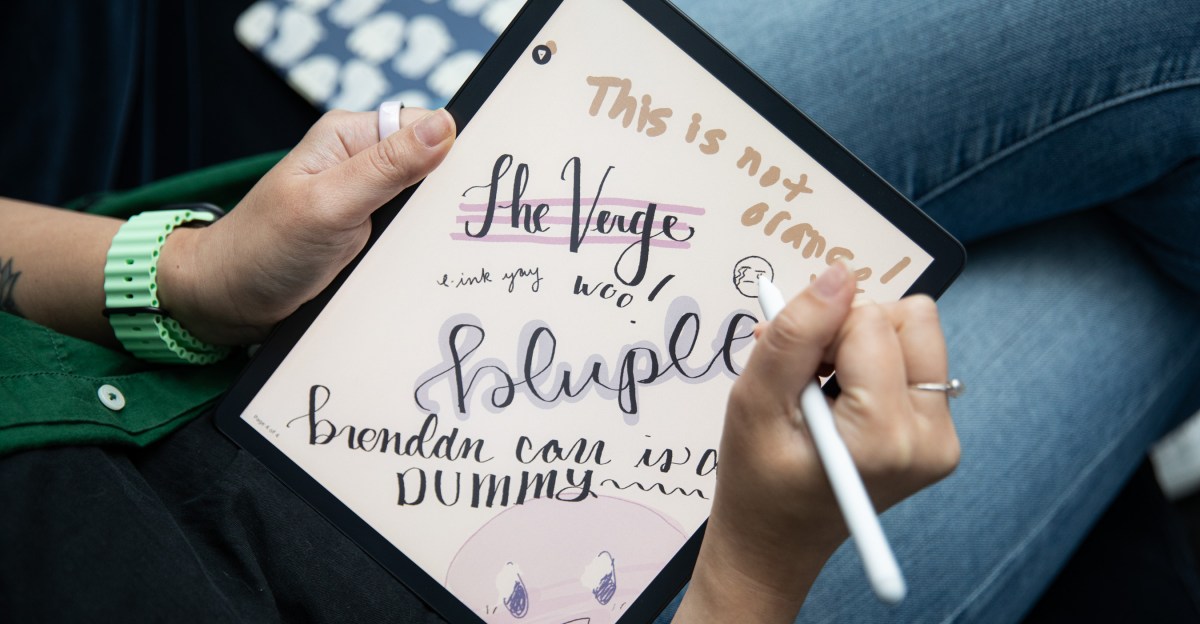
Reading comics in color on an E Ink display is a novel experience. However, E Ink colors are inherently muted due to current technological constraints. For example, an orange highlighter might appear more brown. This can give content a charming, newspaper-like aesthetic but may not be ideal for modern graphic novels with bold art styles. Similarly, for drawing, the device is suitable for rough pencil sketches or doodling, but its limited color options make it less versatile than an analog sketchbook with markers or a dedicated art tablet. You can watch our
for a deeper dive into E Ink color technology.
 The Kindle Scribe Colorsoft (left) is significantly larger than a Paperwhite (right), impacting one-handed reading.
 The device is notably thin at 5.4mm.
 Colors can appear vibrant on cover art and screensavers in photos…
 …but are generally more muted in person.
Color proved most useful for annotation. When reading, it allowed for the use of different colored highlights to categorize themes, facts for further research, or impactful passages. This capability is particularly appealing for those who enjoy color-coding in bullet journals or notebooks, offering a digital replication of that organizational style.
Unfortunately, the Colorsoft may not fully replace analog notebooks. The tactile control offered by traditional pencils, markers, and erasers still surpasses that of the digital stylus. Furthermore, the device’s integration within Amazon’s ecosystem is a significant factor.
Annotating Kindle books is straightforward and enjoyable. However, working with other documents is less seamless. Amazon’s Send to Kindle portal, while fast, subjects documents to Amazon’s terms and conditions. This means documents are considered “information provided to Amazon” and could be used for recommendations, advertising, and personalization. While integration with Google Drive, Microsoft OneDrive, and Microsoft OneNote is available, these also fall under their respective terms in addition to Amazon’s. For sensitive or classified documents, this presents a security concern. Sideloading files is an option, but it highlights the need to navigate Amazon’s proprietary system.
Importing files is simple, but exporting them creates a new file rather than syncing changes via the cloud, potentially leading to disorganized file management. While Kindle books offer comprehensive annotation features, these are not consistently available for all document types. For instance, standard PDFs do not support Amazon’s Active Canvas feature, which enables in-line writing. An AI summarization and search function is available for personal notes but is absent for documents, which could be particularly useful for lengthy contracts or reports.


 Notes taken on the Colorsoft are serviceable, though handwriting often appears neater on physical paper.
These limitations, while not insurmountable, add to the challenges of justifying the Colorsoft’s premium price.
The ideal user for the Kindle Scribe Colorsoft is likely a dedicated annotator who needs to consolidate numerous paper documents. This individual would appreciate the E Ink color limitations as a feature, not a drawback. They would be comfortable with the stylus, take relatively simple notes, accept Amazon’s terms for document handling, and not prioritize extreme portability. Book reading might be a secondary use case. This could include manuscript editors, lawyers, researchers, professors, or minimalist bullet-journaling bookworms.
For such users, the Kindle Scribe Colorsoft could be an excellent tool. For others, the search for the perfect digital notebook may continue.
Terms and Conditions: Amazon Kindle Scribe Colorsoft
Modern smart devices typically require users to agree to various terms and conditions. While these agreements are rarely read in full, it is important to note the number of mandatory agreements for device usage.
Upon initial use, the Kindle Scribe requires connection to an Amazon account. This setup involves Amazon receiving email, billing address, and credit card information for content purchases. Connecting Google Drive, Microsoft OneNote, or Microsoft OneDrive accounts also implies consent to their respective terms and policies, in addition to Amazon’s third-party integration terms. Users must also agree to the following terms:
- Amazon’s Kindle Store Terms of Use
- Amazon’s Amazon.com Conditions of Use
- Amazon’s Amazon.com Privacy Notice
- Amazon’s Amazon Device Terms of Use
- Amazon’s Amazon Photos Terms of Use
- Amazon’s Audible Conditions of Use
- Amazon’s Kindle Personal Documents Distributor Terms of Use
- Amazon’s Alexa Terms of Use
- Amazon’s Kindle Unlimited Terms of Use (if purchased)
- Amazon Prime Terms & Conditions
- Amazon Kids+ Terms & Conditions
In total, there are 11 mandatory agreements to use the Kindle Scribe.
