





Firefox aims to provide a browsing experience that aligns with individual preferences and language needs. Recent updates introduce features developed from community suggestions and user feedback, designed to make everyday browsing more enjoyable.
These new additions include on-device translations for iOS, customizable app icons for Android, and an optional search feature powered by Perplexity.
On-Device Web Translation for iOS
Encountering a webpage in an unfamiliar language can be frustrating. Previously, iOS users lacked a private, integrated translation option within Firefox. This capability is now available.
Translations began rolling out in German, French, and Japanese, with Spanish and Portuguese added recently, and more languages planned for future release.
This translation feature stands out because it leverages extensive research and operates entirely on the user’s device.
Unlike many browsers that send page content to external servers for translation, Firefox performs all translation processes locally on the smartphone.
This approach ensures:
- Content remains on the device.
- No data is logged or stored.
- Offline translation is possible once the language model is downloaded.
Developing on-device translation presents challenges due to mobile device memory and battery constraints. Engineers developed efficient algorithms to translate only the necessary content, rather than an entire page simultaneously.
This initiative highlights a broader commitment to integrating privacy by default into features, rather than as an afterthought.
How it works
When Firefox identifies a webpage in a language different from the device’s settings, a translation icon appears in the toolbar. The page will then be translated into the language configured on the device.
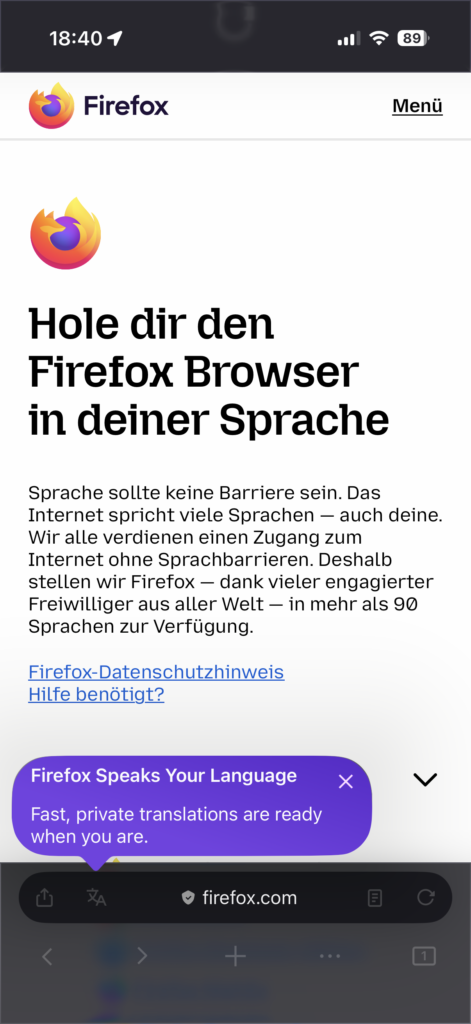 Translation icon appears in the toolbar
Customize Your Firefox Icon – Now on Android
The ability to choose a custom icon on iOS, released earlier this year, proved to be a popular way for users to personalize Firefox. Users appreciated selecting an icon that reflected their personal style, whether bold, classic, or whimsical.
This customization option is now available for Android users.
Personalize Your Home Screen
Android users can access this feature by navigating to: Settings → Customize → App Icon. A selection of Firefox styles is available, including Momo, a cheerful fox embracing the Earth. Momo’s significance extends beyond its visual appeal to its unique origin story.
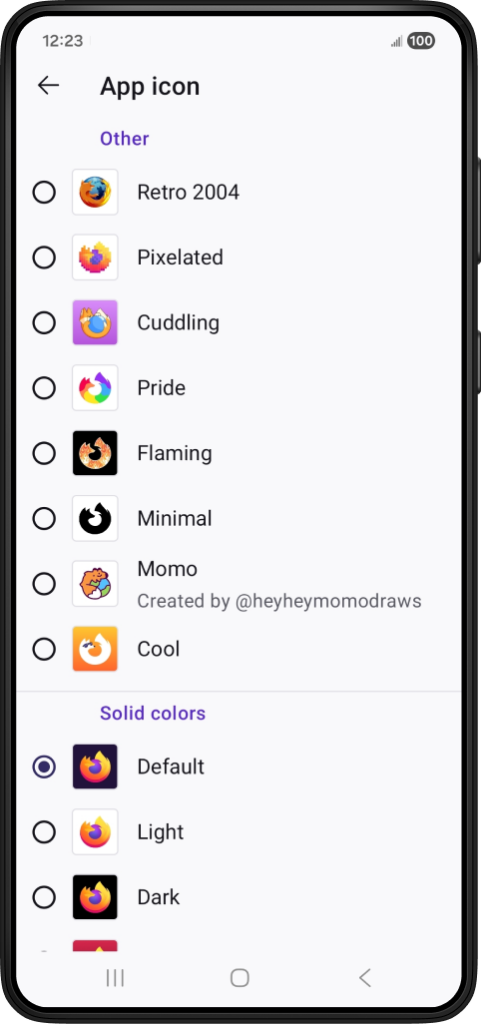 Momo is just one of the many icons to choose from in Firefox mobile
Momo began as a quick sketch by Dutch illustrator Ruud Hendriks (@heyheymomodraws). Its lively character resonated with the Firefox team, evoking a sense of nostalgia reminiscent of Firefox’s original logo. This doodle has since become the first community-created Firefox app icon.
Ruud’s creation illustrates how some of the most engaging product features can originate from simple, authentic ideas shared by the community.
An interview with Ruud details how his sketch transformed into an icon embraced by Firefox users globally.
A New Search Option: Perplexity
Search functionality should offer flexibility, adapting to individual user needs. In a previous release, Perplexity, an AI-powered answer engine, was introduced as an optional search tool for mobile users.
Perplexity delivers conversational answers with accompanying citations, streamlining the process of obtaining quick summaries without needing to browse numerous pages. Users retain control over when and if they choose to utilize this feature.
Perplexity is integrated into the search bar and is available worldwide. Perplexity adheres to strict policies prohibiting the sale or sharing of personal data.
This addition provides another choice for Firefox users, aligning with a commitment to user values.
Designed for Daily Browsing
From translating web content on the go to customizing the home screen or exploring new search methods, these updates aim to make Firefox a more personalized experience for each user.
Many of these concepts, including the Momo icon, originated from the Firefox community itself, involving artists, contributors, testers, and curious users who collectively envision the browser’s potential.
