
Close Menu
    Latest Post

    Verifying 5G Standalone Activation on Your iPhone

    March 1, 2026

    Hands on: the Galaxy S26 and S26 Plus are more of the same for more money

    March 1, 2026

    IronCurtain: A Secure AI Agent Designed to Prevent Rogue Actions

    March 1, 2026
    Facebook X (Twitter) Instagram
    Trending
    • Verifying 5G Standalone Activation on Your iPhone
    • Hands on: the Galaxy S26 and S26 Plus are more of the same for more money
    • IronCurtain: A Secure AI Agent Designed to Prevent Rogue Actions
    • Kwasi Asare’s Entrepreneurial Journey: Risk, Reputation, and Resilience
    • The Rubin Observatory’s alert system sent 800,000 pings on its first night
    • GitHub Actions Now Supports Unzipped Artifact Uploads and Downloads
    • Project Genie: Experimenting with Infinite, Interactive Worlds
    • Text Generation Using Diffusion Models and ROI with LLMs
    Facebook X (Twitter) Instagram Pinterest Vimeo
    NodeTodayNodeToday
    • Home
    • AI
    • Dev
    • Guides
    • Products
    • Security
    • Startups
    • Tech
    • Tools
    NodeTodayNodeToday
    Home»Guides»Android 17 Beta 2 Introduces Apple-Like Handoff and “Bubbles” Multitasking
    Guides

    Android 17 Beta 2 Introduces Apple-Like Handoff and “Bubbles” Multitasking

    Samuel AlejandroBy Samuel AlejandroFebruary 28, 2026No Comments3 Mins Read
    Share Facebook Twitter Pinterest LinkedIn Tumblr Reddit Telegram Email
    src 12oajv5 featured
    Share
    Facebook Twitter LinkedIn Pinterest Email

    HTG Android 17 logo

    Google has quickly followed up the initial Android 17 beta release with a second update, offering a clearer view of upcoming features for phones and tablets. This latest beta introduces notable enhancements to multitasking capabilities.

    Android 17 Beta 2 is now accessible for the Android SDK and specific Google Pixel devices, building on the first beta released on February 18. A significant new feature is “Bubbles,” a windowing mode designed for phones, foldables, and tablets. Users can create app bubbles by long-pressing an app in the launcher, allowing these windows to be freely moved across the screen, similar to desktop applications.

    This “Bubbles” feature is particularly beneficial for foldables and tablets, especially those with a bottom-screen taskbar. A dedicated holding area within the taskbar allows for organizing and switching between various app bubbles. This functionality resembles macOS menu bar utilities or Windows taskbar status icons, but it encapsulates the entire application within the movable popup window.
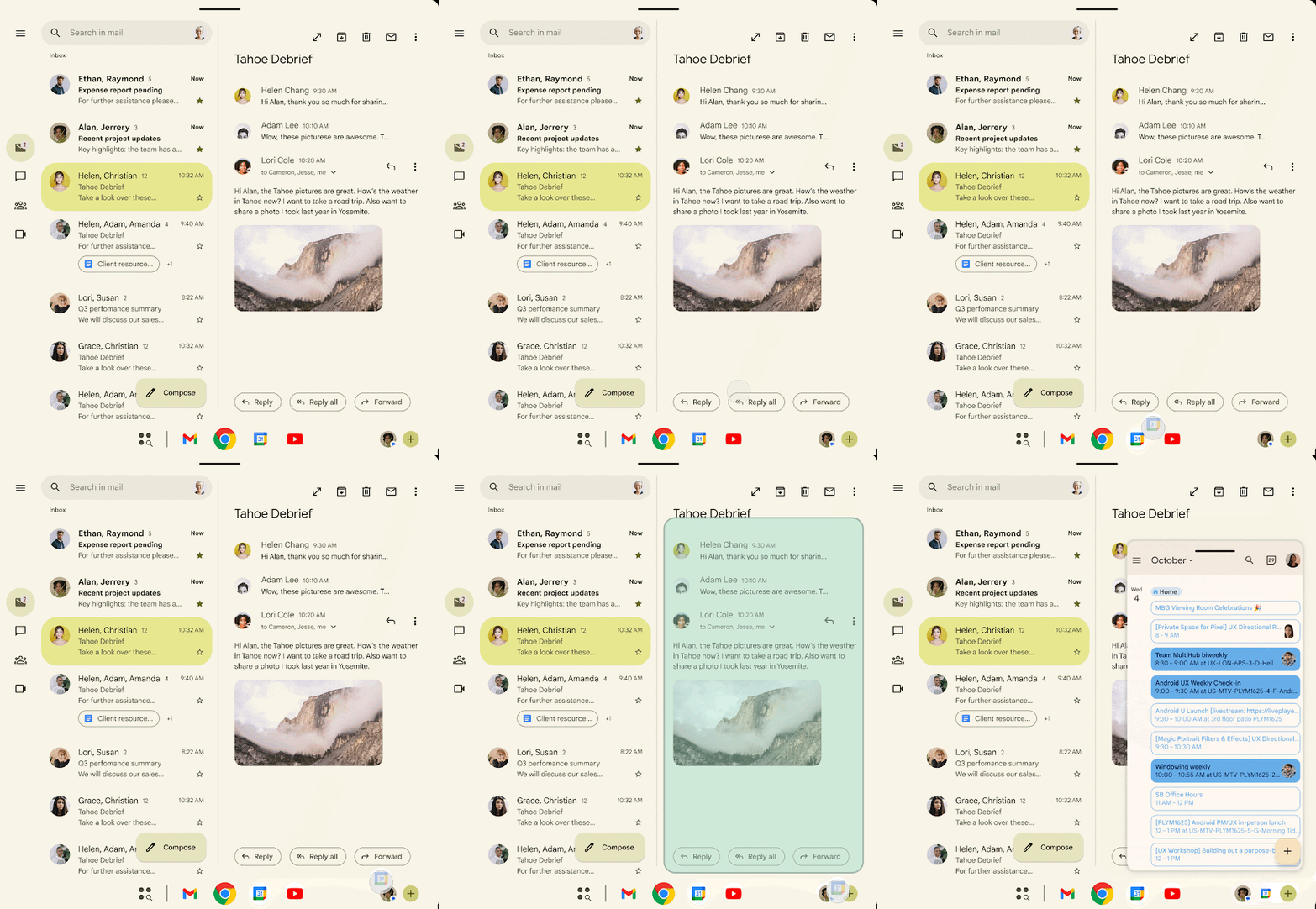
    Adding Google Calendar to the Android taskbar as a Bubble

    It is important to note that this new mode is distinct from the existing messaging bubbles. It supports any application that offers reasonable multi-window compatibility, presenting the full app within the popup.

    Another addition in Android 17 Beta 2 is a new Handoff API. This API enables the seamless continuation of an application’s state on a different device, either through the same app or its web counterpart. Handoff suggestions will appear in the launcher on other devices. For instance, an email open in Gmail on a phone might prompt a suggestion to open that same email on a tablet’s home screen or taskbar.

    This functionality closely resembles Apple’s Handoff feature, which facilitates task transfers between Mac, iPhone, iPad, and Apple Watch. The introduction of similar cross-device workflow enhancements to Android is a positive development, though the extent of app support remains to be seen.

    In a blog post, Google clarified that this feature aims to provide “seamless task continuity,” allowing users to resume their work precisely where they left off across their Android devices. Handoff supports both native app-to-app transitions and app-to-web fallback, ensuring flexibility and a complete experience even if the native application is not installed on the target device.

    Additional features and APIs in the beta include an eye dropper tool for apps that does not require full screen access, improved touchpad support, Unicode 17 compatibility, and a new permission for local network access. A new system-level contacts picker is also present, allowing apps to request specific contact information without needing broader contacts permission.

    Users can enroll a compatible Google Pixel device in the beta program to experience Android 17, or download the device image for the Android SDK emulator. The official release is anticipated in the second quarter of 2026.

    Source: Android Developers Blog

    Share. Facebook Twitter Pinterest LinkedIn Tumblr Email
    Previous ArticleTCL’s $7,000+ flagship TV is ready to fight
    Next Article RCCLX: Innovating GPU Communications on AMD Platforms
    Samuel Alejandro

    Related Posts

    Guides

    Verifying 5G Standalone Activation on Your iPhone

    March 1, 2026
    Guides

    Modern PC hardware failure rates aren’t increasing, the expectations are just higher

    March 1, 2026
    Guides

    How to Add or Remove a Yelp Review

    February 27, 2026
    Add A Comment
    Leave A Reply Cancel Reply

    Latest Post

    ChatGPT Mobile App Surpasses $3 Billion in Consumer Spending

    December 21, 202517 Views

    Automate Your iPhone’s Always-On Display for Better Battery Life and Privacy

    December 21, 202515 Views

    Creator Tayla Cannon Lands $1.1M Investment for Rebuildr PT Software

    December 21, 202514 Views
    Stay In Touch
    • Facebook
    • YouTube
    • TikTok
    • WhatsApp
    • Twitter
    • Instagram
    About

    Welcome to NodeToday, your trusted source for the latest updates in Technology, Artificial Intelligence, and Innovation. We are dedicated to delivering accurate, timely, and insightful content that helps readers stay ahead in a fast-evolving digital world.

    At NodeToday, we cover everything from AI breakthroughs and emerging technologies to product launches, software tools, developer news, and practical guides. Our goal is to simplify complex topics and present them in a clear, engaging, and easy-to-understand way for tech enthusiasts, professionals, and beginners alike.

    Latest Post

    Verifying 5G Standalone Activation on Your iPhone

    March 1, 20264 Views

    Hands on: the Galaxy S26 and S26 Plus are more of the same for more money

    March 1, 20265 Views

    IronCurtain: A Secure AI Agent Designed to Prevent Rogue Actions

    March 1, 20264 Views
    Recent Posts
    • Verifying 5G Standalone Activation on Your iPhone
    • Hands on: the Galaxy S26 and S26 Plus are more of the same for more money
    • IronCurtain: A Secure AI Agent Designed to Prevent Rogue Actions
    • Kwasi Asare’s Entrepreneurial Journey: Risk, Reputation, and Resilience
    • The Rubin Observatory’s alert system sent 800,000 pings on its first night
    Facebook X (Twitter) Instagram Pinterest
    • About Us
    • Contact Us
    • Privacy Policy
    • Terms & Conditions
    • Disclaimer
    • Cookie Policy
    © 2026 NodeToday.

    Type above and press Enter to search. Press Esc to cancel.