
Close Menu
    Latest Post

    Verifying 5G Standalone Activation on Your iPhone

    March 1, 2026

    Hands on: the Galaxy S26 and S26 Plus are more of the same for more money

    March 1, 2026

    IronCurtain: A Secure AI Agent Designed to Prevent Rogue Actions

    March 1, 2026
    Facebook X (Twitter) Instagram
    Trending
    • Verifying 5G Standalone Activation on Your iPhone
    • Hands on: the Galaxy S26 and S26 Plus are more of the same for more money
    • IronCurtain: A Secure AI Agent Designed to Prevent Rogue Actions
    • Kwasi Asare’s Entrepreneurial Journey: Risk, Reputation, and Resilience
    • The Rubin Observatory’s alert system sent 800,000 pings on its first night
    • GitHub Actions Now Supports Unzipped Artifact Uploads and Downloads
    • Project Genie: Experimenting with Infinite, Interactive Worlds
    • Text Generation Using Diffusion Models and ROI with LLMs
    Facebook X (Twitter) Instagram Pinterest Vimeo
    NodeTodayNodeToday
    • Home
    • AI
    • Dev
    • Guides
    • Products
    • Security
    • Startups
    • Tech
    • Tools
    NodeTodayNodeToday
    Home»Tools»Claude and Codex Now Available for Copilot Business & Pro Users
    Tools

    Claude and Codex Now Available for Copilot Business & Pro Users

    Samuel AlejandroBy Samuel AlejandroFebruary 27, 2026No Comments2 Mins Read
    Share Facebook Twitter Pinterest LinkedIn Tumblr Reddit Telegram Email
    src 7xwywc featured
    Share
    Facebook Twitter LinkedIn Pinterest Email

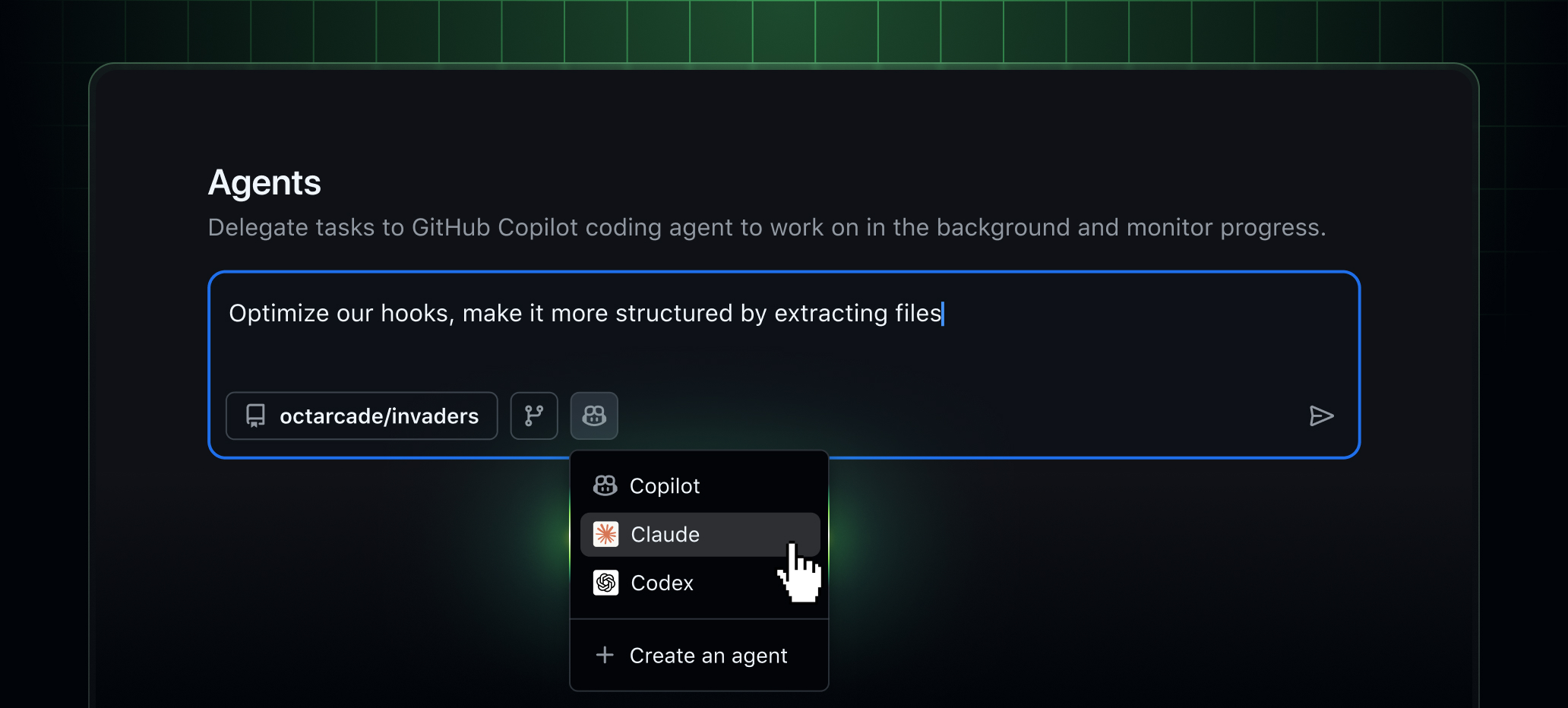
    Illustration of Claude and Codex coding agents in GitHub Copilot

    Claude by Anthropic and OpenAI Codex are now available as coding agents for Copilot Business and Copilot Pro customers. Copilot Enterprise and Pro+ customers previously gained access this month, and availability is now extended to additional teams.

    Claude, Codex, and Copilot can be run directly inside github.com, GitHub Mobile, and VS Code, all within existing GitHub workflows.

    Users can review code on the web, triage issues on mobile, or iterate in the editor, remaining within GitHub while utilizing the same agents across different interfaces with shared history and context.

    No additional subscriptions are required. Access to Claude and Codex is fully included with an existing Copilot subscription.

    Each coding agent session consumes one premium request during public preview.

    One shared platform for all your agents

    Claude, Codex, and Copilot run on a single shared platform inside GitHub with unified governance, shared context, and shared memory.

    Agents operate with access to:

    • Repository code and history
    • Issues and pull requests
    • Copilot Memory
    • Repository instructions and policies

    All activity runs within GitHub’s enterprise controls, with centralized enablement, policy management, and audit logging via the Agent Control Plane that is now generally available.

    How to enable Claude and Codex

    Copilot Pro

    1. Go to Copilot coding agent settings.
    2. Select which repositories agents can access.
    3. Toggle “Claude”, “Codex”, or both On.

    Copilot Business

    An admin must enable agents at both the enterprise and organization levels.

    Enterprise level

    • Go to Enterprise AI Controls → Agents.
    • Under “Partner Agents”, enable Claude and/or Codex.

    Organization level

    • Go to Settings → Copilot → Coding agent.
    • Under “Partner Agents”, enable Claude and/or Codex.

    How to use agents

    Start sessions on GitHub (web and mobile)

    • Open the Agents tab in an enabled repository.
    • Use the agents dropdown in the main header.
    • On GitHub Mobile, open the “Agents” view or tap +.

    Users can enter a request, choose an agent, and submit. Sessions run asynchronously, with live progress and detailed logs available for review.

    Assign agents to issues and pull requests

    • Assign an issue to Claude, Codex, Copilot, or multiple agents to compare approaches.
    • Agents can open draft pull requests for review.
    • Mention @copilot, @claude, or @codex in pull request comments to request updates.

    All agent output appears as draft, reviewable artifacts within existing pull request workflows.

    Use agents in VS Code

    Requires VS Code 1.109 or later.

    Open Agent sessions from the title bar or Command Palette, then choose:

    • Local – Fast, interactive help.
    • Cloud – Autonomous tasks running on GitHub.
    • Background – Asynchronous local tasks (Copilot only).
    Share. Facebook Twitter Pinterest LinkedIn Tumblr Email
    Previous ArticleAdvancing science and math with GPT-5.2
    Next Article Proxima Fusion Seeks €2 Billion for German Nuclear Fusion Test Facility
    Samuel Alejandro

    Related Posts

    Security

    IronCurtain: A Secure AI Agent Designed to Prevent Rogue Actions

    March 1, 2026
    Tools

    GitHub Actions Now Supports Unzipped Artifact Uploads and Downloads

    March 1, 2026
    Tools

    Discovering the Artist Behind Firefox’s New Community-Created App Icon

    February 28, 2026
    Add A Comment
    Leave A Reply Cancel Reply

    Latest Post

    ChatGPT Mobile App Surpasses $3 Billion in Consumer Spending

    December 21, 202517 Views

    Automate Your iPhone’s Always-On Display for Better Battery Life and Privacy

    December 21, 202515 Views

    Creator Tayla Cannon Lands $1.1M Investment for Rebuildr PT Software

    December 21, 202514 Views
    Stay In Touch
    • Facebook
    • YouTube
    • TikTok
    • WhatsApp
    • Twitter
    • Instagram
    About

    Welcome to NodeToday, your trusted source for the latest updates in Technology, Artificial Intelligence, and Innovation. We are dedicated to delivering accurate, timely, and insightful content that helps readers stay ahead in a fast-evolving digital world.

    At NodeToday, we cover everything from AI breakthroughs and emerging technologies to product launches, software tools, developer news, and practical guides. Our goal is to simplify complex topics and present them in a clear, engaging, and easy-to-understand way for tech enthusiasts, professionals, and beginners alike.

    Latest Post

    Verifying 5G Standalone Activation on Your iPhone

    March 1, 20264 Views

    Hands on: the Galaxy S26 and S26 Plus are more of the same for more money

    March 1, 20265 Views

    IronCurtain: A Secure AI Agent Designed to Prevent Rogue Actions

    March 1, 20264 Views
    Recent Posts
    • Verifying 5G Standalone Activation on Your iPhone
    • Hands on: the Galaxy S26 and S26 Plus are more of the same for more money
    • IronCurtain: A Secure AI Agent Designed to Prevent Rogue Actions
    • Kwasi Asare’s Entrepreneurial Journey: Risk, Reputation, and Resilience
    • The Rubin Observatory’s alert system sent 800,000 pings on its first night
    Facebook X (Twitter) Instagram Pinterest
    • About Us
    • Contact Us
    • Privacy Policy
    • Terms & Conditions
    • Disclaimer
    • Cookie Policy
    © 2026 NodeToday.

    Type above and press Enter to search. Press Esc to cancel.