


Microsoft has extended the functionality for enterprise users to restore personal settings and Microsoft Store applications from a previous Windows 11 device. This enhancement aims to streamline the setup process for new or reimaged machines.
Known as the first sign-in restore experience, this feature is integrated into Windows Backup for Organizations, an enterprise-grade solution designed to simplify data backups and facilitate migrations to Windows 11.
Upon logging into a new or reimaged Windows 11 device with a Microsoft Entra ID account, users can now restore their previously saved settings and Microsoft Store app list during their initial login. This is possible even if they initially bypassed the restore option during the device’s setup.
Previously, this restore capability was exclusive to devices joined directly to Microsoft Entra, Microsoft’s cloud-based identity platform. With the latest update, support has been expanded to include hybrid-managed environments, multi-user device configurations, and Windows 365 Cloud PCs. This significantly increases the feature’s applicability across various enterprise deployment scenarios.
“This allows users to restore Windows settings, restore their Microsoft Store app list, or choose to configure the device as new,” Microsoft stated recently. The company further explained, “This feature extends restore capabilities beyond Microsoft Entra-joined devices to support hybrid-managed environments, improving readiness for new or reimaged Windows 11 devices.”
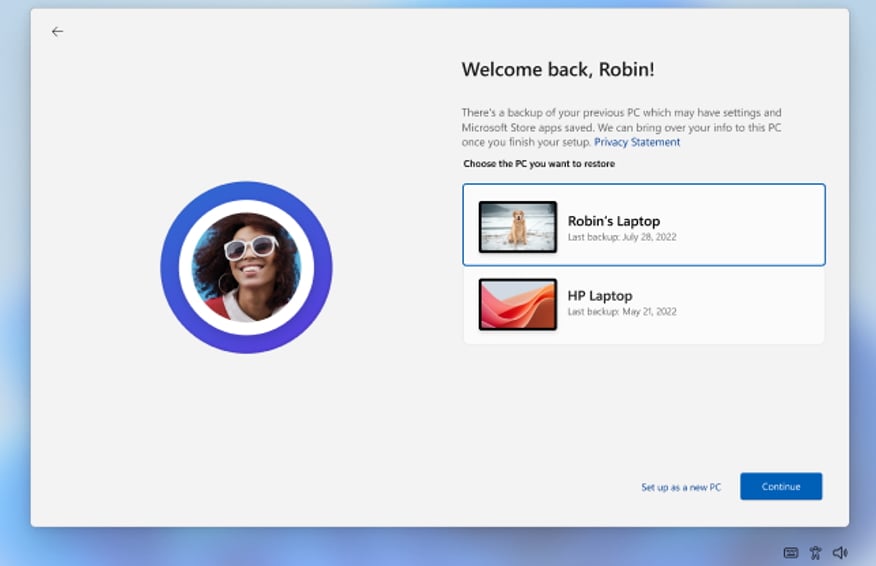 First sign-in restore experience (Microsoft)
When an eligible user logs into a device for the first time, a prompt appears, presenting the choice to restore from a prior device’s backup or to set up the device as new. Users who intentionally skip the restore process during the initial setup will not encounter the prompt again.
The Windows first sign-in restore feature is managed through existing Windows Backup for Organizations policies. IT administrators can configure and deploy it using Microsoft Intune or Group Policy, eliminating the need to learn new management tools.
Microsoft highlighted the feature’s particular utility for organizations transitioning to Windows 11 or those that frequently update hardware. The company also confirmed that administrators maintain complete control over which devices and users are offered the restore experience.
General availability for this feature commenced with devices that installed Windows updates released on February 24, 2026, or later. Its functionality is controlled by administrators and adheres to existing Windows Backup for Organizations policies.
Windows Backup for Organizations was initially unveiled at the Microsoft Ignite conference in November 2024 as an opt-in feature, disabled by default. It entered public preview in May 2025 and achieved general availability in August of the same year.
