
Close Menu
    Latest Post

    Verifying 5G Standalone Activation on Your iPhone

    March 1, 2026

    Hands on: the Galaxy S26 and S26 Plus are more of the same for more money

    March 1, 2026

    IronCurtain: A Secure AI Agent Designed to Prevent Rogue Actions

    March 1, 2026
    Facebook X (Twitter) Instagram
    Trending
    • Verifying 5G Standalone Activation on Your iPhone
    • Hands on: the Galaxy S26 and S26 Plus are more of the same for more money
    • IronCurtain: A Secure AI Agent Designed to Prevent Rogue Actions
    • Kwasi Asare’s Entrepreneurial Journey: Risk, Reputation, and Resilience
    • The Rubin Observatory’s alert system sent 800,000 pings on its first night
    • GitHub Actions Now Supports Unzipped Artifact Uploads and Downloads
    • Project Genie: Experimenting with Infinite, Interactive Worlds
    • Text Generation Using Diffusion Models and ROI with LLMs
    Facebook X (Twitter) Instagram Pinterest Vimeo
    NodeTodayNodeToday
    • Home
    • AI
    • Dev
    • Guides
    • Products
    • Security
    • Startups
    • Tech
    • Tools
    NodeTodayNodeToday
    Home»Guides»Unlock Pixel Tablet’s Hub Mode Using Any USB-C Charger
    Guides

    Unlock Pixel Tablet’s Hub Mode Using Any USB-C Charger

    Samuel AlejandroBy Samuel AlejandroFebruary 26, 2026No Comments2 Mins Read
    Share Facebook Twitter Pinterest LinkedIn Tumblr Reddit Telegram Email
    src 11qmhwc featured
    Share
    Facebook Twitter LinkedIn Pinterest Email

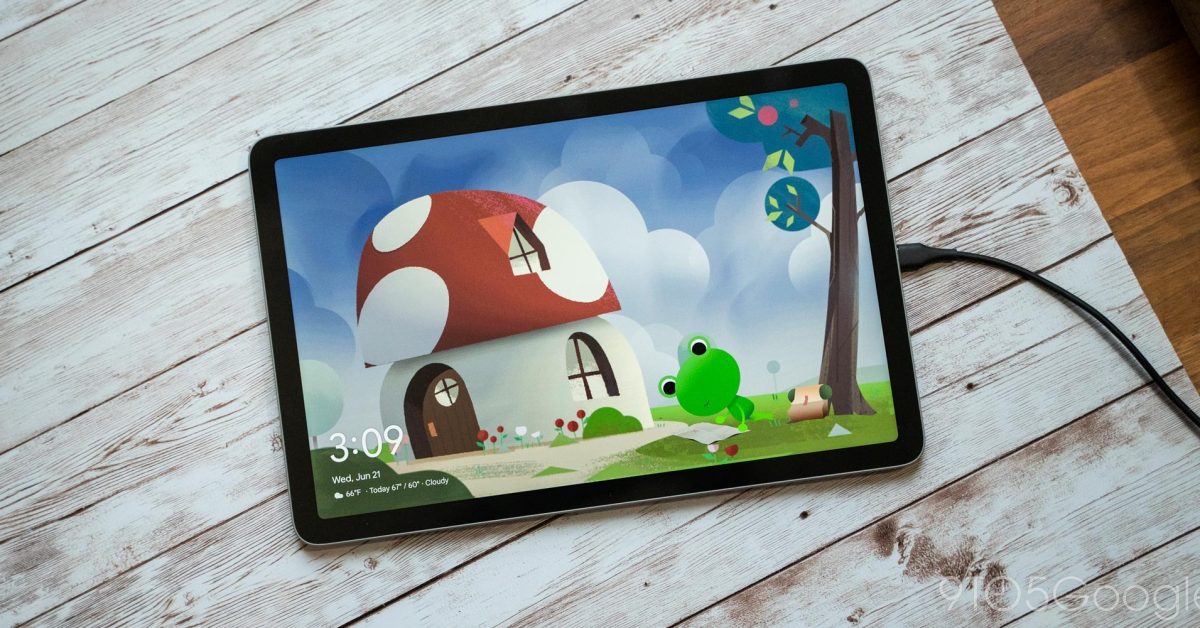
    The Google Pixel Tablet introduces a versatile feature known as “Hub Mode,” designed to transform the device into a smart display when it’s not actively in use. This mode provides glanceable information such as time, weather, and personal photos, alongside convenient access to smart home controls. While many associate Hub Mode exclusively with the official Charging Speaker Dock, its core functionality can actually be activated using any standard USB-C charger.

    The Charging Speaker Dock certainly enhances the Pixel Tablet experience by offering improved audio quality and ensuring the device remains charged. However, the fundamental “Hub Mode” experience, which essentially acts as a sophisticated screensaver, is not dependent on this specific accessory. Users can enjoy the benefits of a smart display by simply plugging their Pixel Tablet into any compatible USB-C power source.
    Image 1

    Samsung launches Galaxy S26 series, and higher prices are basically all that’s new

    To enable Hub Mode with a regular charger, the process is straightforward:

    1. Navigate to the tablet’s Settings menu.
    2. Select Hub Mode.
    3. Ensure the “Hub Mode” toggle is switched on.

    Once activated, users can customize what appears on the screen when Hub Mode is active. Options typically include:

    • Photo Frame: Displaying personal photos from Google Photos.
    • Smart Home Controls: Quick access to connected smart home devices.
    • Ambient Display: General information like time and weather.

    It is important to note that Hub Mode will only activate when the Pixel Tablet is locked and connected to a power source. This ensures that the feature functions as an ambient display rather than interfering with active tablet usage. By understanding this capability, users can leverage their Pixel Tablet as a smart display in various locations around their home without needing multiple docks.

    Share. Facebook Twitter Pinterest LinkedIn Tumblr Email
    Previous ArticleStyx: Blades of Greed – A Return to Pure Stealth Gaming
    Next Article RSC for LISP Developers
    Samuel Alejandro

    Related Posts

    Guides

    Verifying 5G Standalone Activation on Your iPhone

    March 1, 2026
    Guides

    Modern PC hardware failure rates aren’t increasing, the expectations are just higher

    March 1, 2026
    Guides

    Android 17 Beta 2 Introduces Apple-Like Handoff and “Bubbles” Multitasking

    February 28, 2026
    Add A Comment
    Leave A Reply Cancel Reply

    Latest Post

    ChatGPT Mobile App Surpasses $3 Billion in Consumer Spending

    December 21, 202517 Views

    Automate Your iPhone’s Always-On Display for Better Battery Life and Privacy

    December 21, 202515 Views

    Creator Tayla Cannon Lands $1.1M Investment for Rebuildr PT Software

    December 21, 202514 Views
    Stay In Touch
    • Facebook
    • YouTube
    • TikTok
    • WhatsApp
    • Twitter
    • Instagram
    About

    Welcome to NodeToday, your trusted source for the latest updates in Technology, Artificial Intelligence, and Innovation. We are dedicated to delivering accurate, timely, and insightful content that helps readers stay ahead in a fast-evolving digital world.

    At NodeToday, we cover everything from AI breakthroughs and emerging technologies to product launches, software tools, developer news, and practical guides. Our goal is to simplify complex topics and present them in a clear, engaging, and easy-to-understand way for tech enthusiasts, professionals, and beginners alike.

    Latest Post

    Verifying 5G Standalone Activation on Your iPhone

    March 1, 20264 Views

    Hands on: the Galaxy S26 and S26 Plus are more of the same for more money

    March 1, 20265 Views

    IronCurtain: A Secure AI Agent Designed to Prevent Rogue Actions

    March 1, 20264 Views
    Recent Posts
    • Verifying 5G Standalone Activation on Your iPhone
    • Hands on: the Galaxy S26 and S26 Plus are more of the same for more money
    • IronCurtain: A Secure AI Agent Designed to Prevent Rogue Actions
    • Kwasi Asare’s Entrepreneurial Journey: Risk, Reputation, and Resilience
    • The Rubin Observatory’s alert system sent 800,000 pings on its first night
    Facebook X (Twitter) Instagram Pinterest
    • About Us
    • Contact Us
    • Privacy Policy
    • Terms & Conditions
    • Disclaimer
    • Cookie Policy
    © 2026 NodeToday.

    Type above and press Enter to search. Press Esc to cancel.