


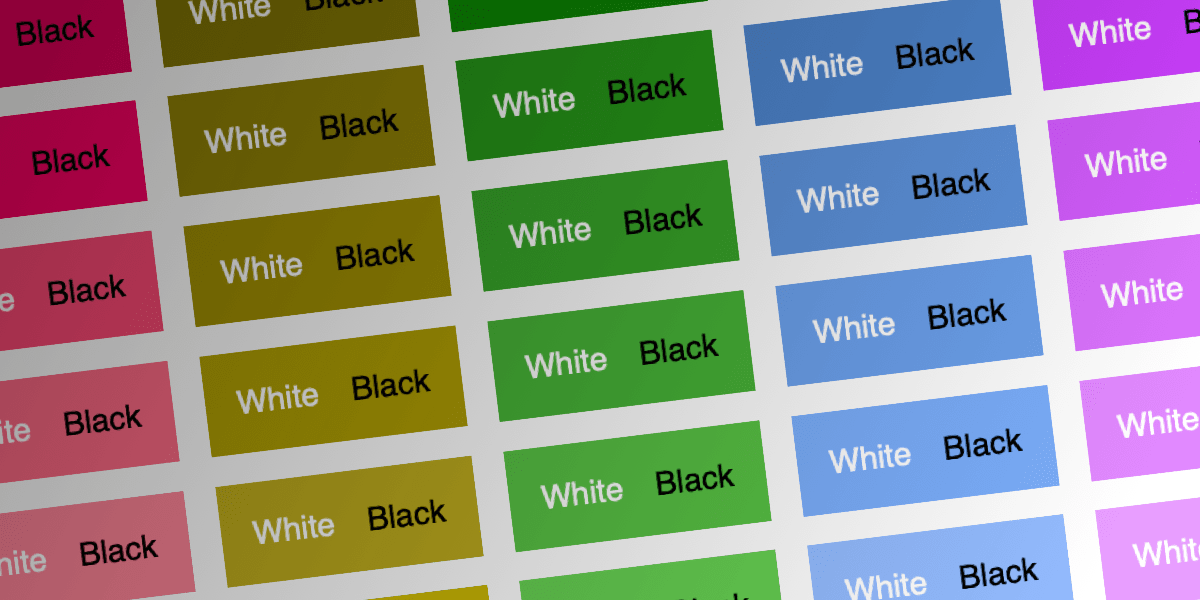
When an element has a customizable background color, determining whether the foreground text should be light or dark is a common challenge, particularly with accessibility in mind.
Several specification functions have been drafted for this capability, including the recent contrast-color() (previously color-contrast()) within the CSS Color Module Level 5 draft. However, with only Safari and Firefox currently supporting it, a final, widely adopted version appears to be distant. Given the significant new functionality introduced in CSS, an exploration was conducted to determine if a cross-browser compatible implementation could be achieved today. The following demonstrates a potential solution:
color: oklch(from <your color> round(1.21 - L) 0 0);The methodology behind this approach is detailed below.
WCAG 2.2
WCAG provides the formulas it uses for calculating the contrast between two RGB colors, which Stacie Arellano has described in great detail. This method is based on older techniques, calculating the luminance of colors (their perceived brightness) and attempting to account for monitor limitations and screen flare:
L1 + 0.05 / L2 + 0.05…where the lighter color (L1) is positioned at the top. Luminance values range from 0 to 1, and this fraction accounts for contrast ratios spanning from 1 (1.05/1.05) to 21 (1.05/.05).
The formulas for calculating the luminance of RGB colors are intricate, but the objective is to determine whether white or black offers superior contrast against a specific color, allowing for some simplification. This leads to a simplified representation:
L = 0.1910(R/255+0.055)^2.4 + 0.6426(G/255+0.055)^2.4 + 0.0649(B/255+0.055)^2.4This can be translated into CSS as follows:
calc(.1910*pow(r/255 + .055,2.4)+.6426*pow(g/255 + .055,2.4)+.0649*pow(b/255 + .055,2.4))The entire expression can be rounded to 1 for white or 0 for black using the round() function:
round(.67913 - .1910*pow(r/255 + .055, 2.4) - .6426*pow(g/255 + .055, 2.4) - .0649*pow(b/255 + .055, 2.4))Multiplying this value by 255 and applying it to all three color channels with the relative color syntax yields the following:
color: rgb(from <your color>
  round(173.178 - 48.705*pow(r/255 + .055, 2.4) - 163.863*pow(g/255 + .055, 2.4) - 16.5495*pow(b/255 + .055, 2.4), 255)
  round(173.178 - 48.705*pow(r/255 + .055, 2.4) - 163.863*pow(g/255 + .055, 2.4) - 16.5495*pow(b/255 + .055, 2.4), 255)
  round(173.178 - 48.705*pow(r/255 + .055, 2.4) - 163.863*pow(g/255 + .055, 2.4) - 16.5495*pow(b/255 + .055, 2.4), 255)
);
This formula, when provided a color, returns either white or black according to WCAG 2 guidelines. While functional, its readability is challenging. It is worth noting that APCA is expected to supersede it as a more advanced formula in future WCAG guidelines. Re-calculating with APCA would be even more complex. Although CSS functions could potentially simplify the code, this implementation would likely remain difficult to access, comprehend, and maintain.
New Approach
A different approach considered available features, specifically color spaces. The ‘L*’ value within the CIELAB color space signifies perceptual lightness, aiming to mirror human visual perception. While distinct from luminance, it offers a similar measure. This suggests a potential method for determining optimal black or white text contrast based on perceptual lightness. The goal is to identify a threshold where colors with lower lightness use black text, and those with higher lightness use white text.
An intuitive assumption might place this threshold at 50% or 0.5; however, this is not the case. Many colors, even bright ones, exhibit better contrast with white text than with black. Examples using lch(), where lightness gradually increases while hue remains constant, illustrate this point:
The transition point, where black text becomes more legible than white, typically falls between 60-65. A Node.js application, utilizing Colorjs.io and APCA for contrast calculations, was developed to determine the precise cutoff.
For oklch(), the identified threshold ranges from .65 to .72, with an average of .69.
- When the OKLCH lightness is .72 or above, black will always contrast better than white.
- Below .65, white will always contrast better than black.
- Between .65 and .72, typically both black and white have contrasts between 45-60.
Therefore, by employing `round()` and an upper bound of .72, a more concise implementation can be created:
color: oklch(from <your color> round(1.21 - L) 0 0);The value 1.21 is used to ensure that .72 rounds down and .71 rounds up: 1.21 – .72 results in .49, which rounds down, while 1.21 – .71 results in .5, which rounds up.
This formula demonstrates good performance and has undergone several production iterations. It offers improved readability and maintainability. However, this formula aligns more closely with APCA than WCAG, leading to occasional discrepancies. For instance, WCAG indicates black has higher contrast (4.70 vs. 4.3 for white) on #407ac2, while APCA suggests the reverse: black at 33.9 contrast and white at 75.7. The new CSS formula aligns with APCA, displaying white text:

This formula could be considered superior to WCAG 2.0 due to its closer alignment with APCA. Nevertheless, accessibility checks remain crucial. If legal compliance mandates WCAG rather than APCA, this simpler formula might be less suitable.
LCH vs. OKLCH
Analysis of both LCH and OKLCH data indicates that OKLCH is the superior choice, beyond its design as a replacement for LCH.
In LCH, the range where colors are too dark for black text and too light for white text is often wider and more variable. For instance, colors from #e862e5 to #fd76f9 fall into this problematic range. In LCH, this corresponds to lightness values between 63 and 70, whereas in OKLCH, it is between .7 and .77. The lightness scaling of OKLCH demonstrates a better match with APCA.
One Step Further
While maximizing contrast is always beneficial, an additional technique can be implemented. The current logic provides only white or black text (a limitation of the color-contrast() function). This can be modified to offer white or another specified color, such as a base text color. Beginning with this:
color: oklch(from <your color> round(1.21 - L) 0 0);

/* becomes: */

--white-or-black: oklch(from <your color> round(1.21 - L) 0 0);
color: rgb(
  from color-mix(in srgb, var(--white-or-black), <base color>)
  calc(2*r) calc(2*g) calc(2*b)
);
This involves some ingenious mathematical operations, though its readability is not optimal:
- If –white-or-black is white, color-mix() produces rgb(127.5, 127.5, 127.5) or brighter. When doubled, this results in rgb(255, 255, 255) or higher, effectively yielding white.
- If –white-or-black is black, color-mix() reduces each RGB channel value by 50%. Doubling this then restores the original value of the <base color>.
Regrettably, this formula is not compatible with Safari 18 and earlier versions, requiring targeting of Chrome, Safari 18+, and Firefox. Nevertheless, it provides a pure CSS method for switching between white and a base text color, rather than solely white and black. A fallback to white and black can be implemented for Safari versions below 18.
These approaches can also be refactored using CSS Custom Functions, though their support is not yet universal:
@function --white-black(--color) {
  result: oklch(from var(--color) round(1.21 - l) 0 0);
}

@function --white-or-base(--color, --base) {
  result: rgb(from color-mix(in srgb, --white-black(var(--color)), var(--base)) calc(2*r) calc(2*g) calc(2*b));
}
Conclusion
This technique offers a flexible and adaptable implementation by identifying a threshold and a straightforward formula. The threshold can be readily adjusted to suit specific requirements.
