


Many organizations handle numerous contracts each year, often encountering inefficiencies due to fragmented systems and complex processes that demand extensive time for contract reviews. This solution aims to tackle these issues by employing multi-agent collaboration, where specialized AI agents work concurrently on different facets of contract analysis. This approach helps to shorten review cycles while maintaining precision and oversight. This guide outlines how to construct an intelligent contract management system using Amazon Quick Suite as the main contract management platform, enhanced by Amazon Bedrock AgentCore for advanced multi-agent functionalities.
Why Quick Suite augmented with Amazon Bedrock AgentCore
Quick Suite functions as an agentic workspace, offering a unified interface for chat, research, business intelligence, and automation. It facilitates a smooth transition from obtaining answers to initiating actions, and automates tasks ranging from routine daily activities to complex business processes like contract processing and analysis. Integrating Amazon Bedrock AgentCore with Quick Suite allows for the secure and scalable encapsulation of business logic within highly capable AI agents. AgentCore services are compatible with various frameworks, including Strands Agents, as well as foundation models both within and outside of Amazon Bedrock.
Solution overview
This solution showcases an intelligent contract management system that utilizes Quick Suite for its user interface and knowledge base, while Amazon Bedrock AgentCore provides multi-agent collaboration. The system employs specialized agents to analyze contracts, assess risks, evaluate compliance, and deliver structured insights through a streamlined architecture.
Architecture components
The solution architecture includes the following components:
- Quick Suite components:
- Spaces for contract management workflows
- Chat agents for conversational contract interactions
- Knowledge bases for integrating legal documents stored in Amazon S3
- Topics for integrating structured contract data
- Actions for connecting to custom agents developed with Amazon Bedrock AgentCore
- Flows for recurring semi-manual document review processes
- Automate for daily and monthly contract automation tasks
- Multi-agent system powered by AgentCore:
- Contract collaboration agent: Central orchestrator coordinating workflow
- Legal agent: Analyzes legal terms and extracts key obligations
- Risk agent: Assesses financial and operational risks
- Compliance agent: Evaluates regulatory compliance
- Supporting infrastructure:
- Amazon API Gateway and AWS Lambda for managing API requests
- Amazon Simple Storage Service (Amazon S3) for document storage
- Amazon Redshift for structured data
Contract management workflow
The solution implements a streamlined contract management workflow, significantly reducing processing time and enhancing accuracy. The system processes contracts using coordinated AI agents, typically completing analysis in minutes compared to days for manual review.
The system utilizes various agent types, each with a primary function and key outputs:
The Contract collaboration agent acts as the central orchestrator and workflow manager, making document routing decisions and consolidating results.
The Legal agent performs legal term analysis and obligation extraction, providing party details, key terms, obligations, and risk flags.
The Risk agent conducts financial and operational risk assessment, generating risk scores, exposure metrics, and negotiation recommendations.
The Compliance agent evaluates regulatory compliance, offering compliance status, regulatory flags, and remediation suggestions.
Let’s explore an example of processing a sample service agreement contract. The workflow consists of the following steps:
- The contract collaboration agent identifies the document as requiring legal, risk, and compliance analysis.
- The legal agent extracts parties, payment terms, and obligations.
- The risk agent identifies financial exposure and negotiation leverage points.
- The compliance agent evaluates regulatory requirements and flags potential issues.
- The contract collaboration agent consolidates findings into a comprehensive report.
Prerequisites
Before setting up Quick Suite, ensure the following:
- An AWS account with administrative permissions
- Access to supported AWS Regions where Quick Suite is available
- Appropriate AWS Identity and Access Management (IAM) roles and policies for Quick Suite service access
Setup part 1: Set up Quick Suite
This section details the setup of Quick Suite components.
Enable Quick Suite
An AWS administrator can enable Quick Suite by:
- Signing in to the AWS Management Console
- Navigating to Quick Suite from the console
- Subscribing to Quick Suite service for the organization
- Configuring identity and access management as needed
After Quick Suite is enabled, access the Amazon Quick Suite web interface and sign in.
Create the contract management space
Within Quick Suite, create a new space named Contract Management to organize contract-related workflows and resources. The assistant on the right can then be used to query resources within this space.
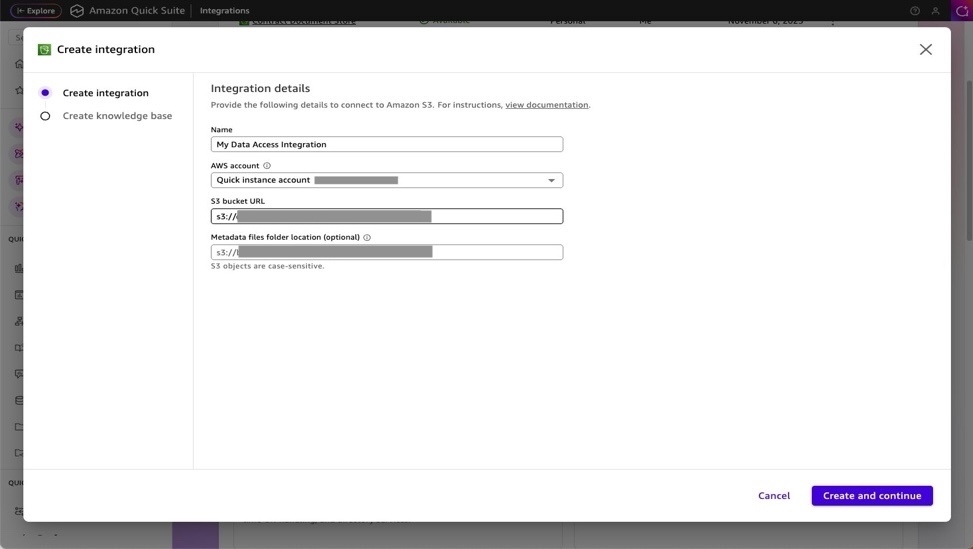
Set up a knowledge base for unstructured data (Amazon S3)
Follow these steps:
- Navigate to Knowledge bases: In the Integrations section, select Knowledge bases.
- Add Amazon S3 integration:
- Select Amazon S3 as the data source.
- Configure the S3 bucket intended to store contract documents.
- Once the knowledge base is created, add it to the Contract Management space.
Set up a knowledge base for structured data (Amazon Redshift)
Follow these steps:
- Add dataset: In the Datasets section, configure the contract data warehouse (Amazon Redshift) for structured contract data. Refer to Creating a dataset from a database for instructions and await dataset configuration completion.
- Add data topics: In the Topics section, integrate structured contract data sources such as:
- Contract databases
- Vendor information systems
- Compliance tracking systems
For adding topics in Quick Suite, see Adding datasets to a topic in Amazon Quick Sight.
- Add topics to the space: Add the relevant topics to the Contract Management space.
Setup part 2: Deploy Amazon Bedrock AgentCore
Amazon Bedrock AgentCore offers enterprise-grade infrastructure for deploying AI agents with session isolation, ensuring each session operates with isolated CPU, memory, and filesystem resources. This separation between user sessions helps protect stateful agent reasoning processes.
- The necessary code is available in this GitHub repository, specifically in the `legal-contract-solution/deployment` subfolder.
- The solution includes a comprehensive `deploy_agents.py` script for the complete deployment of AI agents to AWS using cloud-centered builds. These instructions require Python>=3.10.
pip3 install -r requirements.txtpython3 deploy_agents.py
What the deployment script does
The deployment process is fully automated and manages:
- Dependency management:
- Automatically installs bedrock-agentcore-starter-toolkit if required.
- Verifies the availability of necessary Python packages.
- AWS infrastructure setup:
- Creates IAM roles with the permissions needed for agent execution.
- Sets up an Amazon Elastic Container Registry (Amazon ECR) repository for container images.
- Configures Amazon CloudWatch logging for monitoring.
- Agent deployment:
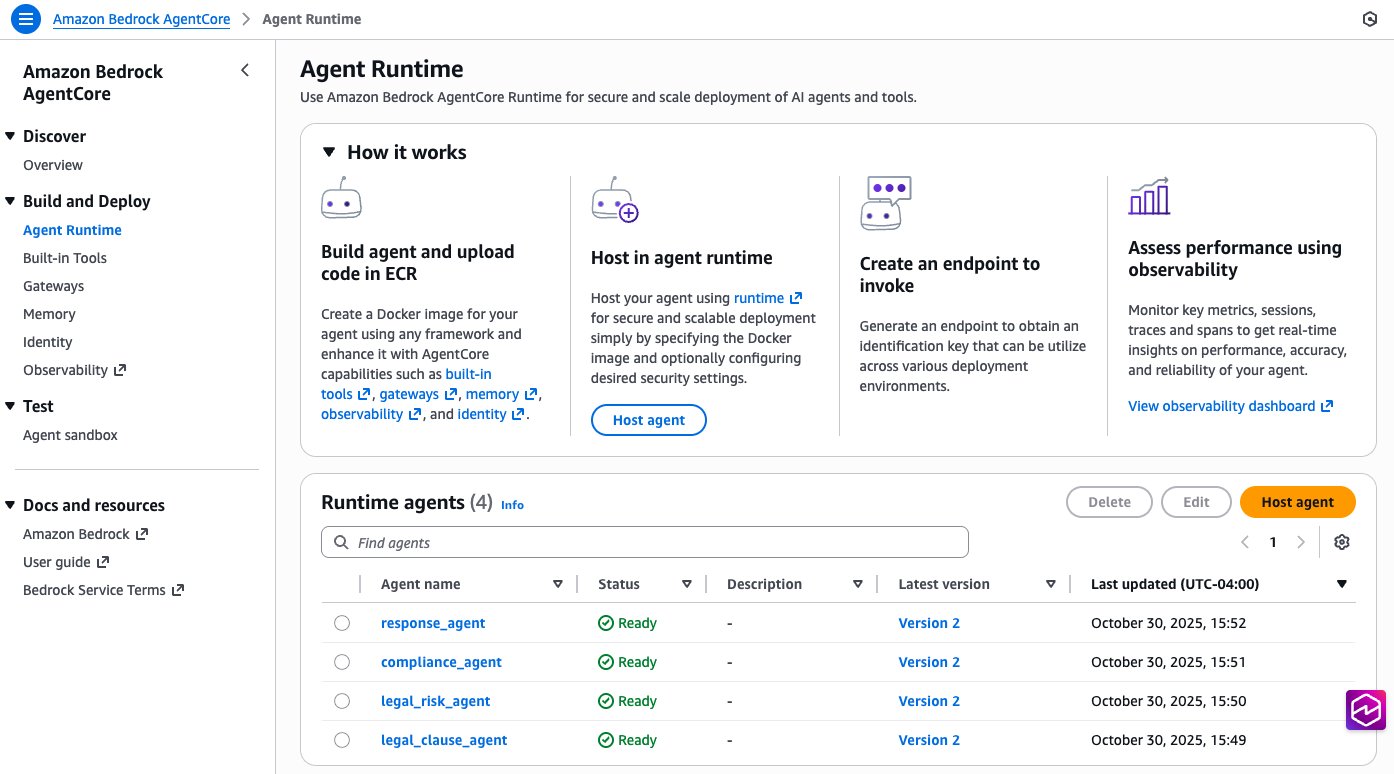
- Deploys four specialized agents.
- Utilizes AWS CodeBuild for cloud-centered ARM64 container builds.
- No local Docker is required, as builds occur within AWS infrastructure.
- Configuration management:
- Automatically configures agent communication protocols.
- Establishes security boundaries between agents.
- Sets up monitoring and observability.
After deployment, the agents are visible in the Amazon Bedrock AgentCore console.
Setup part 3: Integrate Amazon Bedrock AgentCore with Quick Suite
Quick Suite can connect to enterprise solutions and agents via actions integrations, making tools accessible to chat agents and automation workflows.
Deploy API Gateway and Lambda
Navigate to the `legal-contract-solution/deployment` subfolder and execute the command: `python3 deploy_quicksuite_integration.py`
This command provisions Amazon Cognito with a user pool to manage access permissions for the API Gateway endpoint. The Quick Suite configuration references the OAuth details for this user pool. Upon successful deployment, two files will be generated for Quick Suite integration:
- `quicksuite_integration_config.json` – Contains the complete configuration.
- `quicksuite_openapi_schema.json` – Provides the OpenAPI schema for Quick Suite import.
Set up actions integration in Quick Suite
In the Actions section, prepare the integration points that will connect to the agents deployed by AgentCore:
- Obtain the `quicksuite_openapi_schema.json` file from the working folder.
- In the Integrations/Actions section, go to OpenAPI Specification. Create a new OpenAPI integration by uploading the `api_gateway_openapi_schema.json` file, and enter the following Name and Description for the provided agents. Enter the endpoint URL using information from the `quicksuite_integration_config.json` file.
- Name: Legal Contract Analyzer
- Description: Analyze a legal contract using AI agents for clause extraction, risk assessment, and compliance checking
Set up chat agent definition details
In the Chat agents section, set up the following agent with these details:
- Name: Legal Contract AI Analyzer
- Description:
An AI-powered system that analyzes legal contracts and performs comprehensive risk assessments using advanced machine learning capabilities to identify potential issues, compliance gaps, and contractual risks. - Agent identity:
You are an expert legal contract analysis AI system powered by advanced GenAI capabilities. Your purpose is to provide comprehensive contract review and risk assessment services. - Persona instructions:
Use the legal contract analyzer when possible. Always categorize risks by severity (High, Medium, Low). Highlight non-standard clauses, missing provisions, and potential compliance issues. Provide specific recommendations for contract improvements. When analyzing liability clauses, pay special attention to indemnification, limitation of liability, and force majeure provisions. Flag any unusual termination conditions or intellectual property concerns. - Communication style: Professional, precise, and analytical with clear legal terminology.
- Response format:
Provide structured analysis with clear risk categorization, severity levels, and actionable recommendations. Use bullet points for key findings and numbered lists for prioritized recommendations. - Length:
Comprehensive analysis covering all critical aspects while maintaining clarity and focus on actionable insights. - Welcome message:
Welcome to the Legal Contract AI Analyzer. Upload contracts for intelligent analysis and risk assessment. - Suggested prompts:
- Analyze this contract for potential legal risks and compliance issues
- Review the liability clauses in this agreement for red flags
- Assess the termination conditions and notice requirements in this contract
Test your contract management solution
With the infrastructure deployed and Quick Suite configured, the contract management solution can be tested by selecting the Contract Management space. The agent interface allows for asking questions about the knowledge base and instructing agents to review documents.
Clean up
The deployed solution incurs associated infrastructure costs. When it is no longer needed in the AWS account, navigate to the `legal-contract-solution/deployment` subfolder and run the command `python3 cleanup.py` for cleanup.
Conclusion
The combination of Amazon Quick Suite and Amazon Bedrock AgentCore provides procurement and legal teams with immediate operational advantages and positions them for future AI advancements. Amazon Bedrock multi-agent collaboration enables the creation and management of multiple specialized agents that work together to handle increasingly complex business workflows. By implementing this intelligent contract management solution, organizations can transform their procurement processes, reduce contract cycle times, and allow teams to concentrate on strategic decision-making instead of administrative tasks. The solution’s extensible architecture allows for starting with core contract management functions and gradually expanding to address more complex use cases as organizational needs evolve. Whether the goal is to streamline routine contract reviews or to implement comprehensive procurement transformation, this intelligent contract management solution offers a robust foundation for achieving business objectives.
