




- This article presents a novel method for enabling cross-device passkey authentication on devices with inaccessible displays, such as XR devices.
- The approach bypasses QR code usage, facilitating cross-device authentication without an on-device display, while maintaining trust and proximity requirements.
- This method builds upon work by the FIDO Alliance, aiming to introduce secure, passwordless authentication to a new ecosystem of devices and platforms.
Passkeys represent a significant advancement in authentication, providing a phishing-resistant, cryptographically secure alternative to conventional passwords. Typically, the standard cross-device passkey process involves a user registering or authenticating on a desktop device by approving the action on a nearby mobile device, often by scanning a QR code with their phone camera. A challenge arises when attempting to facilitate this flow for XR devices, which may have a head-mounted display or no screen, or for other devices with inaccessible displays like smart home hubs and industrial sensors.
A novel approach has been developed to adapt the WebAuthn passkey flow and FIDO’s CTAP hybrid protocol for devices that either lack a screen or have an inaccessible display. This implementation is now broadly available on Meta Quest devices running Meta Horizon OS. The aim is for this method to provide robust security, based on existing passkey frameworks, without compromising usability for users of various screenless IoT devices, consumer electronics, and industrial hardware.
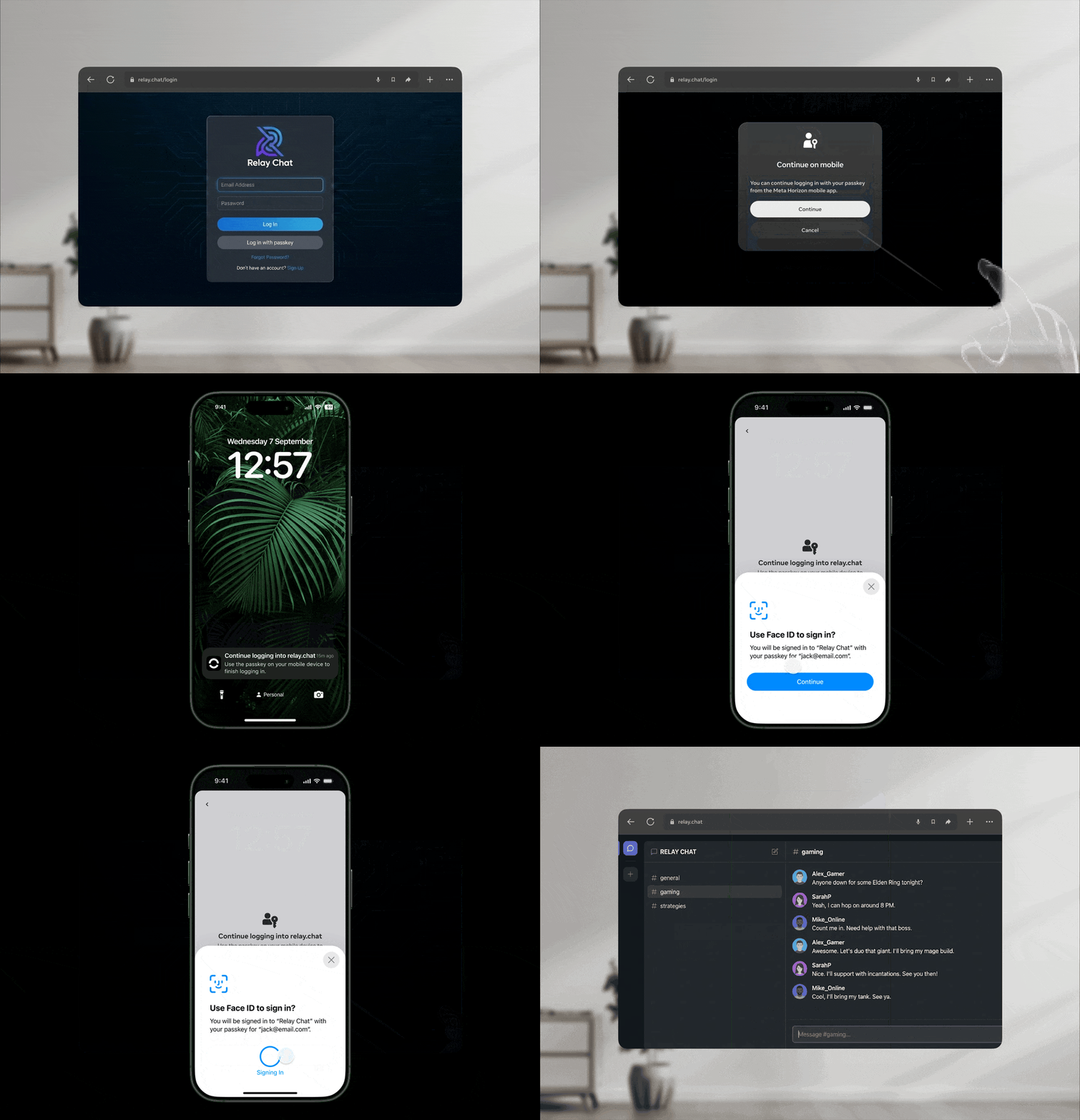
The Challenge: No Screen, No QR Code
The standard cross-device flow depends on two main mechanisms:
- QR code scanning: The relying party presents a QR code on the desktop or inaccessible device, which a mobile authenticator scans to establish a secure link.
- Bluetooth/NFC proximity: Devices utilize local communication protocols to discover each other and begin a secure exchange.
For devices lacking a display, the QR code method is unfeasible. While proximity-based discovery is possible, initiating user verification and confirming intent without on-device visual feedback poses security and usability risks. Users require clear confirmation that they are approving the correct transaction on the intended device.
Solution: Companion App for Secure Message Transport
Typically, scanning a QR code sends a command to the authenticator device to start a hybrid (cross-device) login flow, including a nonce identifying the unauthenticated device client. However, if a user possesses a companion application—such as the Meta Horizon app—linked to the same account as the device, this application can transmit the request to the authenticator OS and execute it via general link/intent execution.
The flow was designed for easy navigation, utilizing in-app notifications to inform users of an initiated login request, directing them into the application, and promptly executing the login request.
For simplicity, the hybrid flow begins as soon as the application opens, as the user would have taken an action (tapping a notification or opening the app) to trigger this, and an additional user verification step exists in hybrid implementations on iOS and Android.
The process on a Meta Quest with the Meta Horizon mobile app unfolds as follows:
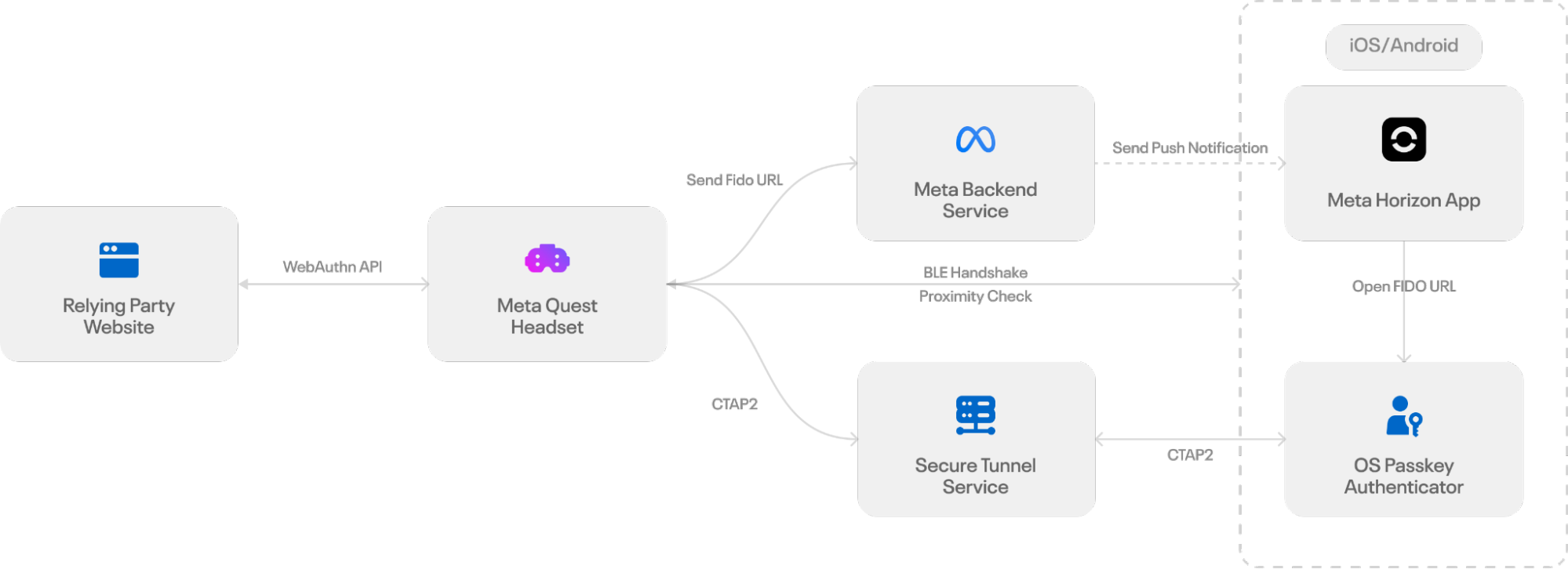
1. Hybrid Flow Message Generation
When a passkey login is initiated on a Meta Quest, the headset’s browser locally creates the same payload typically embedded in a QR Code. This payload includes a new ECDH public key, a session-specific secret, and routing information for the subsequent handshake. Rather than displaying this information as a QR code, the browser encodes it into a FIDO URL—the standard mechanism for hybrid transport—which instructs the mobile device to commence the passkey authentication flow.
2. Message Transmission to Companion App
Once the FIDO URL is generated, the headset needs a secure and reliable method to transfer it to the user’s phone. As the device cannot display a QR code, the system uses the Meta Horizon app’s authenticated push channel to deliver the FIDO URL directly to the mobile device. When a user selects the passkey option in the login dialog, the headset encodes the FIDO URL as structured data within a GraphQL-based push notification.
The Meta Horizon app, logged in with the same account as the headset, receives this payload and verifies the delivery context to ensure it reaches the correct user.
3. Application Notification of Login Request
Following the FIDO URL delivery to the mobile device, the platform’s push service presents it as a standard iOS or Android notification, indicating a pending login request. Tapping this notification directs the operating system to route the deep link to the Meta Horizon app. The app then opens the FIDO URL using the system URL launcher, activating the operating system’s passkey interface.
If notifications are disabled, directly launching the Meta Horizon app will also query the backend for any pending passkey requests linked to the user’s account. Should a valid request exist (requests expire after five minutes), the app automatically starts the passkey flow by opening the FIDO URL.
Once the FIDO URL is opened, the mobile device initiates the hybrid transport sequence, which involves broadcasting the BLE advertisement, establishing the encrypted tunnel, and generating the passkey assertion. In this process, both the system notification and the app launch path function as user consent surfaces and entry points into the standard hybrid transport workflow.
4. Hybrid Command Execution by App
After the user approves the action on their mobile device, a secure channel is established according to WebAuthn standards. The primary distinction lies in the challenge exchange timing:
- The inaccessible device generates the standard WebAuthn challenge and awaits a response.
- The mobile authenticator initiates the secure BLE/NFC connection.
- The challenge is transmitted over this secure channel.
- Upon successful user verification (UV), the mobile device utilizes the relevant key material to generate the AuthenticatorAssertionResponse or AuthenticatorAttestationResponse.
- The response is then sent back to the inaccessible device.
The inaccessible device subsequently acts as a conduit, forwarding the response to the relying party server to finalize the transaction, mirroring the process of a standard display-equipped device.
Impact and Future Direction
This novel implementation successfully eliminates the requirement for an on-device display in the cross-device flow, while still adhering to existing proximity and trust challenges for cross-device passkey login. This solution aims to enable secure, passwordless authentication across a broader spectrum of platforms and ecosystems, extending passkeys beyond mobile and desktop environments into the expanding realm of wearable and IoT devices.
This work builds upon the excellent contributions already made by peers in the FIDO Alliance and mobile operating systems dedicated to creating a robust and interoperable ecosystem for secure and convenient login.
