


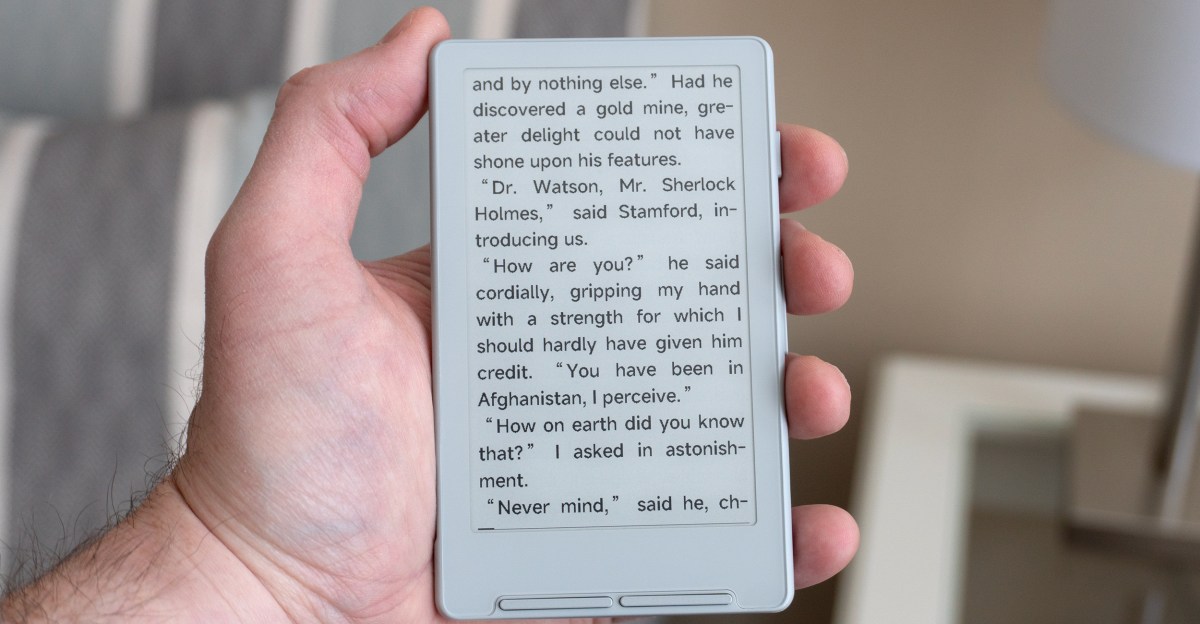
Many e-reader enthusiasts appreciate the compact size of devices like the 5-inch Kobo Mini. The $69 Xteink X4 e-reader is even smaller than the Kobo Mini and other E Ink smartphones such as the Boox Palma. While its pocketable design is appealing, the device is notably unintuitive and functionally limited out of the box. This could be a significant drawback if not for a growing community of users dedicated to improving it.

The X4’s physical size is surprisingly small. Its 4.3-inch E Ink screen is only slightly smaller than the Kobo Mini’s 5-inch panel, but the X4’s much slimmer bezels make the device feel considerably more compact. Initial excitement over its size quickly diminished when testing one of its advertised features.
 The X4 is about half the size of the Kobo Libra 2 (bottom) and much smaller than the discontinued Kobo Mini (middle).
Upon its announcement last December, Xteink showcased images of the e-reader magnetically attached to an iPhone via MagSafe. This suggested the X4 could be a superior alternative to e-reader cases for those desiring a secondary phone screen. However, the unusual placement of its magnets prevents the e-reader from attaching to an iPhone 16 Pro in a practical manner.
 This was the only way the X4 could be attached to an iPhone 16 Pro’s MagSafe mount without using the included adhesive magnetic rings.
 Even with the X4 properly aligned on the back of an iPhone, the e-reader extended too far off the bottom for practical use.
Numerous X4 users have reported this issue. In a statement to The Verge, Xteink explained that “during our early development and testing phase, we worked with a limited range of iPhone models. As a result, on some newer models, the magnetic alignment may not appear perfectly centered.” To address this, Xteink includes a pair of magnetic adhesive rings for proper alignment on devices.
Despite this, the X4 still extends beyond the bottom of an iPhone, making combined use awkward. Consequently, the device is often used as a standalone, ultra-compact e-reader. Measuring less than 6mm thick, the X4 occupies minimal space in a daily carry bag and comes with a basic magnetic folio-style case for protection.
The Xteink X4 is among the most affordable e-readers available, but this price point comes with certain challenges and compromises. Its 4.3-inch E Ink screen has a 220ppi resolution, which is lower than the 300ppi e-paper screens found on current Kindle and Kobo e-readers. While fine text may show jagged edges upon close inspection, the resolution is generally sufficient for a pleasant reading experience.
A notable omission is screen lighting, requiring an external light source for reading in dim conditions. The absence of a touchscreen is a more significant frustration. The X4 features several unlabeled buttons on its right edge and below the display, with functionality that changes depending on the UI context.
 Instead of a touchscreen, the X4 relies on various buttons, several of which are two-sided. But they’re all unlabeled, often resulting in incorrect button presses.
 The side of the X4 includes a power/lock button and a reset button that does not require a paper clip to press.
Adding to the complexity, three of the buttons are two-sided, performing different actions based on which side is pressed. Remembering the correct button and side for selection, returning to a previous screen, or navigating options can be frustrating. This is further compounded by the X4’s limited and confusing software.
Unlike Boox’s smartphone-sized E Ink Palma devices, which run Android and support various activities from video playback to gaming, the X4 is exclusively focused on reading. It supports TXT and EPUB files, along with images like JPGs and BMPs, though loading images can be inconsistent. There is no integrated bookstore, necessitating users to source their own DRM-free EPUB files. While Amazon recently expanded support for EPUBs, transferring ebooks to the X4 remains more difficult than it should be.
 The only storage on the X4 is an included microSD card that can be difficult to remove as it sits deep inside the e-reader when inserted.
 Ebooks are supposed to be uploadable to the e-reader over Wi-Fi, but these features are either listed as “in development” or are barely functional.
The e-reader does not appear as a storage device when connected to a computer. While wireless file uploads from a browser over Wi-Fi or a phone are intended, these features often do not work reliably. The most straightforward method involves copying files to a memory card using a USB reader, but this is complicated by the X4’s microSD card slot, which makes inserting and ejecting a card challenging without long fingernails or a paper clip.
 The X4’s software and UI are basic at best and frustrating at worst. Navigating menus for changing button functions or other settings is confusing, and customizing the layout of an ebook is very limited.
The ebook reading experience is adequate, and the presence of dedicated page turn buttons is a positive. However, users accustomed to Kobo or Kindle devices will likely miss extensive text formatting options. Only two font-size choices, three line spacing options, and no ability to adjust text margins are available. Images and illustrations in ebooks are not displayed, most text formatting is ignored, and while custom font files are supposedly supported, this feature often proves unreliable.
Users can navigate to different chapters, pages, and bookmarks, or activate features like auto page turns at set intervals. However, these actions require opening and navigating a series of menus using the X4’s buttons, an unnecessarily complicated process. While users may eventually become somewhat accustomed to the experience, it is unlikely to be enjoyable.
 Alternate firmware options are already available for the X4, including CrossPoint Reader, which significantly improves the device, adding features like onscreen labels for the e-reader’s buttons.
 The CrossPoint Reader firmware also introduces additional fonts and greater control over a book’s text appearance.
Xteink has released several software updates aimed at improving the X4’s UI and usability, though progress has been slow. Crucially, the company has not locked down the e-reader, allowing a growing community to take on the task of improving the device. Installing CrossPoint Reader, an open-source alternative firmware, is a simple process that immediately resolves many of the frustrations with Xteink’s original software. CrossPoint simplifies the X4’s UI, expands ebook display options, and adds onscreen labels for button functions. It is also easy to uninstall, though many users may choose not to.
The X4 is unlikely to replace more advanced e-readers like the Kobo Libra 2 for primary reading needs, as features like a touchscreen, lighting, access to a robust ebook store, and a user-friendly UI are often essential. Nevertheless, the tiny X4 serves as a welcome alternative to a smartphone for quick reading sessions, despite its inherent frustrations. While recommending devices that require third-party upgrades to function optimally is generally avoided, the ongoing work by the X4 community makes this e-reader a worthwhile consideration for those prioritizing pocketability and a willingness to tinker.
Photos by Andrew Liszewski / The Verge
