


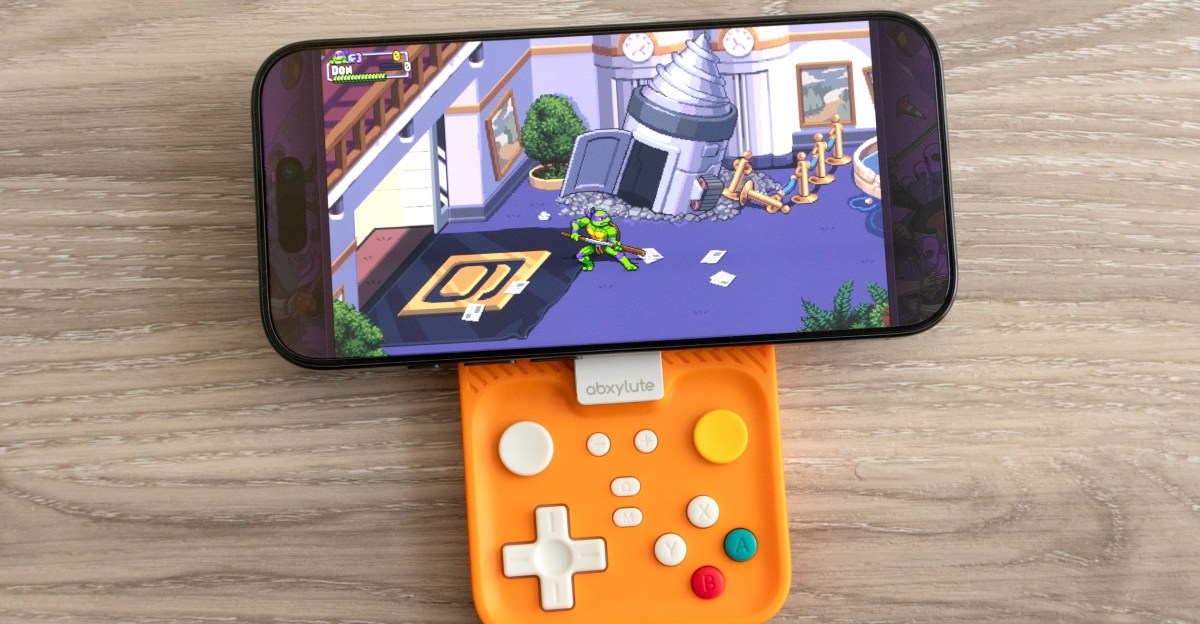
 Turning your phone into a handheld with the M4 could be risky.
With Apple opening its App Store to emulators in 2024, many users are looking for a suitable controller to enhance retro gaming on their phones. Traditional clamp-on controllers, like the Backbone Pro, can be cumbersome, and using a standalone gamepad often requires propping up the phone. The Abxylute M4, which launched a few months ago, appeared to be a promising solution: a compact wireless gamepad that uses a magnetic mount for iPhone attachment. While the design is clever, it is hindered by stiff thumbsticks and a magnetic mount that does not consistently provide secure phone support.
The Abxylute M4 consists of two main parts: a retro-styled rectangular gamepad that connects to a smartphone via Bluetooth, and a Q-shaped mount that attaches the controller to the phone, creating a handheld console experience. The mount is compatible with MagSafe iPhone models and the Google Pixel 10 Series. An adhesive metal ring is included for compatibility with other phone models. Testing was primarily conducted with an iPhone 16 Pro.
 The M4’s magnetic mount can double as a smartphone stand using a ring-shaped kickstand.
The magnetic ring on the M4’s mount adheres to an iPhone’s back as securely as any MagSafe accessory or Qi2 charger. It remains attached until intentionally removed. The mount features a smooth finish, allowing rotation to position the gamepad completely behind the phone instead of extending from the side. However, this configuration makes the device too bulky to fit into a pocket, often necessitating removal when not in use.
 The M4 controller doesn’t protrude far enough from the bottom of a phone to play games in a portrait orientation.
 The M4 can be attached so it completely hides behind your phone. But you’ll need giant pockets to carry it around like this.
A design limitation of the M4 is its exclusive use in landscape orientation when attached. In a vertical mode, the controller does not extend sufficiently for all controls to be accessible. While not inherently negative, some users, particularly those accustomed to devices like the Game Boy, prefer vertical gameplay. Newer mobile controllers, such as the GameSir Pocket Taco and the 8Bitdo FlipPad, offer vertical support.
 The mount attaches to the M4 controller using one of two magnetic connectors.
A more significant concern, and a potential drawback, is the connection between the mount and the controller itself. This connection also relies on a strong magnet, causing the controller to snap into place. However, the connection does not always feel robust enough to keep the mount securely attached to the controller, especially when a phone is in place.
 The mount’s connection to the M4 controller feels strong, but it doesn’t take a lot of force for it to accidentally disconnect.
While the mount-to-controller connection feels adequate when holding the M4 and phone directly in front for gameplay, it can separate at certain angles or with accidental bumps. The two components also consistently disconnect if the entire setup is inadvertently turned upside down, leading to the phone and attached mount falling. Fortunately, testing was conducted over a soft surface.
This behavior has been noted by other reviewers, including Retro Dodo’s Brandon Saltalamacchia. A lighter phone, such as an iPhone Air, might fare better with this connection. However, given the substantial investment in modern smartphones (an iPhone 16 Pro costs approximately CA$1,500 or $1,100 US), relying on the M4’s current design presents a considerable risk.
The M4 is not entirely dependent on its magnetic mount; it can function as a standalone Bluetooth controller with phones, consoles, or other compatible devices. Its square-shaped design proved surprisingly comfortable, even for larger hands, allowing easy access to shoulder buttons without awkward finger contortion. The overall build quality feels solid.
 The M4 controller’s action buttons are small, but the D-pad feels comfortably sized, even for my large thumbs.
 There’s two pairs of shoulder buttons atop the M4 controller, which I found easy to reach without having to overstretch my fingers.
The controller features four small action buttons with satisfying resistance, complemented by a large D-pad. The D-pad, while somewhat mushy and prone to registering multiple directional inputs, is acceptable for casual gaming sessions. For users seeking high scores or precise control, a different controller might be preferable.
 The M4’s analog joysticks feature a sliding disc design similar to what the Nintendo 3DS offered. But on the M4 they’re stiff and uncomfortable to use.
Abxylute includes two analog joysticks, a rare feature for controllers of this size. These joysticks utilize a sliding disc design, reminiscent of the Nintendo 3DS, but are less effective. The M4’s sliding joysticks are stiff and uncomfortable, making subtle movements extremely difficult. Extended use, such as a few races in Mario Kart World, resulted in thumb discomfort, suggesting limited future use for these joysticks.
As a compact controller, the $49 Abxylute M4 is decent but falls short of being exceptional. Its primary appeal lies in the promise of transforming a smartphone into a handheld console, a concept that garnered over $300,000 from nearly 6,000 backers on Kickstarter. However, many users may find themselves frustrated or disappointed if they do not exercise extreme caution during use. Entrusting a valuable mobile device to the M4 requires a level of confidence that some may find too high.
