
Close Menu
    Latest Post

    Anker’s X1 Pro shouldn’t exist, but I’m so glad it does

    February 22, 2026

    Suspected Russian Actor Linked to CANFAIL Malware Attacks on Ukrainian Organizations

    February 22, 2026

    Trump Reinstates De Minimis Exemption Suspension Despite Supreme Court Ruling

    February 22, 2026
    Facebook X (Twitter) Instagram
    Trending
    • Anker’s X1 Pro shouldn’t exist, but I’m so glad it does
    • Suspected Russian Actor Linked to CANFAIL Malware Attacks on Ukrainian Organizations
    • Trump Reinstates De Minimis Exemption Suspension Despite Supreme Court Ruling
    • How Cloudflare Mitigated a Vulnerability in its ACME Validation Logic
    • Demis Hassabis and John Jumper Receive Nobel Prize in Chemistry
    • How to Cancel Your Google Pixel Watch Fitbit Premium Trial
    • GHD Speed Hair Dryer Review: Powerful Performance and User-Friendly Design
    • An FBI ‘Asset’ Helped Run a Dark Web Site That Sold Fentanyl-Laced Drugs for Years
    Facebook X (Twitter) Instagram Pinterest Vimeo
    NodeTodayNodeToday
    • Home
    • AI
    • Dev
    • Guides
    • Products
    • Security
    • Startups
    • Tech
    • Tools
    NodeTodayNodeToday
    Home»Guides»Customizing and Utilizing the iOS 18 Control Center
    Guides

    Customizing and Utilizing the iOS 18 Control Center

    Samuel AlejandroBy Samuel AlejandroJanuary 18, 2026No Comments3 Mins Read
    Share Facebook Twitter Pinterest LinkedIn Tumblr Reddit Telegram Email
    src 1m1g2ft featured
    Share
    Facebook Twitter LinkedIn Pinterest Email

    Image 1

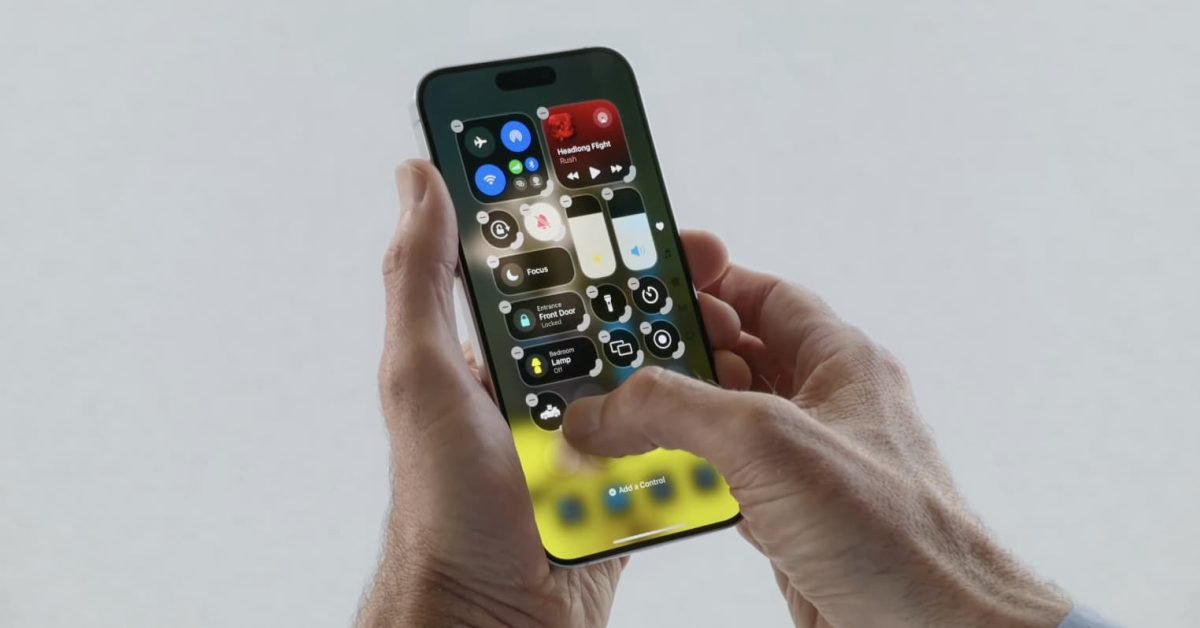
    The Control Center in iOS 18 has undergone a significant transformation, providing users with unprecedented levels of personalization. This redesign aims to make essential controls more accessible and adaptable to individual workflows.

    Accessing the New Control Center

    To open the Control Center, simply swipe down from the top-right corner of your iPhone’s screen, as in previous iOS versions. The most noticeable change is the introduction of multiple pages, allowing for a more organized layout of controls.

    Key Features of the Redesigned Control Center

    • Multiple Pages: Controls are now organized across several pages, which can be navigated by swiping horizontally. This prevents clutter and allows for a greater number of available controls.
    • Resizable Controls: Many controls can be resized, offering a more prominent display for frequently used functions or a compact view for less critical ones.
    • Third-Party Integration: For the first time, developers can integrate their app controls directly into the Control Center, expanding its utility beyond Apple’s native offerings.

    Customizing Your Control Center

    Personalizing the Control Center is straightforward. To enter customization mode, press and hold anywhere on the Control Center background. This action reveals options to modify the layout and content.

    Adding and Removing Controls

    In customization mode, a ‘+’ button appears in the top-left corner, allowing users to browse and add new controls from a comprehensive list. To remove an existing control, tap the ‘-‘ button that appears on its icon.

    Rearranging Controls

    While in customization mode, controls can be dragged and dropped to new positions within the current page or even moved to different pages. This flexibility ensures that the most important controls are always within easy reach.

    Resizing Controls

    Certain controls feature a resize handle, typically a small icon or border, which allows users to adjust their size. Tapping and dragging this handle enables switching between small, medium, and large formats, depending on the control’s functionality.

    Utilizing Third-Party App Controls

    With iOS 18, third-party applications can offer their own controls within the Control Center. Once an app is installed and supports this feature, its controls will appear in the list of available options for users to add, just like native Apple controls. This opens up new possibilities for quick access to app-specific functions without needing to open the app itself.

    Examples of Enhanced Controls

    The updated Control Center includes dedicated sections for various functionalities:

    • Media Playback: A dedicated page for music and video controls, often featuring larger, more interactive elements.
    • Home Controls: Smart home device controls are consolidated, making it easier to manage lights, thermostats, and other accessories.
    • Connectivity: Wi-Fi, Bluetooth, and cellular data toggles are still present, potentially with enhanced quick-access options.

    The iOS 18 Control Center represents a significant step forward in user interface flexibility, empowering users to tailor their iPhone experience more precisely than ever before.

    Share. Facebook Twitter Pinterest LinkedIn Tumblr Email
    Previous ArticleVari CoreChair Review: An Active Sitting Solution for Focused Work
    Next Article What’s !important #3: Popover Context Menus, @scope, New Web Platform Features, and More
    Samuel Alejandro

    Related Posts

    Guides

    How to Cancel Your Google Pixel Watch Fitbit Premium Trial

    February 21, 2026
    Guides

    Unlock Instant Gaming Performance on Your Laptop with This GPU Setting

    February 21, 2026
    Guides

    How to craft a bow in Minecraft

    February 20, 2026
    Add A Comment
    Leave A Reply Cancel Reply

    Latest Post

    ChatGPT Mobile App Surpasses $3 Billion in Consumer Spending

    December 21, 202513 Views

    Creator Tayla Cannon Lands $1.1M Investment for Rebuildr PT Software

    December 21, 202511 Views

    Automate Your iPhone’s Always-On Display for Better Battery Life and Privacy

    December 21, 202510 Views
    Stay In Touch
    • Facebook
    • YouTube
    • TikTok
    • WhatsApp
    • Twitter
    • Instagram
    About

    Welcome to NodeToday, your trusted source for the latest updates in Technology, Artificial Intelligence, and Innovation. We are dedicated to delivering accurate, timely, and insightful content that helps readers stay ahead in a fast-evolving digital world.

    At NodeToday, we cover everything from AI breakthroughs and emerging technologies to product launches, software tools, developer news, and practical guides. Our goal is to simplify complex topics and present them in a clear, engaging, and easy-to-understand way for tech enthusiasts, professionals, and beginners alike.

    Latest Post

    Anker’s X1 Pro shouldn’t exist, but I’m so glad it does

    February 22, 20260 Views

    Suspected Russian Actor Linked to CANFAIL Malware Attacks on Ukrainian Organizations

    February 22, 20260 Views

    Trump Reinstates De Minimis Exemption Suspension Despite Supreme Court Ruling

    February 22, 20260 Views
    Recent Posts
    • Anker’s X1 Pro shouldn’t exist, but I’m so glad it does
    • Suspected Russian Actor Linked to CANFAIL Malware Attacks on Ukrainian Organizations
    • Trump Reinstates De Minimis Exemption Suspension Despite Supreme Court Ruling
    • How Cloudflare Mitigated a Vulnerability in its ACME Validation Logic
    • Demis Hassabis and John Jumper Receive Nobel Prize in Chemistry
    Facebook X (Twitter) Instagram Pinterest
    • About Us
    • Contact Us
    • Privacy Policy
    • Terms & Conditions
    • Disclaimer
    • Cookie Policy
    © 2026 NodeToday.

    Type above and press Enter to search. Press Esc to cancel.